> This is part 1 of 2 of the full documentation (pages 1–100 of 106).
> The content is paginated: fetch every part to see all of it.
> Next part: https://docs.enclaive.cloud/confidential-cloud/llms-full.txt/1
> Page index: https://docs.enclaive.cloud/confidential-cloud/llms.txt

# Welcome

This documentation focuses on Confidential Computing using hardware-graded security technologies.

{% hint style="info" %}
This documentation is a work in progress and subject to updates and revisions. Keep an eye out for version changes and new additions to ensure you have the latest information.
{% endhint %}

{% hint style="info" %}
This documentation assumes that you have a foundational understanding of computer architecture, information security, cryptography and familiarity with basic cloud computing concepts. If you are new to cloud computing or lack the necessary knowledge, we recommend exploring introductory tutorials on Virtual Machines, [Docker](https://docs.docker.com/), and [Kubernetes](https://kubernetes.io/docs/home/) before proceeding.
{% endhint %}

In an era defined by escalating concerns over data privacy and security breaches, the demand for innovative solutions to safeguard sensitive information has never been more pressing. Enter confidential computing, a paradigm-shifting approach that promises to revolutionize how we handle and process data in the digital age. By enabling computations on encrypted data without compromising confidentiality, confidential computing opens up a realm of possibilities for industries ranging from finance to healthcare, where preserving the privacy and integrity of data is paramount. In this technical documentation, we delve into the intricacies of confidential computing, exploring its principles, applications, and the transformative impact it holds for the future of secure data processing in the cloud.

## Confidential Computing

<table data-view="cards"><thead><tr><th></th><th></th><th></th><th data-hidden data-card-target data-type="content-ref"></th></tr></thead><tbody><tr><td>What is Confidential Computing</td><td></td><td></td><td><a href="/confidential-cloud/confidential-computing/what-is-confidential-computing">What is Confidential Computing</a></td></tr><tr><td>What Problems solves Confidential Computing</td><td></td><td></td><td><a href="/confidential-cloud/confidential-computing/what-problems-confidential-computing-solves">What problems Confidential Computing solves</a></td></tr><tr><td>Why Confidential Computing</td><td></td><td></td><td><a href="/confidential-cloud/confidential-computing/why-confidential-computing">Why Confidential Computing</a></td></tr><tr><td>How Confidential Computing works</td><td></td><td></td><td><a href="/confidential-cloud/confidential-computing/how-confidential-computing-works">How Confidential Computing works</a></td></tr><tr><td>Technologies</td><td></td><td></td><td><a href="/confidential-cloud/confidential-computing/hardware-secure-enclave">Technology Overview</a></td></tr><tr><td>Cloud Service Provider</td><td></td><td></td><td><a href="/confidential-cloud/confidential-computing/cloud-service-providers">Cloud Service Providers</a></td></tr></tbody></table>

## By Technology

<table data-view="cards"><thead><tr><th></th><th></th><th></th><th data-hidden data-card-target data-type="content-ref"></th></tr></thead><tbody><tr><td></td><td>AMD SEV SNP</td><td></td><td><a href="/confidential-cloud/technology-in-depth/amd-sev">AMD SEV</a></td></tr><tr><td></td><td>Intel TDX</td><td></td><td><a href="/confidential-cloud/technology-in-depth/intel-tdx">Intel TDX</a></td></tr><tr><td></td><td>Intel SGX</td><td></td><td><a href="/confidential-cloud/technology-in-depth/intel-sgx">Intel SGX</a></td></tr><tr><td>ARM CC</td><td></td><td></td><td><a href="/confidential-cloud/technology-in-depth/arm-cc">ARM CC</a></td></tr><tr><td>RISC-V AP-TEE</td><td></td><td></td><td></td></tr><tr><td>NVIDIA CC</td><td></td><td>(work in progress)</td><td></td></tr></tbody></table>

## Open Source Tooling&#x20;

<table data-card-size="large" data-view="cards"><thead><tr><th data-type="content-ref"></th></tr></thead><tbody><tr><td><a href="/confidential-cloud/technology-in-depth/intel-sgx/enclaive-development-kit">enclaive Development Kit</a></td></tr><tr><td><a href="/confidential-cloud/technology-in-depth/intel-sgx/vault-remote-attestation-plug-in">Vault Remote Attestation Plug-In</a></td></tr></tbody></table>


# What is Confidential Computing

**Confidential computing** refers to a set of technologies and practices that protect sensitive data and computations even when processed in untrusted environments. Traditional computing models assume data is secure within trusted environments like data centers or cloud servers. Confidential computing recognizes that these trusted environments can still be vulnerable to various threats, such as insider attacks, external breaches, or malicious actors with privileged access.

Confidential computing utilizes hardware-based security features to create isolated enclaves where sensitive data can be processed securely. These enclaves provide a protected execution environment, shielding the data and computations from unauthorized access or tampering, even by the underlying operating system or hypervisor.

By leveraging confidential computing, it becomes feasible to encapsulate the infrastructure, reducing the risk of infiltration into the control plane or worker nodes. This cryptographic isolation substantially benefits Cloud Service Providers, empowering them to safeguard their control plane and clients' workloads against various threats. These threats include the growing number of cloud vulnerabilities (as documented in the [Cloud Vulnerability Database](https://www.cloudvulndb.org/)), misconfigurations, malicious actors, and errors made by customers.

Organizations can safely operate on sensitive data in untrusted environments, enabling secure data processing, analysis, and storage while maintaining confidentiality and integrity. This technology has broad applications, ranging from protecting intellectual property and privacy-sensitive information to facilitating secure multi-party computation and enabling secure machine learning in collaborative environments.


# What problems Confidential Computing solves

In the following section, you will learn about our solution for integrating hardware secure enclave with confidential computing across various platforms, showcasing how enclaves play a crucial role in this process:

{% content-ref url="/pages/x45mzCcQiF7qqBKUJG2X" %}
[Bare Metal](/confidential-cloud/confidential-computing/what-problems-confidential-computing-solves/bare-metal)
{% endcontent-ref %}

{% content-ref url="/pages/XkWZ0ZQhGvcBqxUxTq6K" %}
[Docker](/confidential-cloud/confidential-computing/what-problems-confidential-computing-solves/docker)
{% endcontent-ref %}

{% content-ref url="/pages/uaBVaeHFUeo8ttu8xTf8" %}
[Kubernetes](/confidential-cloud/confidential-computing/what-problems-confidential-computing-solves/kubernetes)
{% endcontent-ref %}

{% content-ref url="/pages/UThCZEJbGbTBuI643Yl7" %}
[Knative](/confidential-cloud/confidential-computing/what-problems-confidential-computing-solves/knative)
{% endcontent-ref %}


# Bare Metal

### Issues

Bare Metal infrastructure poses two primary concerns for data confidentiality and security: shared resource vulnerabilities and physical access risks.

<details>

<summary>Shared Resource Vulnerabilities</summary>

Bare Metal infrastructure has faced criticism due to the inherent vulnerabilities associated with shared resources. In a multi-tenant environment, where multiple customers share the same physical hardware, there is a risk of data leakage and unauthorized access. Without proper isolation mechanisms, one customer's workload can potentially access or interfere with the resources and data of other customers. This vulnerability becomes particularly concerning for organizations that handle sensitive or regulated data, as it compromises data confidentiality and violates compliance requirements.

</details>

<details>

<summary>Physical Access Risks</summary>

Another critique of Bare Metal infrastructure revolves around the risks associated with physical access. In scenarios where the infrastructure is located outside the organization's premises or managed by a third-party provider, the physical security of the hardware becomes a concern. Unauthorized access to the physical servers can lead to data breaches, tampering, or even theft of sensitive information. This risk is particularly pertinent for organizations operating in industries with stringent security and privacy requirements, such as finance, healthcare, and government sectors.

</details>

### Solution

To address these concerns, enclaive leverages hardware secure enclave technology to enhance data confidentiality and security in Bare Metal environments. This solution focuses on providing strong isolation and secure execution of workloads, mitigating the risks associated with shared resources and physical access.

Our solution has been meticulously designed to simplify the deployment of secure workloads on Bare Metal infrastructure while ensuring straightforward operation and management. Our primary objective was to incorporate existing practices and workflows familiar to DevOps professionals and engineers while leveraging hardware secure enclave technology to enhance security. The key components of this solution are as follows:

<details>

<summary><strong>Secure Execution Enclave</strong></summary>

At the core of our solution lies the Secure Execution Enclave, which utilizes hardware secure enclave technology to provide a secure and isolated execution environment for workloads. This enclave ensures that customer data and applications are protected from unauthorized access and interference by other tenants sharing the same physical hardware. By leveraging hardware-based security features, Secure Execution Enclave provides strong confidentiality guarantees for sensitive workloads.

</details>

<details>

<summary><strong>Access Control and Audit</strong></summary>

Our solution incorporates robust access control mechanisms to prevent unauthorized physical access to the Bare Metal infrastructure. It includes stringent identity verification protocols, surveillance systems, and comprehensive audit logs to monitor and track any unauthorized physical access attempts. These measures ensure the integrity of the infrastructure and reduce the risks associated with unauthorized tampering or data theft.

</details>

To ensure simplicity for our customers (engineers, DevOps), we have adopted the following role model:

The Service Provider offers a secure Bare Metal infrastructure, comprising:

* Physical servers equipped with hardware secure enclave technology.
* Stringent physical security measures, including access control and surveillance systems.

The customer's responsibilities include:

* Deploying and provisioning their workloads within the Secure Execution Enclave provided by the Service Provider.
* Adhering to best practices for secure workload configuration and deployment.
* Ensuring proper access controls and monitoring within their own applications.

It is important to note that the security and confidentiality of workloads on Bare Metal infrastructure rely on the utilization of the Secure Execution Enclave and adherence to secure deployment practices, which are integral to the effectiveness of the solution.


# Docker

### Issues

Docker poses two primary concerns for application integrity: trust and secure execution.

<details>

<summary>Trust</summary>

Docker has faced significant criticism regarding trust issues related to container images and their sources. Inadequate mechanisms for verifying the authenticity and integrity of container images make it challenging to establish trust in the software supply chain. This vulnerability exposes organizations to the risk of deploying compromised or malicious container images, which can lead to security breaches, data loss, and unauthorized access. The lack of trust in container images becomes particularly concerning when relying on third-party or publicly available repositories, where the origin and integrity of the images are difficult to ascertain.

</details>

<details>

<summary>Secure Execution</summary>

Another critique directed at Docker is the need for enhanced security during container execution. Docker's default execution environment lacks strong isolation measures, leaving containers vulnerable to various runtime attacks. Without proper safeguards, adversaries can exploit vulnerabilities within containers or the host system to gain unauthorized access or execute malicious code. This becomes a critical concern for organizations that handle sensitive data or operate in regulated industries where secure execution and data confidentiality are paramount.

</details>

### Solution

To address these concerns, enclaive leverages hardware secure enclave technology to enhance the trustworthiness and secure execution of Docker containers. This solution focuses on establishing trust in container images and providing a secure runtime environment for executing containers with strong isolation.

Our enhanced containers have been meticulously designed to simplify the deployment of trusted and securely executed Docker containers while ensuring straightforward operation and management. Our primary objective was to incorporate existing Docker workflows and practices familiar to DevOps professionals and engineers while leveraging hardware secure enclave technology to enhance security. The key components of this solution are as follows:

<details>

<summary><strong>Trusted Container Images</strong></summary>

Similar to standard Docker images, Trusted Container Images undergo a rigorous verification process to establish their authenticity and integrity. These images are signed using cryptographic techniques and can be validated against trusted registries or certificate authorities. By ensuring the trustworthiness of container images, organizations can mitigate the risk of deploying compromised or malicious software.

</details>

<details>

<summary><strong>Secure Execution Environment</strong></summary>

At the core of the container lies the Secure Execution Environment, powered by Intel SGX technology. This environment provides strong confidentiality guarantees, allowing Docker containers to execute securely without interference from the host system or other containers. The secure execution environment ensures that containers are protected from unauthorized access, runtime attacks, and data leakage.

</details>

To ensure simplicity for our customers (engineers, DevOps), we have adopted the following role model:

The Cloud Service Provider (CSP) offers a Docker environment with hardware secure enclave support, comprising: Docker hosts equipped with hardware secure enclave access to the Provisioning Certification Service (PCS) through the Datacenter Provisioning Certification Caching Service (PCCS)

The customer's responsibilities include:

* Deploying and provisioning their own trusted container images within the Docker environment.
* Use secure enclave supported hardware.
* Adhering to best practices for secure containerization and image verification.

It is important to note that the trustworthiness and secure execution of containers rely on the proper validation of trusted attributes and the utilization of hardware secure enclave technology, which are integral to the security of the solution.


# Kubernetes

Kubernetes has faced criticism for weak container isolation, making it vulnerable to attacks due to inadequate patch management. This compromises node, pod, and workload isolation, posing concerns for Cloud Service Providers. Demonstrations have shown adversaries breaching the virtualization perimeter and compromising all virtualized nodes.

To address these issues, enclaive introduces Confidential Kubernetes (cK8s), which ensures fine-grained confidentiality by protecting workloads with encrypted, attested containers. The solution incorporates user-friendly Confidential Containers and a vault running in an enclave, simplifying deployment and management. Customers are responsible for their own Confidential Vault and Containers within a secure enclave-supported K8s cluster. Ownership verification of containers requires validating <mark style="color:red;">`MRENCLAVE`</mark> and <mark style="color:red;">`MRSIGNER`</mark> attributes for enhanced security.

### Issues

Kubernetes poses two primary concerns for application confidentiality: security and privacy.

<details>

<summary>Security</summary>

Kubernetes has faced significant criticism regarding its container isolation capabilities, which are considered weak. This vulnerability has made it susceptible to various attacks, particularly when adversaries exploit container vulnerabilities due to inadequate patch management. As a result, Kubernetes' security model allows for the contamination of both the node and all its associated pods. This issue is particularly concerning for Cloud Service Providers (CSPs) who virtualize compute resources, as the isolation of nodes and clusters and customers' workloads is also compromised. Recent demonstrations have shown that adversaries can breach the virtualization perimeter, take control of the underlying bare metal machine, and infiltrate all virtualized nodes. Consequently, there is a pressing need to strengthen the isolation measures against these aforementioned threats.

</details>

<details>

<summary>Privacy</summary>

Another critique levelled against Kubernetes is its lack of privacy, which is a critical requirement in various regulated industries such as healthcare, pharmaceuticals, finance, and the public sector. Compliance with regulatory standards necessitates the isolation of workloads from the underlying CSP infrastructure to safeguard data and ensure secure data processing.

</details>

### Solution

In response to these concerns, enclaive has introduced Confidential Kubernetes (cK8s), aiming to protect customers' workloads with the utmost precision. This solution focuses on achieving fine-grained confidentiality by safeguarding the workload at the level of confidential containers running within a pod.

<img src="https://3478727215-files.gitbook.io/~/files/v0/b/gitbook-x-prod.appspot.com/o/spaces%2FetGMTZNbCMxe3nxgUCdF%2Fuploads%2FdtanaaDkvRxLvmWSqQ6a%2Ffile.excalidraw.svg?alt=media&amp;token=36b2defa-2fcd-4800-b2fd-99484bc95a4a" alt="Example: Confidential Kubernetes (cK8s) using Intel SGX" class="gitbook-drawing">

Enclaive's Confidential Kubernetes cluster has been meticulously designed to simplify the deployment of confidential workloads while ensuring straightforward operation and management. Our primary objective was to incorporate existing tools, best practices, and the workflows DevOps professionals and engineers utilize in their day-to-day operations while minimizing the complexities associated with hardware secure enclaves. The fundamental components of this solution are as follows:

<details>

<summary><strong>Confidential Containers</strong></summary>

Similar to standard Docker containers, Confidential Containers are accompanied by a user-friendly build description language and inherit the ease of deployment. However, they possess additional capabilities by default, as they are ready for hardware secure enclave. This means that the applications within these containers are encrypted in memory, can be attested for verification, and offer provisional functionalities.

</details>

<details>

<summary><strong>Confidential Vault</strong></summary>

At the core of the cK8s cluster lies the Confidential Vault. Running within an enclave empowers developers to generate, manage, and provision environments, keys, and certificates for attested confidential containers. The Confidential Vault utilizes the HashiCorp Vault engine within an hardware secure enclave and incorporates essential functionalities such as attestation and secret key provisioning protocols.

</details>

To ensure simplicity for our customers (engineers, DevOps), we have adopted the following role model:

The Cloud Service Provider (CSP) offers a K8s cluster with hardware secure enclave support, comprising:

* Kubernetes nodes equipped with hardware secure enclave drivers
* Access to the Provisioning Certification Service (PCS) through the Datacenter Provisioning Certification Caching Service (PCCS)

The customer's responsibilities include:

* Building, deploying, and provisioning their own Confidential Vault within the cluster
* Building, deploying, and provisioning their own Confidential Containers within the cluster
* Any additional requirements typical in a non-enclaved setting

It is important to note that for customers to claim ownership of a container, they must possess the capability to verify the secure attributes, which are integral to the security of the solution.


# Knative

### Issues

Knative poses two primary concerns for application confidentiality and trust: data leakage and unverified event sources.

<details>

<summary>Data Leakage</summary>

Knative has faced criticism for the potential risk of data leakage within its event-driven architecture. As events flow through the Knative system, there is a possibility that sensitive data within those events may be inadvertently exposed to unauthorized parties. Without proper measures to enforce data confidentiality, this vulnerability poses a significant risk to organizations that handle sensitive or regulated data. The leakage of such data can lead to breaches, privacy violations, and potential legal and financial consequences.

</details>

<details>

<summary>Unverified Event Sources</summary>

Another critique of Knative is its lack of verification mechanisms for event sources. Knative relies on external sources to trigger events and initiate serverless functions. However, without proper validation of these event sources, there is a risk of malicious or untrusted sources triggering unintended or potentially harmful actions within the Knative environment. This vulnerability becomes particularly concerning when integrating with third-party event sources or when operating in environments where the trustworthiness and integrity of event sources are critical, such as financial transactions or healthcare systems.

</details>

### Solution

To address these concerns, enclaive leverages hardware secure enclave technology to enhance the confidentiality and trustworthiness of Knative applications. This solution focuses on providing strong data confidentiality and validating event sources to ensure the integrity of the event-driven system.

The framework has been meticulously designed to simplify the deployment of secure Knative applications while ensuring straightforward operation and management. Our primary objective was to incorporate existing Knative workflows and practices familiar to DevOps professionals and engineers while leveraging hardware secure enclave technology to enhance security. The key components of this solution are as follows:

<details>

<summary><strong>Secure Event Processing</strong></summary>

Within the framework, event processing occurs within a secure enclave powered by Intel SGX technology. This ensures that sensitive data within events remains confidential, even as they flow through the Knative system. By encrypting event data in memory and applying secure processing mechanisms, Secure Event Processing protects against unauthorized data leakage and exposure.

</details>

<details>

<summary><strong>Verified Event Sources</strong></summary>

Our solution incorporates mechanisms to validate the trustworthiness and integrity of event sources. This includes cryptographic validation and certificate-based authentication to ensure that only trusted and verified sources can trigger events within the Knative environment. By validating event sources, the system mitigates the risk of unintended actions and malicious events.

</details>

To ensure simplicity for our customers (engineers, DevOps), we have adopted the following role model:

The Service Provider offers a secure Knative environment, comprising:

* Knative infrastructure with hardware secure enclave.
* Secure Event Processing components within the environment.

The customer's responsibilities include:

* Deploying and configuring their Knative applications within the secure environment provided by the Service Provider.
* Ensuring the confidentiality of event data by leveraging the Secure Event Processing capabilities.
* Validating and configuring trusted event sources within their applications.

It is important to note that the security and trustworthiness of Knative applications rely on the utilization of secure processing components and validated event sources, which are integral to the effectiveness of the solution.


# Why Confidential Computing

Cloud computing allows organizations of all sizes to achieve cost savings. Through the implementation of confidential computing, sensitive information remains protected throughout its entire life cycle, from leaving a company's premises to entering the cloud infrastructure.

Confidential cloud computing ensures end-to-end protection, minimizes reliance on processors and their vendors, and reduces the level of trust required in the software stack. As a result, even if adversaries attempt to intercept network transmission, access disk storage, or infiltrate main memory, they cannot access the data as they are all encrypted.

While the advantages of using our solution can vary across different platforms, it's important to highlight the following key benefits in general:

## Robust Security Protections

Even in the face of compromised BIOS, Virtual Machine Manager (VMM), OS, and drivers, Hardware secure enclave can still protect your application against:

* Kernel-space exploits
* Malicious insider attacks
* Accidental privilege misuse
* UEFI firmware exploits
* Other root attacks attempt to infiltrate and corrupt the network and system.

The enhanced security and reduced attack surface make it harder for adversaries to exploit vulnerabilities.

## Reliable Privacy Protections

* The code within the enclave remains secure and inaccessible even if an attacker gains full execution control over the platform.
* The memory protections provided by hardware secure enclave thwart memory bus snooping, memory tampering, and cold-boot attacks on data stored in RAM.
* The confidentiality and integrity of data, program code, and protocol messages are never compromised or de-anonymized.

## Zero-Trust Infrastructure

* The trusted computing base of the parent application is minimized to the smallest possible footprint.
* Migrating to a (public) cloud environment while maintaining the trust and security of the own on-premise infrastructure.

## Easy to Deploy

* In any hosting environment, irrespective of geographical location and platform.
* Out-of-the-box deployment support. *One small step for a developer, one giant leap for a zero-trust infrastructure.*

## Comply with Regulations

* Privacy export regulation, such as [Schrems-II](https://www.europarl.europa.eu/RegData/etudes/ATAG/2020/652073/EPRS_ATA\(2020\)652073_EN.pdf).
* [GDPR](https://gdpr-info.eu/)/[CCPA](https://oag.ca.gov/privacy/ccpa), processing user data (***data in use***) in the cloud.
* Better [TOMs](https://www.knowyourcompliance.com/gdpr-technical-organisational-measures/) (Technical and Organizational Measures).


# How Confidential Computing works

Confidential computing employs various techniques and technologies to ensure the security and privacy of sensitive data during processing. While the specific implementations may differ, the fundamental principles of confidential computing involve the following key components:

<table data-card-size="large" data-view="cards"><thead><tr><th></th><th></th><th></th><th data-type="content-ref"></th><th data-hidden data-card-target data-type="content-ref"></th></tr></thead><tbody><tr><td><strong>Memory Encryption</strong>: Confidential computing leverages hardware features to encrypt memory within secure enclaves. This ensures that data remains encrypted even while it's being processed, preventing unauthorized access to sensitive information.</td><td></td><td></td><td></td><td><a href="/confidential-cloud/confidential-computing/how-confidential-computing-works/memory-encryption">Memory Encryption</a></td></tr><tr><td><strong>Workload Attestation</strong>: Workload attestation verifies the integrity and identity of a workload running within an enclave. It allows external parties to verify that a particular workload is running securely within a trusted execution environment (TEE), ensuring the workload has not been compromised.</td><td></td><td></td><td></td><td><a href="/confidential-cloud/confidential-computing/how-confidential-computing-works/workload-attestation">Workload Attestation</a></td></tr><tr><td><strong>Confidential Boot</strong>: Confidential boot ensures the integrity and security of the system during the boot process. It involves establishing a secure chain of trust, verifying the authenticity and integrity of each component in the boot sequence, and protecting against tampering or malicious modifications.</td><td></td><td></td><td></td><td><a href="/confidential-cloud/confidential-computing/how-confidential-computing-works/confidential-boot">Confidential Boot</a></td></tr><tr><td><strong>Sealing/Binding</strong>: Sealing or binding refers to encrypting data and tying it to a specific enclave or platform. This ensures that the encrypted data can only be accessed by authorized enclaves or identities, providing confidentiality and protecting against unauthorized access.</td><td></td><td></td><td></td><td><a href="/confidential-cloud/confidential-computing/how-confidential-computing-works/sealing-binding">Sealing / Binding</a></td></tr><tr><td><strong>Secret Provisioning</strong>: Provisioning ensures that the enclaves are correctly initialized with the required secrets to process data and workloads securely.</td><td></td><td></td><td></td><td><a href="/confidential-cloud/confidential-computing/how-confidential-computing-works/provisioning">Secret Provisioning</a></td></tr></tbody></table>


# Memory Encryption

Memory encryption plays a crucial role in ensuring the security and confidentiality of data within the context of confidential computing. It is a technique used to protect the contents of memory, preventing unauthorized access or tampering.

In confidential computing environments, memory encryption is typically implemented using hardware-based features. These technologies provide secure enclaves or trusted execution environments where sensitive data can be processed securely.

Here's an overview of how memory encryption works in confidential computing:

<details>

<summary><strong>Memory Encryption</strong></summary>

Within the secure enclave, memory encryption is employed to conceal the contents of memory. This encryption ensures that the data stored in memory is protected even if an adversary gains access to the physical memory.

</details>

<details>

<summary><strong>Memory Authentication</strong></summary>

The memory within the secure enclave is authenticated. This protects the enclaved process against modification, for example, changing the program flow or injecting malicious microoperations.

</details>

<details>

<summary><strong>Encryption Keys</strong></summary>

Encryption keys are used to encrypt and decrypt the memory contents. These keys are securely generated and managed within the hardware-based security processor of the confidential computing platform. The keys are typically unique to each enclave and are inaccessible to other system components.

</details>

<details>

<summary><strong>Transparent Decryption</strong></summary>

When data is needed for processing within the secure enclave, the encrypted memory is transparently decrypted using the enclave's encryption keys. The decrypted process instructions can then be passed to the CPU for execution. In the same vein, the output of the CPU is first encrypted, before written to the memory.

</details>

By employing memory encryption techniques, confidential computing platforms mitigate the risk of unauthorized access to sensitive data in memory. It helps protect against attacks such as memory scraping, some variants of side-channel attacks, or unauthorized memory access by malicious actors or privileged software layers. Memory encryption is critical to maintaining data confidentiality and integrity in confidential computing environments.


# Workload Attestation

Workload attestation is a vital component of confidential computing that verifies the integrity and authenticity of workloads running within a trusted execution environment (TEE) or secure enclave. It enables external entities to establish trust in the execution environment and ensure the workload has not been tampered with or compromised.

Here's an overview of how workload attestation works in confidential computing:

<details>

<summary><strong>Enclave Measurement</strong></summary>

At the start of the execution, the secure enclave measures its code and data, generating a unique cryptographic hash that serves as a measurement or attestation identity.

</details>

<details>

<summary><strong>Attestation Report</strong></summary>

The enclave generates an attestation report containing the measurement and other relevant information about the enclave's state. This report may include details such as the enclave's identity, cryptographic measurements, and security properties.

</details>

<details>

<summary><strong>Attestation Service</strong></summary>

The attestation report is securely communicated to an attestation service, which acts as a trusted third-party verifier. The service evaluates the report, validates the measurements, and assesses the integrity and authenticity of the enclave.

</details>

<details>

<summary><strong>Remote Attestation</strong></summary>

The attestation service provides an attestation certificate or evidence of the enclave's integrity to the external entities requesting attestation. This evidence can be used by remote parties to establish trust and verify the integrity of the enclave.

</details>

<details>

<summary><strong>Policy Verification</strong></summary>

The remote entities can apply policy-based verification to the attestation evidence, ensuring that the enclave meets their specific security requirements. Policies can define conditions such as specific measurements, software versions, or compliance with certain security standards.

</details>

<details>

<summary><strong>Secure Communication</strong></summary>

During the attestation process, the communication between the enclave, the attestation service, and the external entities must be secured to protect the confidentiality and integrity of the attestation information. Techniques like encryption and secure channels are used to establish secure communication channels.

</details>

Workload attestation provides a means to establish trust in the execution environment, enabling secure collaborations and interactions between enclaves and external systems. It allows external entities to verify the integrity of the enclave, ensuring that the workload running within it has not been compromised, tampered with, or replaced by malicious software. Workload attestation is crucial for maintaining the confidentiality, integrity, and trustworthiness of the computations performed within secure enclaves in confidential computing environments.


# Confidential Boot

Confidential boot is a security mechanism employed in confidential computing to ensure the integrity and confidentiality of the system's boot process. It focuses on protecting the system from tampering, unauthorized modifications, and attacks during the boot-up phase.

Here's an overview of how confidential boot works in confidential computing environments:

<details>

<summary><strong>Secure Boot</strong></summary>

Confidential boot begins with the implementation of a secure boot process. It involves verifying the integrity and authenticity of each component involved in the boot process, starting from the firmware or bootloader, through the operating system, and up to the trusted execution environment (TEE) or secure enclave.

</details>

<details>

<summary><strong>Chain of Trust</strong></summary>

The secure boot process establishes a chain of trust, where each component verifies the integrity and authenticity of the next component in the boot sequence. This chain ensures that only trusted and unmodified components are loaded into the system, preventing unauthorized or malicious software from compromising the boot process.

</details>

<details>

<summary><strong>Measurement and Attestation</strong></summary>

During the boot process, measurements are taken to create a cryptographic hash of each component being loaded. These measurements serve as a unique identifier for each component and are used for later attestation. Attestation involves providing proof of the measurements to establish the integrity of the system's boot state.

</details>

<details>

<summary><strong>Secure Storage and Key Management</strong></summary>

Secure storage and key management mechanisms are employed to ensure the confidentiality of sensitive boot-time information. This includes securely storing encryption keys, cryptographic material, or sensitive configuration data required during the boot process.

</details>

<details>

<summary><strong>Remote Attestation</strong></summary>

Confidential boot often incorporates remote attestation, where the measurements obtained during the boot process are securely communicated to remote parties for verification. This allows external entities to verify the integrity of the boot process and ensure the system's trustworthiness before engaging in sensitive operations.

</details>

The confidential boot is critical in establishing a trusted and secure foundation for the entire confidential computing environment. Verifying the integrity of the boot process and protecting against unauthorized modifications helps ensure the system's confidentiality, integrity, and trustworthiness from the very beginning of its operation.


# Sealing / Binding

Sealing or binding is a concept in confidential computing that refers to the process of securely protecting and encrypting data within a trusted execution environment (TEE) or secure enclave. It allows sensitive data to be securely bound to the enclave's identity or state, ensuring its confidentiality and integrity.

Here's an overview of how sealing or binding works in confidential computing:

<details>

<summary><strong>Data Encryption</strong></summary>

Before sealing or binding, the sensitive data is typically encrypted using encryption keys that are generated and managed within the TEE or secure enclave. This encryption ensures the data remains confidential and protected even if the enclave's state is compromised.

</details>

<details>

<summary><strong>Sealing Process</strong></summary>

The sealing process involves associating the encrypted data with the enclave's identity or state. This linkage ensures that the sealed data can only be accessed or decrypted within the same or compatible enclave with the same identity or state.

</details>

<details>

<summary><strong>Enclave Identity or State</strong></summary>

The sealing process may bind the sealed data to specific attributes of the enclave, such as its measurement, cryptographic identity, or other security properties. This ensures that the data can only be accessed within an enclave that matches the specified attributes.

</details>

<details>

<summary><strong>Key Management</strong></summary>

The sealing process often involves the management of encryption keys used for sealing and unsealing data. These keys are securely stored within the enclave, safeguarded against unauthorized access or extraction.

</details>

<details>

<summary><strong>Unsealing Process</strong></summary>

When the enclave needs to access the sealed data, it goes through an unsealing process. This process verifies the enclave's identity or state compatibility with the sealed data and decrypts the data using the appropriate encryption keys.

</details>

Sealing or binding in confidential computing provides a mechanism to protect sensitive data and ensure its confidentiality and integrity within secure enclaves. It prevents unauthorized access or tampering of the data, even if the enclave's state is compromised. By associating the data with the enclave's identity or state, sealing enables secure storage, transmission, and processing of sensitive information in confidential computing environments.


# Secret Provisioning

Secret provisioning in confidential computing refers to the process of setting up and initializing the trusted execution environment (TEE) or secure enclaves to establish a secure and trusted execution environment for sensitive workloads. It involves various steps to ensure the confidential computing platform's integrity, confidentiality, and proper configuration.

Here's an overview of the provisioning process in confidential computing:

<details>

<summary><strong>Secure Hardware</strong></summary>

Provisioning starts with ensuring the use of trusted hardware that provides hardware-based security features like Intel SGX or ARM TrustZone. These hardware features form the foundation for establishing secure enclaves.

</details>

<details>

<summary><strong>Enclave Creation</strong></summary>

The process involves creating secure enclaves, which are isolated and protected execution environments within the TEE. Enclaves are typically created using specific development frameworks or software development kits (SDKs) provided by the confidential computing platform.

</details>

<details>

<summary><strong>Secure Boot</strong></summary>

During provisioning, the secure boot process is set up to establish a chain of trust, ensuring that the system boots with trusted and unmodified components. This process involves verifying the integrity and authenticity of firmware, bootloaders, and subsequent software layers.

</details>

<details>

<summary><strong>Key Generation and Management</strong></summary>

Provisioning includes generating and managing encryption keys and cryptographic material used within the secure enclaves. This involves securely generating and storing cryptographic keys and establishing secure retrieval and usage mechanisms.

</details>

<details>

<summary><strong>Enclave Configuration</strong></summary>

Configuration settings for the secure enclaves are established during provisioning. This includes defining enclave-specific parameters, such as memory limits, CPU allocations, and other resource constraints, as well as security-related settings for access control, attestation, and encryption.

</details>

<details>

<summary><strong>Attestation Setup</strong></summary>

Provisioning may also involve setting up attestation mechanisms to establish trust in the enclaves' integrity and authenticity. This includes configuring attestation services, generating attestation certificates, and establishing secure communication channels for attestation purposes.

</details>

<details>

<summary><strong>Secure Communication</strong></summary>

Provisioning ensures the establishment of secure communication channels within the confidential computing platform. This includes configuring encrypted communication protocols, secure channels, or network isolation mechanisms to protect data transmission and prevent unauthorized access.

</details>

The provisioning process in confidential computing is crucial for establishing a secure and trusted execution environment for sensitive workloads. It ensures the proper setup, configuration, and initialization of the TEE or secure enclaves, enabling organizations to leverage the benefits of confidential computing while maintaining the highest levels of security and confidentiality.


# Technology Overview

Last Update: July 2023

Hardware-based secure enclave establishes isolated environments for specific applications, effectively segregating them from the rest of the software stack.

Enclave provides sophisticated hardware-based security features and encryption capabilities. By running application-specific code and data within an enclave, we can have an additional layer of security, privacy, and trust in the execution environment. As a result, deploying applications within containers becomes an excellent choice, particularly in potentially untrusted cloud environments.

Hardware secure enclave technologies include [Intel SGX](https://www.intel.com/content/www/us/en/developer/tools/software-guard-extensions/overview.html), [Intel TDX](https://www.intel.com/content/www/us/en/developer/articles/technical/intel-trust-domain-extensions.html), [AMD SEV](https://www.amd.com/en/developer/sev.html), [ARM CCA](https://www.arm.com/architecture/security-features/arm-confidential-compute-architecture), and [RISC-V AP-TEE](https://github.com/riscv-non-isa/riscv-ap-tee). GPU-based technologies include[ NVIDIA CC](https://www.nvidia.com/en-us/data-center/solutions/confidential-computing/).

<details>

<summary>Intel SGX</summary>

Intel SGX provides a secure execution environment called an enclave to protect sensitive code and data. It allows applications to isolate portions of their code and data in enclaves, ensuring confidentiality and integrity. SGX enables secure computations even on compromised systems, preventing access to the enclave's contents.

</details>

<details>

<summary>Intel TDX</summary>

Intel TDX safeguards confidential guest virtual machines (VMs) from both host and physical attacks by isolating the register state of the guest and encrypting its memory. TDX employs a specialized module operating in a dedicated mode that acts as an intermediary between the host and guest, ensuring effective separation between them.

</details>

<details>

<summary>AMD SEV</summary>

AMD SEV is designed to protect virtual machines (VMs) in cloud environments. SEV encrypts the VM's memory, isolating it from the hypervisor and other VMs. This technology provides a secure execution environment for VMs, protecting them from unauthorized access and tampering.

</details>

<details>

<summary>ARM CCA</summary>

ARM CCA is a hardware-based security technology that enables confidential computing on ARM-based processors. CCA provides mechanisms for isolating and protecting sensitive code and data within secure enclaves. It allows applications to execute securely and protects against unauthorized access or tampering.

</details>

<details>

<summary>RISC-V AP-TEE</summary>

RISC-V AP-TEE is a trusted execution environment designed for the RISC-V (pronounced "risk-five", )  architecture, an open standard instruction set architecture (ISA) based on established reduced instruction set computer (RISC) principles. AP-TEE provides a secure execution environment for applications, protecting sensitive code and data from unauthorized access. Unlike most other ISA designs, RISC-V AP-TEE is provided under royalty-free open-source licenses.

</details>


# Cloud Service Providers

Last Update: July 2023

Each cloud provider implements confidential computing using various hardware-based security technologies and may have additional platform-specific features and services. These offerings provide customers with options to run their sensitive workloads in a secure and isolated environment, protecting their data and ensuring confidentiality, integrity, and privacy in the cloud.

{% tabs %}
{% tab title="Azure" %}

### [Azure Confidential Computing](https://azure.microsoft.com/en-us/solutions/confidential-compute/)

Azure Confidential Computing leverages Intel SGX technology and AMD SEV technology. Azure offers several products for confidential computing, including **Confidential VMs with Application Enclaves**, which protect data by encrypting and isolating it in memory during CPU processing. **Confidential VMs** provide an easy way to deploy confidential workloads without requiring changes to existing applications or code. **Confidential containers** are also available, allowing containerized applications to be deployed and managed with a fully managed Kubernetes service.

Additionally, Azure offers other products that enhance confidential computing capabilities, such as **SQL Azure Always Encrypted**, which enables in-place encryption and confidential queries. **Trusted launch** improves the security of generation 2 VMs by protecting against advanced and persistent attack techniques. **Azure confidential ledger** provides a tamperproof data store hosted in trusted execution environments (TEEs) with cryptographically verifiable evidence. **Microsoft Azure Attestation** allows for the remote verification of platform trustworthiness and binary integrity. **Azure Key Vault M-HSM** safeguards cryptographic keys and other secrets cloud applications and services use.
{% endtab %}

{% tab title="GCP" %}

### [Google Cloud Platform (GCP) Confidential Computing](https://cloud.google.com/confidential-computing)

GCP Confidential Computing Platform offers various features to protect the confidentiality of data in the cloud and enable secure processing. **Confidential VMs** encrypt data while it's being processed, **Confidential GKE Nodes** provide encryption in-use for GKE clusters, **Confidential Space** allows for collaborative analysis of sensitive data while maintaining confidentiality, **Confidential Dataflow** supports encrypted data processing pipelines, and **Confidential Dataproc** enables secure big data processing with inline memory encryption. These features utilize AMD SEV for enhanced data protection.
{% endtab %}

{% tab title="AWS" %}

### [Amazon Web Services (AWS) Nitro Enclaves](https://aws.amazon.com/ec2/nitro/nitro-enclaves/)

AWS Nitro Enclaves is a feature that allows users to create isolated compute environments within Amazon EC2 instances to securely process highly sensitive data such as personally identifiable information (PII), healthcare data, financial data, and intellectual property. Nitro Enclaves utilizes the Nitro Hypervisor technology, which provides CPU and memory isolation for EC2 instances, to further isolate the CPU and memory of the enclave from the parent instance. Nitro Enclaves is processor agnostic, and it is supported on most Intel, AMD, and AWS Graviton-based Amazon EC2 instance types built on the AWS Nitro System.
{% endtab %}

{% tab title="IBM" %}

### [IBM Cloud Data Shield](https://www.ibm.com/cloud/blog/announcements/ibm-cloud-data-shield-now-generally-available)

{% hint style="warning" %}
**Note**: As of 10 November 2022, the IBM Cloud Data Shield service is [deprecated](https://www.ibm.com/cloud/blog/announcements/ibm-cloud-data-shield-deprecation).
{% endhint %}

IBM Cloud Data Shield is a runtime protection offering that utilizes Intel SGX to encrypt data while in use for containerized workloads on IBM Cloud Kubernetes Service and Red Hat OpenShift. It extends data security with a Zero Trust Architecture and supports C, C++, Python, and Java programming languages. It can be used for various applications, cryptographic key management, enhancing blockchain privacy, multi-party computation, content protection, edge computing, and digital wallets, ensuring data sensitivity, compliance, and privacy in the cloud.
{% endtab %}

{% tab title="Alibaba" %}

### [Alibaba Cloud Confidential Computing](https://www.alibabacloud.com/blog/alibaba-cloud-released-industrys-first-trusted-and-virtualized-instance-with-support-for-sgx-2-0-and-tpm_596821)

Alibaba Cloud introduced the trusted and virtualized Elastic Compute Service (ECS) instance that supports SGX 2.0 (Software Guard Extensions) and TPM (Trusted Platform Module). The instance offers larger EPC memory and a remote attestation service, enabling efficient computing with large datasets and providing enhanced data protection for financial and internet-based applications. Alibaba Cloud has been actively promoting SGX technology, including launching cryptographic computing solutions and collaborating with universities and enterprises to cultivate SGX application developers. Their efforts aim to build a robust ecosystem and improve chip-level data security in the cloud infrastructure.
{% endtab %}

{% tab title="OVH" %}

### [OVH Cloud Secure Enclaves](https://help.ovhcloud.com/csm/en-ie-dedicated-servers-intel-sgx?id=kb_article_view\&sysparm_article=KB0044003)

OVH Cloud offers Secure Enclaves, which provide secure execution environments for sensitive workloads. OVH Cloud utilizes Intel SGX technology to protect data and computations within enclaves, ensuring confidentiality and integrity.
{% endtab %}
{% endtabs %}


# Intel SGX


# Getting Started


# Bare Metal Server Installation

## Supported Hardware

You can refer to [Intel's processor list](https://www.intel.com/content/www/us/en/support/articles/000028173/processors.html) for a comprehensive overview. Please note that MacBooks with Intel CPUs are unlikely to be supported. If you come across a compatible configuration, kindly inform us.

In addition to SGX, the hardware module must also support <mark style="color:red;">`FSGSBASE`</mark>, which is an architecture extension enabling direct writes to <mark style="color:red;">`FS`</mark> and <mark style="color:red;">`GS`</mark> segment registers. This facilitates fast thread switching in user applications and provides an additional address register for application use. <mark style="color:red;">`FSGSBASE`</mark> is already supported if your kernel version is 5.9 or higher.

## Firmware

Regularly updating the firmware to the latest version is crucial to address security vulnerabilities and ensure the system's security and reliability. Intel sends security bulletins once you apply for a PCS API key. It is recommended to promptly update the firmware upon receiving a security notice, as outdated systems may experience attestation service failures based on the customer's selected policy. Firmware versioning is part of the attestation flow, and customers have the option to fail attestation if known vulnerable firmware is detected.

Note that Supermicro releases firmware updates with a slight delay to the open market, while Asrock does not provide updates unless specifically requested. Hyperscalers may need private agreements with OEMs to obtain firmware updates before CVEs are reported.

## Host Operating System

The host operating system needs to support SGX drivers. In recent upstream Linux kernels, the drivers are initialized correctly by default, requiring no additional action. Disregard any instructions from Intel regarding host kernel initialization, as the upstream Linux implementation provides significantly improved launch policy support compared to Intel's original intentions.

To confirm SGX driver initialization, check if "/dev/sgx\_enclave" is present. If not, update the BIOS to enable SGX and ensure that the Linux kernel is updated to the latest version. You can use the following command to check (with `sudo` access):

```bash
sudo dmesg | grep -i sgx
[    3.891614] sgx: EPC section 0x8000c00000-0x807f7fffff
```

Or without `sudo` access:

```bash
grep sgx /proc/cpuinfo
```

Refer to the board's manual for the required memory layout for SGX. It may stipulate a minimum of 8 populated banks and the need to disable certain memory features. For example, Supermicro provides specific instructions in its [manual](https://www.supermicro.com/manuals/other/X12DP_X12SP_Intel_SGX_Support.pdf), while other AMI systems may have similar requirements. Note that SGX is incompatible with NVRAM, hot-pluggable memory, and PCIe-attached memory. Only directly attached DRAM with ECC will function correctly.

If you believe that your hardware supports Intel SGX but you suspect that the driver is missing, follow these steps to proceed:

1. Check your Linux kernel version:

   ```bash
   uname -r
   ```
2. Ubuntu 21.04 or higher (Kernel version ≥ 5.11) includes the driver by default, upgrade your Linux distribution or kernel version if possible.
3. Otherwise, if your kernel version is 5.9 or higher, install the DCAP drivers from the [Intel SGX repo](https://github.com/intel/linux-sgx-driver) using the following commands:

   ```shell
   sudo apt update
   sudo apt -y install dkms
   wget https://download.01.org/intel-sgx/sgx-linux/2.13.3/linux/distro/ubuntu20.04-server/sgx_linux_x64_driver_1.41.bin -O sgx_linux_x64_driver.bin
   chmod +x sgx_linux_x64_driver.bin
   sudo ./sgx_linux_x64_driver.bin
   ```
4. After installing the SGX driver, you may need to install additional dependencies. Run the following command:

   ```shell
   sudo apt -y install clang-10 libssl-dev gdb libsgx-enclave-common libsgx-quote-ex libprotobuf17 libsgx-dcap-ql libsgx-dcap-ql-dev az-dcap-client open-enclave
   ```
5. If your kernel version is older than 5.9, upgrade your kernel to version 5.11 or higher. Follow the instructions provided [here](https://ubuntuhandbook.org/index.php/2021/02/linux-kernel-5-11released-install-ubuntu-linux-mint/).

## Register CPU

To register the CPU with Intel and obtain the Provisioning Certification Key (PCK), it is necessary to use the Intel Multipackage Registration Agent. The quickest method is to add the following Ubuntu repository:

```
deb [arch=amd64] https://download.01.org/intel-sgx/sgx_repo/ubuntu focal main
```

Then, install the "mpa\_registration\_tool" package. Ensure that auto-registration is enabled in the BIOS, which allows the agent to communicate with Intel on behalf of the BIOS. While the agent is not technically required during normal operation, leaving it enabled can facilitate automatic key updates when Intel mandates them.

To subscribe to Intel Provisioning Certificate Service and receive an API key, visit the following link: [Intel Provisioning Certificate Service](https://api.portal.trustedservices.intel.com/provisioning-certification) and click on "Subscribe", then log in / create a new account and you will find the key.

## DCAP Framework

Follow Intel's [installation guidelines](https://www.intel.com/content/www/us/en/developer/articles/guide/intel-software-guard-extensions-data-center-attestation-primitives-quick-install-guide.html) for the DCAP framework. To verify the successful installation of DCAP drivers, check if `/dev/sgx_provision` is present.

At a high level, the steps to set up the minimum Intel SGX DCAP environment are as follows:

1. Subscribe to the Intel PCS Attestation service and obtain the necessary API keys.
2. Set up Intel's Provisioning Certification Caching Service (PCCS), which acts as a reference caching service.
3. Provision the Intel SGX-enabled platform for SGX workloads.
4. Verify the provisioning data.

When subscribing to the Intel PCS Service, you will receive two API keys: a primary key and a secondary key. Both keys are interchangeable, and their purpose is to ensure uninterrupted service in case the active key needs to be regenerated.

To subscribe to the service, please visit the [Intel SGX Software Services page](https://api.portal.trustedservices.intel.com/).


# Enclave Development Environment

When it comes to programming an enclave, there are two options available:

<details>

<summary>Intel SGX Software Development Kit</summary>

This approach involves utilizing the Intel SGX Software Development Kit (SDK) to build an enclaved program. It requires partitioning the application and implementing secure communication mechanisms independently. Developers have full control over the implementation but need to handle all aspects of enclave development themselves.

</details>

<details>

<summary>Library Operating System</summary>

Library Operating Systems (libOSs) have gained attention as an alternative to virtualization. The concept behind libOSes is that applications don't necessarily require the entire functionality of a host Operating System. Operating Systems act as a middle layer between hardware and applications, facilitating application development. In the context of enclaves, libOSes allow wrapping an existing program with minimal modifications.

LibOSes offer several benefits, including security isolation, host platform compatibility, and migration support. By refactoring a traditional OS kernel into an application library, duplicate functionality and overheads are minimized. This lean approach makes libOSes particularly appealing for cloud virtualization. However, it's important to note that the lack of certain OS functions may limit the applicability of enclaving any type of application.

<img src="https://lh3.googleusercontent.com/LUMseZ-YkJQdX3iyIHl5O-BdIvvPfbXXwC_V1DVddiYwGpd6pKOXuV232thbpnKouZz8SlNd6V8QqU4_VqkIFmZzsWigHd_RlztDV8CPILwOhoyd00FRpMQfvGMa9htmGCGw0ijKAo9SEQKhGu_q8DE" alt="" data-size="original"><img src="https://lh5.googleusercontent.com/ZKLYf3M3CkzuZAaEVQmoUxg30v7uIh0eLwS07ujygPM2VzvPWKGaQKVqbYwWbvlKIAA9tT9SKDBMj0NWbZdVbKjULOTD_qIC4W4znPV8B6-Ac56Z6_D3759QXzZo89WIxI_7BcCivAGHneB5AsoS_j4" alt="" data-size="original">

**Normal application stack (left) vs. libOSed application stack (right)**

The decision on how much functionality to include within the enclave depends on the chosen libOS. At one extreme, a library OS can pull most of the application-supporting code of the OS into the enclave. At the other extreme, thin "shim" layers wrap an API layer like the system call table. Pulling more code into the enclave increases the Trusted Computing Base (TCB) size but reduces the complexity and attack surface between the enclave and the untrusted OS. Performance implications depend on reducing enclave border crossings and managing the size of the Enclave Page Cache.

</details>

## Best Practice

Considering the two approaches, developers need to consider security, performance, and usability when developing enclaved applications. The SDK approach is preferred for security-sensitive functions that require a small Trusted Computing Base (TCB) but may limit the usability due to the lack of certain functionalities. It is suitable for implementing key or identity management systems, cryptographic wallets, or HSM/TPM modules.

On the other hand, the libOS approach is recommended for comprehensive or closed-source applications that do not require recompiling the code. However, the choice of libOS impacts performance and usability. If the libOS doesn't provide a required host OS function to maintain a small TCB, developers may need to patch out that function from the program code, affecting the usability. This approach is suitable for off-the-shelf and proprietary applications such as databases, servers, and API endpoints.

## Limitations

It's important to acknowledge that not all applications are suitable for SGX-based enclaving. Applications relying on shared memory principles cannot run inside an enclave, as it would compromise the SGX security model by allowing potentially malicious processes to enter the enclave. Prominent examples include PostgresDB and SAP's fork Hana.


# Intel SGX SDK Setup

Getting the Intel SDK running on your computer is sometimes tricky. Check out the wiki for tutorials.

## Intel(R) Software Guard Extensions for Linux\* OS

### Ubuntu 20.04 LTS 64-bit Desktop

This documentation is a quick installation guide to run Intel(R) Software Guard Extensions on Ubuntu 20.04 LTS 64-bit Desktop with disabled Flexible Launch Control (FLC) support.

#### **Prerequisites**

To install the Intel® SGX PSW, first install the following tools&#x20;

`$ sudo apt-get install libssl-dev libcurl4-openssl-dev libprotobuf-dev`

To install the Intel® SGX SDK, install the following tools

`$ sudo apt-get install build-essential python-is-python3`

#### **Install Intel® SGX Driver Installation**

Download the DCAP [driver](https://docs.enclaive.cloud/vault). You  find the DCAP version in the `driver_readme.txt` file.

Set the protections to allow for the .bin file execution&#x20;

`$ chmod 777 sgx_linux_x64_driver_<version>.bin`

Run the following command:

`$ sudo./sgx_linux_x64_driver_<version>.bin`

Reboot your system.

#### **Intel® SGX Platform Software (PSW) Installation**

Add the following repository to your sources

```
$ echo 'deb [arch=amd64] https://download.01.org/intel-sgx/sgx_repo/ubuntu focal main' | sudo tee /etc/apt/sources.list.d/intel-sgx.list
```

Add the key to the list of trusted keys used by the apt to authenticate packages:&#x20;

```
$ wget https://download.01.org/intel-sgx/sgx_repo/ubuntu/intel-sgx-deb.key 
$ sudo apt-key add intel-sgx-deb.key
```

Update the apt and install the packages:&#x20;

`$ sudo apt-get update`

Install launch service:&#x20;

`$ sudo apt-get install libsgx-launch libsgx-urts`

Install EPID-based attestation service:&#x20;

`$ sudo apt-get install libsgx-epid`

Install algorithm agnostic attestation service&#x20;

`$ sudo apt-get install libsgx-quote-ex`

#### Install Intel® SGX SDK Installation

Download [Intel® SGX SDK package](https://docs.enclaive.cloud/sylica/tutorials).&#x20;

Set the protections to allow for the .bin file execution

`$ chmod 777 sgx_linux_x64_sdk_<version>.bin`

Install the SDK using the following command:&#x20;

`$ sudo./sgx_linux_x64_sdk_<version>.bin`

Install the SDK in directory `/opt/intel/sgxsdk.`

Run the following command

`source /opt/intel/sgxsdk/environment`

#### **Find further Documentation**

[Intel(R) SGX for Linux\* OS](https://01.org/intel-softwareguard-extensions) project home page on [01.org](https://01.org/) [Intel(R) SGX Programming Reference](https://software.intel.com/sites/default/files/managed/7c/f1/332831-sdm-vol-3d.pdf)

## Intel(R) Software Guard Extensions for Win10 x64

### Windows 10 x64 version 20H2 (OS Build 19042.964)

#### **Prerequisites**

Update bios/uefi to the newest version. The new firmware can be found at the page of your manufactor or it can be updated through their distributed applications. To run with native Intel SGX support, enable SGX in your bios/uefi. Mostly found under **security**.

#### **Install Intel® SGX**

Download **Intel SGX SDK for Windows v.2.12.1004.exe** and **Intel SGX PSW for Windows v.2.12.102.1.exe** from [here](https://software.intel.com/content/www/us/en/develop/topics/software-guard-extensions/sdk.html).


# Technology

{% hint style="info" %}
The official overview: [Intel® Software Guard Extensions](https://www.intel.com/content/www/us/en/developer/tools/software-guard-extensions/overview.html)
{% endhint %}

Intel Software Guard Extensions (SGX) is an architectural extension available in Intel Xeon Scalable processors that enables the creation of CPU-based Trusted Execution Environments (TEEs) called enclaves, where applications can run securely on an otherwise untrusted system. It is a security technology developed by Intel that aims to protect sensitive data and code from unauthorized access or tampering.

Here's a quick overview of how Intel SGX works:

<details>

<summary><strong>Enclaves</strong></summary>

An enclave is a protected memory area isolated from the rest of the system. It provides confidentiality and integrity guarantees for the code and data it contains. Enclaves are created by the application developer using the Intel SGX SDK.

</details>

<details>

<summary><strong>Enclave Initialization</strong></summary>

During the initialization process, the application developer defines the initial state of the enclave, including the code and data to be protected. The enclave is assigned a unique identity and a cryptographic key called the enclave sealing key.

</details>

<details>

<summary><strong>Enclave Launch</strong></summary>

When an application wants to run inside an enclave, it first needs to be launched. The launch process involves establishing a secure channel between the application and the processor's SGX subsystem. The processor verifies the integrity of the enclave and measures it to ensure that it hasn't been tampered with.

</details>

<details>

<summary><strong>Secure Execution</strong></summary>

Once the enclave is successfully launched, the application can execute inside it. The enclave code and data are protected from access by other processes, even those running with higher privileges, such as the operating system or hypervisor.

</details>

<details>

<summary><strong>Memory Protection</strong></summary>

The memory used by the enclave is encrypted to prevent unauthorized access. The encryption and decryption of memory are handled transparently by the processor, ensuring that enclave data remains confidential.

</details>


# Features

Intel SGX enclaves revolve around the following capabilities:

<details>

<summary><strong>Memory Confidentiality</strong></summary>

SGX-enabled programs are stored in clear text. However, when data is moved from the processor to the main memory, the processor encrypts it using an SGX-specific key known only to the CPU. Acting as a trust anchor, the CPU securely stores the key, effectively `enclaving` the program in memory.

</details>

<details>

<summary><strong>Execution Integrity</strong></summary>

Enclaved programs possess a cryptographic identity that allows them to verify the authenticity of their code. Integrity protection is maintained during runtime, and if any part of the enclaved microcode is altered, the CPU detects the modification.

</details>

<details>

<summary><strong>Key Derivation</strong></summary>

The SGX processor can derive and store additional key material for encrypting `state` outside of the enclave or establishing a secure channel to another enclave. By default, an enclave is a volatile memory process and is erased after termination. To persist enclaves, binding/sealing keys are derived to encrypt the state and store it on a persistent volume. Keys are associated either with the enclave's identity (`binding key`) or the platform (`sealing`).

</details>

<details>

<summary><strong>Enclave Measurement</strong></summary>

An essential aspect of enclaving applications is the ability to prove the enclave's identity to another enclave or a third party. This is achieved by requesting the CPU to measure the enclave. The SGX security processor acts as a trusted entity in this process.

</details>

Other principles, such as attestation, key provisioning, and migration, are derived from these properties.


# Threat Model

SGX operates assuming that adversaries have physical or remote access to a computer, allowing them to gain control over various components including boot firmware, System Management Mode, host operating system, hypervisor, guest operating system, user-space applications, and peripheral devices. Specifically, we assume that adversaries can access the main memory and conduct physical and hardware attacks, such as probing buses or accessing main memory through malicious Direct Memory Access (DMA).

In this context, SGX-enclaved programs extend the security perimeter against rootkits, return-oriented programming, Meltdown, Rowhammer, cold boot memory attacks, and DRAM probing attacks.

The primary trust assumption is that the CPU is trusted, specifically the SGX security processor extension. SGX incorporates built-in countermeasures against side-channel attacks to prevent the extraction of key material. However, only limited public documentation is available regarding these countermeasures.

<img src="https://3478727215-files.gitbook.io/~/files/v0/b/gitbook-x-prod.appspot.com/o/spaces%2FetGMTZNbCMxe3nxgUCdF%2Fuploads%2FbXcpt0XLfV6AJR06kXq3%2Ffile.excalidraw.svg?alt=media&amp;token=263eb448-3442-4ef1-bd3a-e20e8ef35c1f" alt="Summary of the threat model" class="gitbook-drawing">

The adversaries' primary objective is to obtain confidential data or disrupt the execution of an enclave. It is important to note that SGX does not guarantee availability since adversaries have control over all computational resources and can launch Denial of Service (DoS) attacks.


# Versions

**Note:** SGXv1, including EPID attestation, is deprecated. Available is SGXv2 and DCAP attestation.

### SGX 1.0

SGXv1 significantly impacted secure computing in 2015 with the introduction of 6th Generation Core processors. It allows developers to partition their applications securely and protect specific code within hardware-encrypted memory enclaves, safeguarding them from unauthorized access and cold boot attacks. To ensure enhanced protection, any unauthorized attempts on an enclave trigger exceptions, enabling immediate detection. To support these capabilities, 18 new instructions were added to the Instruction Set Architecture (ISA) to facilitate secure computation in untrustworthy environments while maintaining security through trusted firmware and microcode implementations.

SGXv1's 18 ISA instructions:

| Supervisor Instruction | Description                       | User Instruction | Description                   |
| ---------------------- | --------------------------------- | ---------------- | ----------------------------- |
| ENCLS\[EADD]           | Add a page                        | ENCLU\[EENTER]   | Enter an Enclave              |
| ENCLS\[EBLOCK]         | Block an EPC page                 | ENCLU\[EEXIT]    | Exit an Enclave               |
| ENCLS\[ECREATE]        | Create an enclave                 | ENCLU\[EGETKEY]  | Create a cryptographic key    |
| ENCLS\[EDBGRD]         | Read data by debugger             | ENCLU\[EREPORT]  | Create a cryptographic report |
| ENCLS\[EDBGWR]         | Write data by debugger            | ENCLU\[ERESUME]  | Re-enter an Enclave           |
| ENCLS\[EEXTEND]        | Extend EPC page measurement       | 　                | 　                             |
| ENCLS\[EINIT]          | Initialize an enclave             | 　                | 　                             |
| ENCLS\[ELDB]           | Load an EPC page as blocked       | 　                | 　                             |
| ENCLS\[ELDU]           | Load an EPC page as unblocked     | 　                | 　                             |
| ENCLS\[EPA]            | Add version array                 | 　                | 　                             |
| ENCLS\[EREMOVE]        | Remove a page from EPC            | 　                | 　                             |
| ENCLS\[ETRACK]         | Activate EBLOCK checks            | 　                | 　                             |
| ENCLS\[EWB]            | Write back/invalidate an EPC page | 　                | 　                             |

In SGXv1, the enclave size is limited to 128MB, which is primarily suited to desktop applications. It was primarily focused on applications such as digital rights management and key management. One successful implementation was the end-to-end streaming security in the Blu-ray standard. However, due to limited commercial adoption, Intel discontinued its desktop SGX line and shifted its strategy towards server CPUs, which led to the introduction of SGXv2.

### SGX 2.0

Intel SGXv2 is found in the Icelake and Sapphire dedicated server CPU series. It introduced six additional instructions to the ISA. The main change in SGXv2 was the support for significantly larger and dynamically growing enclave sizes, reaching up to 1 TB (2\*512 GB on a 2-socket board) to accommodate cloud-based applications. Another notable change addressed the remote attestation framework. While privacy was a crucial aspect in DRM applications, the concept of attesting a "streaming" enclave was based on an enhanced privacy identity (EPID) that protected the desktop user's privacy. With SGXv2, Intel revamped the attestation framework to meet the requirements of cloud service providers, resulting in the Data Center Attestation Primitive (DCAP).

SGXv2's 6 ISA instuctions:

| Supervisor Instruction | Description                          | User Instruction    | Description                 |
| ---------------------- | ------------------------------------ | ------------------- | --------------------------- |
| ENCLS\[EAUG]           | Allocate page to an existing enclave | ENCLU\[EACCEPT]     | Accept changes to a page    |
| ENCLS\[EMODPR]         | Restrict page permissions            | ENCLU\[EMODPE]      | Enhance access rights       |
| ENCLS\[EMODT]          | Make page TCS                        | ENCLU\[EACCEPTCOPY] | Copy page to a new location |

Other features that could be considered part of SGXv2 are:

<details>

<summary><strong>Flexible Launch Control (FLC)</strong></summary>

Although not strictly part of SGXv2, FLC was neither present in the original SGX hardware. FLC allows other companies, besides Intel, to create a Launch Enclave, a special enclave responsible for determining whether an enclave can be launched on the platform and enforcing different launch policies. To define a Launch Control Policy Provider other than the default Intel, the SHA256 value of the enclave signer's public key must be written to the IA32\_SGXPUBKEYHASH0..3 MSRs.

</details>

<details>

<summary><strong>Key Separation and Sharing (KSS)</strong></summary>

Also not part of SGXv2, KSS was absent in the original SGX hardware. This feature enables the enclave signer to define additional enclave identity attributes and configuration identifiers.

</details>


# Concepts


# Memory Encryption

### Memory Layout

The Enclave Page Cache (EPC) serves as a specialized memory region that contains an enclave's code and data. Each page within the EPC is encrypted using the Memory Encryption Engine (MEE). The Enclave Page Cache Map (EPCM) stores metadata about each page, including configuration, permissions, and page type. Under SGX, the operating system and hypervisor retain complete control over the page tables, and the address translation process and page tables used by the host application are shared with the code of each enclave.

<img src="https://3478727215-files.gitbook.io/~/files/v0/b/gitbook-x-prod.appspot.com/o/spaces%2FetGMTZNbCMxe3nxgUCdF%2Fuploads%2FyotQGkQTyvYs9idyRBxC%2Ffile.excalidraw.svg?alt=media&amp;token=e3f3ff22-ec54-4770-9b47-b7dc75ede4e6" alt="Memory layout" class="gitbook-drawing">

The EPCM ensures memory protection and prevents virtual address translations from compromising enclave security. For example, if the system software attempts to allocate the same EPC page to two enclaves, the corresponding SGX instruction for allocation will fail.

There are four data structures associated with enclave operation within the EPC:

<details>

<summary><strong>Regular Structure</strong></summary>

Regular EPC pages contain the code and data of an enclave.

</details>

<details>

<summary><strong>SGX Enclave Control Structure (SECS)</strong></summary>

Each enclave has one SECS, which holds metadata used by the hardware to protect the enclave.

</details>

<details>

<summary><strong>Thread Control Structure (TCS)</strong></summary>

Each enclave contains one or more TCSs, which store metadata used by the hardware to preserve thread-specific information during enclave entry and exit.

</details>

<details>

<summary><strong>Version Array (VA)</strong></summary>

Version Array pages consist of 512 slots, where each slot can store a version number for a page that has been evicted from the EPC.

</details>

During boot time, keys are generated specifically for decrypting the contents of encrypted pages within the CPU. These keys are managed by the Memory Encryption Engine (MEE) and are never exposed externally. Consequently, only the specific CPU can decrypt the memory since the keys are stored internally and inaccessible to any software. Furthermore, privileged software operating outside enclaves is restricted from reading or writing the EPC or EPCM pages.

The MEE utilizes a complex combination of Merkle trees, a modified version of AES Counter Mode, and a Carter-Wegman MAC construction. It employs a 128-bit confidentiality key, a 56-bit counter, a 128-bit integrity key (producing 56-bit MAC tags), and a 512-bit universal hash key (used in the MAC construction). These keys are generated during boot, stored in dedicated MEE registers, and destroyed upon system reset. The MEE operates on 512-bit cache lines, requiring four AES operations for each encryption.

The MEE implements a proprietary mechanism to encrypt and authenticate the EPC and EPCM. However, the ability to read and write each page table in an encrypted form results in a significant number of message authentication tags. While the MEE was designed to minimize the number of tags, in the context of SGXv2 with up to 1TB EPC, approximately 25% of memory is allocated for these tags. To free up more memory for enclaved applications, SGXv2 introduced Total Memory Encryption - Multi-Key (TME-MK), which replaces the MEE algorithm with a Merkle-Tree-based AES-XTS.

### Identities

Two identities are associated with each enclave:

<details>

<summary><strong>Enclave Identity</strong></summary>

Represented by the value of <mark style="color:red;">`MRENCLAVE`</mark>, which is a SHA256 digest of the enclave log (measurement) throughout the build and initialization process. The log includes memory content such as code, data, stack, and heap, as well as the relative location of each page within the enclave and the security flags being used. <mark style="color:red;">`MRENCLAVE`</mark> uniquely identifies a specific enclave, ensuring that sealed data is only accessible to instances of that enclave. It's important to note that different builds or versions of an enclave will result in different <mark style="color:red;">`MRENCLAVE`</mark> values.

</details>

<details>

<summary><strong>Signing Identity</strong></summary>

Provided by an authority and referred to as <mark style="color:red;">`MRSIGNER`</mark>. The authority signs the enclave using a 3064-bit RSA signature algorithm before distribution. <mark style="color:red;">`MRSIGNER`</mark> represents the SHA256 hash of the signing public key modulus and uniquely identifies all enclaves issued by the same signer.

</details>

In addition to the enclave and signer measurements, developers are expected to define a product ID and Security Version Number (SVN). With the introduction of KSS in SGXv2, new build attributes include a family ID and extended product ID, while new enclave launch attributes consist of Config ID and Config SVN. These identifiers, along with a user-defined 64-byte string, are part of the <mark style="color:red;">`EREPORT`</mark>, a hardware instruction that generates a data structure containing the enclave's measurement, signer identity, attributes, and additional information.

The <mark style="color:red;">`EREPORT`</mark> is typically used during local attestation and is embedded into the quote. The attributes are also utilized by SGX key derivation to generate different keys for each configuration. Thus, the introduction of new launch and build attributes enables a finer-grained key derivation mechanism, allowing a single authority to build, enclave, and attest various categories and versions of a program.

### Keys

Enclaves can employ the hardware instruction <mark style="color:red;">`EGETKEY`</mark> to obtain derivatives of device keys. <mark style="color:red;">`EGETKEY`</mark> generates symmetric keys based on invoking enclave attributes and the requested key type. There are five different key types, two of which are sealing and report keys available for all enclaves, while the remaining three are exclusive to SGX architectural enclaves. <mark style="color:red;">`EGETKEY`</mark> utilizes the requested enclave's SVN to define key characteristics, <mark style="color:red;">`CPUSVN`</mark> to reflect the processor microcode version, or <mark style="color:red;">`ISVSVN`</mark> to reflect the enclave software version.

#### Device Root Keys

There are two device root keys that are fused into SGX CPUs during production:

<details>

<summary><strong>Root Provisioning Key (RPK)</strong></summary>

This key is randomly generated on a dedicated Hardware Security Module (HSM) within the Intel Key Generation Facility (iKGF), a highly secure offline production facility. Intel maintains a database of all keys produced by the HSM, which are delivered to different factory facilities for integration into processors' fuses. RPKs serve as the basis for demonstrating the authenticity of SGX processors through an online provisioning protocol. Different derivations of each RPK are also forwarded to Intel's online servers.

</details>

<details>

<summary><strong>Root Sealing Key (RSK)</strong></summary>

This key is automatically generated within each CPU during production, ensuring statistical uniqueness across different platforms. Intel aims to erase all residues of this key on the production line, ensuring that each platform assumes its RSK value is both unique and known only to itself. Many keys provided by the enclave's trusted interface are derived from the platform's RSK to prevent other parties from accessing the keys.

</details>

#### Derived Keys

The following platform-specific byte strings are derived from the device keys:

<details>

<summary><strong>Report</strong></summary>

<mark style="color:red;">`EREPORT`</mark> verification key.

</details>

<details>

<summary><strong>EINIT Token</strong></summary>

<mark style="color:red;">`EINIT`</mark> Token creation key. The <mark style="color:red;">`EINIT`</mark> token is used by <mark style="color:red;">`EINIT`</mark> to verify if an enclave is authorized to launch. The <mark style="color:red;">`EINIT`</mark> token is generated by an enclave possessing the <mark style="color:red;">`EINITTOKEN`</mark> key, which is the Launch Enclave.

</details>

<details>

<summary><strong>Seal Key</strong></summary>

Protects enclave secrets that need to be shared outside the enclave for long-term retention.

</details>

<details>

<summary><strong>Provision Seal Key</strong></summary>

An attestation key provisioning enclave uses this key to protect attestation keys for long-term retention outside the enclave.

</details>

<details>

<summary><strong>Provisioning Key</strong></summary>

An attestation key provisioning enclave uses this key to demonstrate that the platform is the Trusted Computing Base (TCB) it claims to be.

</details>

<img src="https://3478727215-files.gitbook.io/~/files/v0/b/gitbook-x-prod.appspot.com/o/spaces%2FetGMTZNbCMxe3nxgUCdF%2Fuploads%2Fv0rUHHxSyJs56bXU3AUk%2Ffile.excalidraw.svg?alt=media&amp;token=21e31548-5de9-492c-9e21-be018d60c53b" alt="SGX Key derivation hierarchy" class="gitbook-drawing">

#### Derivation Mechanism

The key derivation process involves two stages. Each update to the processor logic is signed and assigned a Security Version Number (SVN), representing the security revision of the platform. By employing a pseudorandom function (PRF) with the Security Version Number and the Root Provisioning Key as inputs, a "versioned" key is derived, bound to the current platform version. This "versioned" key, along with other inputs, is then used to derive the keys mentioned above (refer to the Figure above). The parameters used in this process include:

<details>

<summary><strong>MRENCLAVE</strong></summary>

A SHA256 hash measurement of the enclave computed during the build.

</details>

<details>

<summary><strong>MRSIGNER</strong></summary>

A SHA256 hash of the public key modulus used to sign the enclave <mark style="color:red;">`SIGSTRUCT`</mark>.

</details>

<details>

<summary><strong>CPUSVN</strong></summary>

The set of Security Version Numbers (SVNs) of firmware components in the Trusted Computing Base (TCB).

</details>

<details>

<summary><strong>ISVSVN</strong></summary>

The SVN of the software component in the TCB assigned by the enclave signer through <mark style="color:red;">`SIGSTRUCT`</mark>.

</details>

<details>

<summary><strong>ISVPRODID</strong></summary>

A product identifier assigned by the enclave signer through <mark style="color:red;">`SIGSTRUCT`</mark>.

</details>

<details>

<summary><strong>OwnerEpoch</strong></summary>

A value provided by the platform, created when a new owner takes possession of the platform.

</details>

The table below summarizes the inputs to the key derivation mechanism for different types of keys.

<figure><img src="https://lh6.googleusercontent.com/iMFKYtPnsjWNnL1trYyFCVndt_8foiBAmaVFR_0kyjHLV59bTBfQlxB_VZO9nsnKsMoFRG-fX_Sn4hU3bmhwTdom-Y9fBxHQmx4mg4V2gVJcJoNk59ro-fes_18550I6WQ_V0Cfvw7Nm1Vbz8Rb03tw" alt=""><figcaption><p>Inputs to the key derivation mechanism</p></figcaption></figure>


# Local and Remote Attestation

SGX offers a secure mechanism for enclaves to establish trust in each other's integrity. Through local attestation, enclaves on the same platform can securely verify their authenticity and validate the genuineness of the underlying hardware. For remote scenarios, enclaves can demonstrate their trustworthiness through remote attestation, which involves verification by third parties outside the platform.

### Local Attestation

During local attestation, one enclave can verify the integrity and genuineness of another enclave and the underlying hardware platform.

<figure><img src="https://lh5.googleusercontent.com/VoHm9PdjQY_-q7yQaSo8l_ZHoRrLCW4Lx42jNVQGAs-xXxWwCmPH48L03Z6kUMAgDB5kls6qGCgNjLWWyGqJIJ5hDtlIfKc_cUAiT8rK33kDXUnX4vglK6gm7YkWvrWvwG5rQmTI7kCnpAQDoixQZj0" alt=""><figcaption><p>An example flow of how two enclaves on the same platform would authenticate each other</p></figcaption></figure>

The process involves the following steps:

1. Enclave A, hosted by application A, and enclave B, hosted by application B, establish a communication path between them after the untrusted applications have set it up.
2. Enclave B sends its <mark style="color:red;">`MRENCLAVE`</mark> identity to enclave A.
3. Enclave A requests the hardware to generate an <mark style="color:red;">`EREPORT`</mark> structure for enclave B, using the received <mark style="color:red;">`MRENCLAVE`</mark> value. Enclave A signs the report with the identity information of enclave B.
4. Enclave A transmits the report to enclave B through the untrusted application. The report is protected with a MAC (Message Authentication Code) generated using a key derived from the <mark style="color:red;">`TARGETINFO`</mark>, which is the <mark style="color:red;">`MRENCLAVE`</mark> value of enclave B.
5. Enclave B, upon invoking <mark style="color:red;">`EGETKEY`</mark>, derives the MAC key associated with its own measurement and verifies the report.
6. Enclave B asks the hardware to verify the report it received from enclave A, confirming that enclave A is running on the same platform. Enclave B can reciprocate by creating its own <mark style="color:red;">`EREPORT`</mark> for enclave A, using the <mark style="color:red;">`MRENCLAVE`</mark> value from the received report.
7. Enclave B transmits its report to enclave A, establishing mutual authentication.

<figure><img src="https://lh4.googleusercontent.com/UX8GnaQmyqUoVz60EkCqZ5qqOMoecV6TKdjhUCpsSYUSJkBE8-a2jRdPSmE4LMOMt85mHZE2vjJZ1mJ5dNN7L8grNsyWrx2b-MskCkFrfgbgIpTcoKFsOhrg8dYm4FGfJLljrF_ih7h8m0LVGYqRuSE" alt=""><figcaption><p>Report structure</p></figcaption></figure>

The authenticated report structure contains information about the enclave's measurement and other relevant data, secured with the report key.

### Remote Attestation

In scenarios where a third party needs to establish trust with a remotely executed enclave before providing it with secrets, remote attestation is employed. SGX leverages the Quoting Enclave (QE), a component developed and signed by Intel as part of the DCAP attestation framework, to facilitate remote attestation.

The process of remote attestation involves the following steps:

<figure><img src="https://lh3.googleusercontent.com/fo9bNOfusmEE3BP0oO-_wnlGuYp1ruvTCEkU1qehJDC7oc7SO0qyGkDFTNNe-OZRArH4tytJAepb5e3bA8UtDP8OELLwceXr0hfN72ddz14oCq1vSa26jJAvlSUULB4esWbgr8yeMqLa3YfkWSIYAc4" alt=""><figcaption><p>Remote attestation flow</p></figcaption></figure>

1. An off-platform challenger sends an attestation request to an application.
2. The application requests its enclave to produce an attestation.
3. The enclave performs a local attestation by generating a report, similar to the local attestation process described earlier.
4. The report is sent from the application's enclave to the Quoting Enclave (QE). The QE locally verifies the received report and transforms it into a remotely verifiable quote by signing it with the Attestation Key.
5. The quote, representing the remote attestation, is returned to the application.
6. The application sends the quote to the challenger.
7. The challenger can use an Attestation Verification Service to verify the quote, identifying and assessing the trustworthiness of the SGX enclave.

The Quoting Enclave ensures a secure and trustworthy environment for the transformation of a report into a quote, preventing any unauthorized modifications or falsifications.

Overall, remote attestation enables remote enclaves to establish trust with external parties, providing assurance of their integrity and security.


# DCAP-Attestation Framework

Intel offers a comprehensive certification infrastructure to certify Quoting Enclaves, utilizing a certificate chain rooted in an Intel-issued certificate. Additionally, Intel has open-sourced the core enclaves, allowing the implementation of remote attestation. It's important to note that this framework serves as a reference implementation, allowing for the flexibility to build upon enclaves and certificate authorities with different root of trust.

### Overview

<figure><img src="https://lh6.googleusercontent.com/dYdUEEBz6pOzMlXX4-5FA400ZHy86FmPvfJSaOLMBcuyqk6uVc4kEPMycvMBVHUaKk49iZzDM0d5umUuwZRaKqNDpwEUqPtOjehllC3svTFI76g8IerpVVBlxGBSKsNWMV87P2jOwCfxdFMWepKYeR8" alt=""><figcaption><p> The DCAP framework suggested by Intel for cloud vendors</p></figcaption></figure>

{% hint style="info" %}
**Note**: Not all components are required or incorporated in other enclave software components.
{% endhint %}

The SGX-based enclave attestation framework consists of the following components:

<details>

<summary><strong>Intel Provisioning Certification Service</strong></summary>

This service provides an API for retrieving Provisioning Certification Key (PCK) certificates, certificate revocation lists, the quoting enclave, and quoting enclave verification identities.

</details>

<details>

<summary><strong>Intel PCK Certificate ID Retrieval Tool</strong></summary>

This tool, operating on SGX-capable platforms, retrieves the platform PCK certificate from the Provisioning Certification Service.

</details>

<details>

<summary><strong>Intel SGX DCAP drivers</strong></summary>

Linux Kernels 5.11+ include the upstreamed drivers for SGX DCAP.

</details>

<details>

<summary><strong>Quote Generation Library</strong></summary>

This library facilitates the generation of quotes through the Quoting Enclave (QE) and Provisioning Certificate Enclave (PCE).

</details>

<details>

<summary><strong>Platform Quote Provider Library</strong></summary>

This library offers a set of APIs that abstract platform implementation-specific functions. It enables the QE and QEV library to access data and services across various platforms and attestation environments.

</details>

<details>

<summary><strong>Quote Format</strong></summary>

Intel has developed a quote format for DCAP-based quotes, which is utilized by the quote generation library and the quote verification library.

</details>

<details>

<summary><strong>Quote Verification Library</strong></summary>

Intel provides a quote verification library with a set of APIs for verifying DCAP quotes.

</details>

<details>

<summary><strong>Provisioning Certificate Caching Service (PCCS)</strong></summary>

Many cloud service providers and data center owners restrict their platforms from direct internet access and prefer not to rely on externally hosted services for runtime operations. The PCCS allows caching of PCK certificates, PCK certificate revocation lists, TCB Information, QE identity, and QVE Identity structures for all platforms within a data center or cloud service provider.

</details>

<details>

<summary><strong>Proxy Gateway</strong></summary>

This tool works in conjunction with the provisioning certificate cache service to retrieve the certificates.

</details>

The foundation of this infrastructure is the Provisioning Certification Enclave (PCE), an Intel-provided enclave that acts as a local Certificate Authority for local Quoting Enclaves operating on the same platform.

The Quoting Enclaves generate their own Attestation Keys using their preferred methods and algorithms. The QE provides the attestation public key to the PCE, which authenticates the request and issues a certificate-like structure identifying the QE and the Attestation Key. This structure is signed by the Provisioning Certification Key (PCK), a device-specific signing key that belongs to the Trusted Computing Base. Intel publishes certificates and certificate revocation lists (CRLs) for the PCKs in all genuine Intel platforms, resulting in a complete signature chain from the Quotes to an Intel Certificate Authority (CA). Therefore, anyone with the complete certificate chain and CRLs can verify the resulting Quote.

In summary, the chain of trust is established as follows:

> **Intel Root CA** -> **PCK certificate** -> **Attestation Key Cert** -> **Quote**

### Provisioning Certificate Enclave

The Provisioning Certificate Enclave (PCE) utilizes two values to serve as a local Certificate Authority (CA). These values are derived from hardware keys obtained through the <mark style="color:red;">`EGETKEY`</mark> hardware instruction. The first value is the Provisioning Certification Key, which is a 256-bit Elliptic Curve signing key compliant with IETF RFC 6090. It uses the NIST p-256 curve and is unique to the device, the current SGX TCB SVNs, and the PCE's <mark style="color:red;">`ISVSVN`</mark>. The CertifyKey() API enables an enclave to request certification of provided data using this key. The other value is the Platform Provisioning ID (PPID), which is unique to the platform and PCE identity but not specific to the TCB. These values and the corresponding TCB SVNs are utilized to identify the platform when requesting the corresponding PCK certificate from Intel.

#### CertifyKey()

To ensure the certificate-like structure created by the PCE is meaningful, it must contain the measurement identity of the requesting enclave. The PCE employs the SGX local attestation architecture to identify the requester. The caller provides a REPORT created by <mark style="color:red;">`EREPORT`</mark>, including caller-specified ReportData. The caller also specifies the PCK to be used for identification, indicating it through <mark style="color:red;">`CPUSVN`</mark>s and PCE <mark style="color:red;">`ISVSVN`</mark> associated with the key. The inclusion of CPUSVN allows flexibility in requesting a key to be signed by a lower CPUSVN if certificates are unavailable for the current TCB or do not exist.

The PCK serves as a unique hardware identifier that some users may prefer to keep inaccessible. To prevent unauthorized access to the PCK by software not authorized to access unique IDs, the PCE only processes requests from enclaves with ATTRIBUTES.PROVISIONKEY set to 1. The Launch Enclave, selected by the Operating System, holds the authority to set the PROVISIONKEY attribute (controlled by a value of 4).

#### GetPCInfo()

The GetPCInfo() API of the PCE allows other enclaves to request a copy of the platform's PPID and the PCE's SVN. Similar to CertifyEnclave(), the GetPCInfo() API only honors requests from enclaves with ATTRIBUTES.PROVISIONKEY set to 1. Additionally, the PPID is encrypted during transit from the PCE to the calling enclave. The caller specifies a public key in the request, and the PCE encrypts the PPID using that key. The caller can also specify the cryptographic algorithm, although the initial version of the PCE only supports RSA 3072 with OAEP padding. The choice of encryption key selection method depends on the privacy requirements of the environment. In privacy-sensitive attestation environments, the PCK Certificate Service's key may be utilized to ensure end-to-end confidentiality of unique IDs between the PCE and the backend. In non-privacy-sensitive environments, the key can be an ephemeral key generated by the Quoting Enclave (QE) before invoking the API.

### Quoting Enclave

The Intel-provided Quoting Enclave supports 256-bit Elliptic Curve signing keys compliant with IETF RFC 6090, utilizing the NIST p-256 curve.

#### Attestation Signing Key Generation

The Intel Quoting Enclave generates the attestation key by deriving it from its Seal Key using <mark style="color:red;">`EGETKEY`</mark> as a seed for a key derivation algorithm. This process generates a repeatable signing key, which is not known to Intel. Changes to OwnerEpoch result in a new Attestation Key, but this key remains the same across the platform, regardless of where it is generated within the same TCB and across resets. It does not require persistent storage.

If desired, the Quoting Enclave can generate a different key, for example, when invoked in different virtual machines (VMs). Alternatively, a QE developer can generate the attestation key using the hardware DRNG. It's important to note that this method results in unique Quoting Keys for different VMs, but all keys are certified by the same platform Provisioning Certification Enclave.

If a new attestation key is required, such as after TCB Recovery, the Quoting Enclave generates a new ECDSA key using the same procedure.

#### Certification

The Intel-provided Quoting Enclave implements separate APIs for key generation and key certification functions. In the event of a compromised PCE or Provisioning Certification Key without compromising the Quoting Enclave, the existing Attestation Key can be re-certified instead of generating a new QE key.


# Secret Key Provisioning

A secure secret key provisioning protocol is employed when an enclave needs to receive secret keys that cannot be sealed for persistence but instead need to be installed into the enclave. It is important to note that an enclave program resides on the host, and including any secrets such as TLS certificates' private keys or environment variables containing admin passwords directly in the program package or file system is not recommended. Considering the threat model where adversaries have control over the host, it must be assumed that they can access the program and potentially reverse-engineer the secrets.

Suppose the secret keys are encrypted using AES256-bit encryption and loaded into the enclave. The next step is to establish a mechanism to securely provision the decryption keys into the enclave. The provisioning protocol incorporates concepts from secure channel protocols like TLS, combined with remote authentication (RA). The protocol operates between enclave A and a relying party B, following these steps:

1. Enclave A initiates an RA-TLS channel with the relying party. The enclave sends a certificate containing a remote attestation quote through this channel.
2. The relying party verifies the remote attestation quote received from enclave A. Upon successful verification, indicating the integrity and authenticity of the enclave, the relying party proceeds with the provisioning process.
3. Using the secure TLS channel established in Step 1, the relying party securely transfers the provisioned secret keys to enclave A.

It is worth mentioning that variations of the protocol may require performing remote attestation of the relying party as well, ensuring mutual authentication between enclaves.

By employing this secure secret key provisioning protocol, enclaves can receive the necessary decryption keys in a protected manner, mitigating the risks associated with exposing sensitive secrets to potential adversaries who control the host environment.


# enclaive Development Kit

Here you will find some practical tutorials for enclaive's confidential computing solution using Intel SGX.&#x20;

{% hint style="info" %}
Download the enclaive development kit from Github
{% endhint %}

## Intel SGXv2-ready Containers

The following containers are available to deploy workloads in enclaves.

| <p><a href="https://github.com/enclaive/enclaive-docker-arangodb-sgx"><img src="https://avatars.githubusercontent.com/u/5547849" alt="arangodb-sgx"></a><br>ArangoDB-SGX</p>                                                                                                                  |                 <p><a href="https://github.com/enclaive/enclaive-docker-mariadb-sgx"><img src="https://www.vectorlogo.zone/logos/mariadb/mariadb-icon.svg" alt="mysql-sgx"></a><br>MariaDB-SGX</p>                |      <p><a href="https://github.com/enclaive/enclaive-docker-mongodb-sgx"><img src="https://raw.githubusercontent.com/devicons/devicon/master/icons/mongodb/mongodb-plain.svg" alt="mongodb-sgx"></a><br>MongoDB-SGX</p>      |       <p><a href="https://github.com/enclaive/enclaive-docker-redis-sgx"><img src="https://raw.githubusercontent.com/devicons/devicon/master/icons/redis/redis-plain.svg" alt="redis-sgx"></a><br>Redis-SGX</p>      |                                                                                                                                                                                                               |
| --------------------------------------------------------------------------------------------------------------------------------------------------------------------------------------------------------------------------------------------------------------------------------------------- | :---------------------------------------------------------------------------------------------------------------------------------------------------------------------------------------------------------------: | :---------------------------------------------------------------------------------------------------------------------------------------------------------------------------------------------------------------------------: | :------------------------------------------------------------------------------------------------------------------------------------------------------------------------------------------------------------------: | ------------------------------------------------------------------------------------------------------------------------------------------------------------------------------------------------------------- |
| <p><a href="https://github.com/enclaive/enclaive-docker-nodejs-sgx"><img src="https://raw.githubusercontent.com/devicons/devicon/master/icons/nodejs/nodejs-plain.svg" alt="nodejs-sgx"></a><br>Nodejs-SGX</p>                                                                                | <p><a href="https://github.com/enclaive/enclaive-docker-python-sgx"><img src="https://raw.githubusercontent.com/devicons/devicon/master/icons/python/python-original.svg" alt="python-sgx"></a><br>Python-SGX</p> |              <p><a href="https://github.com/enclaive/enclaive-docker-rust-sgx"><img src="https://raw.githubusercontent.com/devicons/devicon/master/icons/rust/rust-plain.svg" alt="rust-sgx"></a><br>Rust-SGX</p>             |             <p><a href="https://github.com/enclaive/enclaive-docker-go-sgx"><img src="https://raw.githubusercontent.com/devicons/devicon/master/icons/go/go-original.svg" alt="go-sgx"></a><br>Go-SGX</p>            | <p><a href="https://github.com/enclaive/enclaive-docker-php-sgx"><img src="https://raw.githubusercontent.com/devicons/devicon/master/icons/php/php-original.svg" alt="php-sgx"></a><br>PHP-SGX</p>            |
| <p><a href="https://github.com/enclaive/enclaive-docker-ruby-sgx"><img src="https://raw.githubusercontent.com/devicons/devicon/master/icons/ruby/ruby-plain.svg" alt="ruby-sgx"></a><br>Ruby-SGX</p>                                                                                          |      <p><a href="https://github.com/enclaive/enclaive-docker-java-sgx"><img src="https://raw.githubusercontent.com/devicons/devicon/master/icons/java/java-original.svg" alt="java-sgx"></a><br>Java-SGX</p>      |                    <p><a href="https://github.com/enclaive/enclaive-docker-c-sgx"><img src="https://raw.githubusercontent.com/devicons/devicon/master/icons/c/c-original.svg" alt="c-sgx"></a><br>C-SGX</p>                   | <p><a href="https://github.com/enclaive/enclaive-docker-cpp-sgx"><img src="https://raw.githubusercontent.com/devicons/devicon/master/icons/cplusplus/cplusplus-original.svg" alt="cplusplus-sgx"></a><br>Cpp-SGX</p> | <p><a href="https://github.com/enclaive/enclaive-docker-cs-sgx"><img src="https://raw.githubusercontent.com/devicons/devicon/master/icons/csharp/csharp-original.svg" alt="csharp-sgx"></a><br>Csharp-SGX</p> |
| <p><a href="https://github.com/enclaive/enclaive-docker-mosquitto-sgx"><img src="https://raw.githubusercontent.com/eclipse/mosquitto/master/logo/mosquitto-logo-min.svg" alt="mosquitto-sgx"></a><br>Mosquitto-SGX</p>                                                                        |    <p><a href="https://github.com/enclaive/enclaive-docker-nginx-sgx"><img src="https://raw.githubusercontent.com/devicons/devicon/master/icons/nginx/nginx-original.svg" alt="nginx-sgx"></a><br>Nginx-SGX</p>   | <p><a href="https://github.com/enclaive/enclaive-docker-wordpress-sgx"><img src="https://raw.githubusercontent.com/devicons/devicon/master/icons/wordpress/wordpress-plain.svg" alt="wordpress-sgx"></a><br>Wordpress-SGX</p> |    <p><a href="https://github.com/enclaive/enclaive-docker-umami-sgx"><img src="https://raw.githubusercontent.com/umami-software/umami/master/public/safari-pinned-tab.svg" alt="umami-sgx"></a><br>Umami-SGX</p>    |                                                                                                                                                                                                               |
| <p><a href="https://github.com/enclaive/enclaive-docker-hashicorp-vault-sgx"><img src="https://raw.githubusercontent.com/docker-library/docs/90d4d43bdfccd5cb21e5fd964d32b0074af0f357/vault/logo.svg?sanitize=true" alt="hashicorp-vault-sgx"></a><br>Always encrypted<br>Hashicorp Vault</p> |                                                                                                                                                                                                                   |                                                                                                                                                                                                                               |                                                                                                                                                                                                                      |                                                                                                                                                                                                               |

## Prerequisites

To utilize the features of Intel Software Guard Extensions (SGXv2), a CPU with SGX support is necessary. The CPU must also support SGX Flexible Launch Control with Measured Boot. It is also highly recommended that the memory size of the host machine should be equal to or greater than 16 GB to ensure that there is enough memory.

In the realm of confidential computing with SGX, a cloud service provider plays a crucial role beyond merely providing the hardware. They are responsible for delivering specific services necessary for the smooth operation of the Data Center Attestation Primitives (DCAP) attestation flow.

The following cloud infrastructures are equipped with SGX-ready capabilities by default:

1. [Microsoft Azure Confidential Cloud](https://azure.microsoft.com/en-us/solutions/confidential-compute/)
2. [OVH Cloud](https://docs.ovh.com/ie/en/dedicated/enable-and-use-intel-sgx/)
3. [Alibaba Cloud](https://www.alibabacloud.com/blog/alibaba-cloud-released-industrys-first-trusted-and-virtualized-instance-with-support-for-sgx-2-0-and-tpm_596821)

Please note that the information may not reflect the latest updates or additions by the cloud providers. It's always advisable to check with the providers directly or refer to their official documentation for the most up-to-date information on their SGX-ready cloud infrastructures. Furthermore, Confidential computing is a rapidly evolving field, and cloud providers consistently enhance their offerings with confidential computing capabilities. If your preferred infrastructure provider is not listed here, please feel free to contact us. We'll be glad to assist you in finding the right solution.


# Architecture

Enclaive's solution utilizes a libOS-based approach to provision applications within its containers. The libOS is built upon the [gramine](https://github.com/gramineproject/gramine) project, an actively maintained project by Intel, which itself is a fork of the graphene research project originating from Stoney Brook University in 2011. Graphene, in turn, incorporates Intel's SGX SDK, providing drivers, Quoting Enclave (QE), and Provision Certificate Enclave (PCE), along with the Data Center Attestation Primitive (DCAP) framework and system libraries implementing RA-TLS, which bridges the gap and integrates Remote Attestation into the establishment of the standard secure channel protocol TLS.

The execution of the libOS takes place within a pico-process, which encompasses an unmodified application binary and its supporting libraries, running on a dedicated libOS instance. This libOS is designed to abstract host kernel functionality through a generic Application Binary Interface (ABI). This ABI facilitates the implementation of various fundamental abstractions, such as virtual memory, threads, synchronization, byte streams (similar to pipes), a file system, and networking, which can be easily supported on different host operating systems. While Linux serves as the reference host kernel, other platforms can be supported by implementing the corresponding Platform Adaptation Layer (PAL). From a technical perspective, the libOS consists of modified libraries for the Executable and Linkable Format (ELF) linker and (dynamic) loader, libc, and libthread, enabling the issuance of system calls as functions to its own Linux library. The Linux library, in turn, implements these system calls using a variant of the unikernel Drawbridge ABI, provided by the PAL, and relies on calls to the underlying kernel.

<figure><img src="https://lh5.googleusercontent.com/gLSrJfTC-EMP5KYjpwSp5YfuauOZpFF5ePJz0wMMVwwf7TMJ_wIFn-IF9dsTAaxSqZDDV7cPem-mx-vxtobQ7euCZY0G7kXDURnZtorZKqY43FrGyRx9JQWvmlDKY3l0rT2_5JNQK8aHmqBpn-9C1NM" alt=""><figcaption><p>Enclaive's confidential containers architecture with Intel SGX</p></figcaption></figure>

The architecture diagram above illustrates the structure of a Confidential Container and outlines enclaive's framework for enclaving an application. Several key components play vital roles:

<details>

<summary><strong>Intel's Architectural Enclave Service Manager (AESM)</strong></summary>

Serves as the system services management agent for SGX-enabled applications. It encompasses various SGX system components, including remote attestation quote signing for QE, and report certification for PCE.

</details>

<details>

<summary><strong>Gramine</strong></summary>

Linked with Intel-provided or customized DCAP and Quote Provider libraries, interfaces with the AESM daemon to generate quotes. It launches the libOS Enclave and provides the host communication layer to access resources. The transparent Compatibility Layer within the enclave performs actions within the enclave memory or verifies host communication, employing measures such as authenticated encryption for persistent modifiable data or integrity hashes loaded during startup as part of the measurement.

</details>

<details>

<summary><strong>Enclaive's Premain</strong></summary>

Executes prior to the actual application and establishes an RA-TLS channel to the vault. This facilitates the pre-loading of secrets, including decryption keys for unfolding encrypted persistent files and TLS credentials for cluster authentication. The Attestation Shim seamlessly enclaves binaries and offers provisioned or ephemeral secrets.

</details>

With these enhancements, client workloads can now benefit from transparent data storage encryption using provisioned certificates, which can be configured in a file as before. In essence, while the vault and containers continue to operate as they did previously, they can now leverage the advantages provided by SGX.


# Workflow

<figure><img src="https://lh4.googleusercontent.com/wBFATuGAgAcWIjqTAeS5ps5b29ZLZbVOBKPg7nHSD74_AqXGAdHLiS9Gzrin3iS1-HEqpqDlHWr9zGCurNQ3jEpkaPPYnPs05EEjLLJupJM3N0PtLDgoQEdV3zQq3HNHO53SY7wKaK5eC4_LSRtr8dE" alt=""><figcaption><p>Attestation workflow</p></figcaption></figure>

Once an enclave is launched, the AESM (Architectural Enclave Service Manager) facilitates the provision of the PCK (Provisioning Certification Key) Certificate to the Quoting Enclave. Within the LibOS-based environment, the application code executing inside can then initiate a request for a quote corresponding to its report. This report incorporates a hash of user-supplied data, enabling the inclusion of any desired information during the attestation process.

In the overall setup, everything apart from the application code is available within a base Docker container, which serves as a foundation for enclaving custom binaries. In most scenarios, particularly in the case of LibOS-based enclaving, the applications are unaware that they are operating within a Trusted Execution Environment and, therefore, do not provide their own attestations.

Rather than modifying each application to incorporate attestation handling, we provide a premain binary that executes prior to the workload itself. This approach enables the provisioning of secrets to applications within temporary storage located in enclave memory. As a result, the application configuration achieves transparency, allowing for simple usage of file paths to access these provisioned files.


# Tutorials

Here, we are going to showcase several use cases that have seamlessly integrated enclaive's development kit. The kit aims to ease the enclavation of containers.&#x20;

## Kubernetes

{% content-ref url="/pages/Wn7AngGdMteJuY3tTgwP" %}
[Redis in cK8s](/confidential-cloud/technology-in-depth/intel-sgx/enclaive-development-kit/use-cases/redis)
{% endcontent-ref %}

{% content-ref url="/pages/p5652RmL7kXcrs1GgJa5" %}
[MongoDB in cK8s](/confidential-cloud/technology-in-depth/intel-sgx/enclaive-development-kit/use-cases/mongodb-in-ck8s)
{% endcontent-ref %}

{% content-ref url="/pages/xeXE5W4C6Xq3WkP5Lq0p" %}
[K8s + HashiCorp Vault on Azure DCsv3](/confidential-cloud/technology-in-depth/intel-sgx/enclaive-development-kit/use-cases/kubernetes)
{% endcontent-ref %}

## Docker

<table data-header-hidden><thead><tr><th width="193" align="center"></th><th width="147" align="center"></th><th width="141" align="center"></th><th width="144" align="center"></th><th></th></tr></thead><tbody><tr><td align="center"><a href="https://github.com/enclaive/enclaive-docker-arangodb-sgx"><img src="https://avatars.githubusercontent.com/u/5547849" alt="arangodb-sgx"></a><br>ArangoDB-SGX</td><td align="center"><a href="https://github.com/enclaive/enclaive-docker-mariadb-sgx"><img src="https://www.vectorlogo.zone/logos/mariadb/mariadb-icon.svg" alt="mysql-sgx"></a><br>MariaDB-SGX</td><td align="center"><a href="https://github.com/enclaive/enclaive-docker-mongodb-sgx"><img src="https://raw.githubusercontent.com/devicons/devicon/master/icons/mongodb/mongodb-plain.svg" alt="mongodb-sgx"></a><br>MongoDB-SGX</td><td align="center"><a href="https://github.com/enclaive/enclaive-docker-redis-sgx"><img src="https://raw.githubusercontent.com/devicons/devicon/master/icons/redis/redis-plain.svg" alt="redis-sgx"></a><br>Redis-SGX</td><td></td></tr><tr><td align="center"><a href="https://github.com/enclaive/enclaive-docker-nodejs-sgx"><img src="https://raw.githubusercontent.com/devicons/devicon/master/icons/nodejs/nodejs-plain.svg" alt="nodejs-sgx"></a><br>Nodejs-SGX</td><td align="center"><a href="https://github.com/enclaive/enclaive-docker-python-sgx"><img src="https://raw.githubusercontent.com/devicons/devicon/master/icons/python/python-original.svg" alt="python-sgx"></a><br>Python-SGX</td><td align="center"><a href="https://github.com/enclaive/enclaive-docker-rust-sgx"><img src="https://raw.githubusercontent.com/devicons/devicon/master/icons/rust/rust-plain.svg" alt="rust-sgx"></a><br>Rust-SGX</td><td align="center"><a href="https://github.com/enclaive/enclaive-docker-go-sgx"><img src="https://raw.githubusercontent.com/devicons/devicon/master/icons/go/go-original.svg" alt="go-sgx"></a><br>Go-SGX</td><td><a href="https://github.com/enclaive/enclaive-docker-php-sgx"><img src="https://raw.githubusercontent.com/devicons/devicon/master/icons/php/php-original.svg" alt="php-sgx"></a><br>PHP-SGX</td></tr><tr><td align="center"><a href="https://github.com/enclaive/enclaive-docker-ruby-sgx"><img src="https://raw.githubusercontent.com/devicons/devicon/master/icons/ruby/ruby-plain.svg" alt="ruby-sgx"></a><br>Ruby-SGX</td><td align="center"><a href="https://github.com/enclaive/enclaive-docker-java-sgx"><img src="https://raw.githubusercontent.com/devicons/devicon/master/icons/java/java-original.svg" alt="java-sgx"></a><br>Java-SGX</td><td align="center"><a href="https://github.com/enclaive/enclaive-docker-c-sgx"><img src="https://raw.githubusercontent.com/devicons/devicon/master/icons/c/c-original.svg" alt="c-sgx"></a><br>C-SGX</td><td align="center"><a href="https://github.com/enclaive/enclaive-docker-cpp-sgx"><img src="https://raw.githubusercontent.com/devicons/devicon/master/icons/cplusplus/cplusplus-original.svg" alt="cplusplus-sgx"></a><br>Cpp-SGX</td><td><a href="https://github.com/enclaive/enclaive-docker-cs-sgx"><img src="https://raw.githubusercontent.com/devicons/devicon/master/icons/csharp/csharp-original.svg" alt="csharp-sgx"></a><br>Csharp-SGX</td></tr><tr><td align="center"><a href="https://github.com/enclaive/enclaive-docker-mosquitto-sgx"><img src="https://raw.githubusercontent.com/eclipse/mosquitto/master/logo/mosquitto-logo-min.svg" alt="mosquitto-sgx"></a><br>Mosquitto-SGX</td><td align="center"><a href="https://github.com/enclaive/enclaive-docker-nginx-sgx"><img src="https://raw.githubusercontent.com/devicons/devicon/master/icons/nginx/nginx-original.svg" alt="nginx-sgx"></a><br>Nginx-SGX</td><td align="center"><a href="https://github.com/enclaive/enclaive-docker-wordpress-sgx"><img src="https://raw.githubusercontent.com/devicons/devicon/master/icons/wordpress/wordpress-plain.svg" alt="wordpress-sgx"></a><br>Wordpress-SGX</td><td align="center"><a href="https://github.com/enclaive/enclaive-docker-umami-sgx"><img src="https://raw.githubusercontent.com/umami-software/umami/master/public/safari-pinned-tab.svg" alt="umami-sgx"></a><br>Umami-SGX</td><td></td></tr><tr><td align="center"><a href="https://github.com/enclaive/enclaive-docker-hashicorp-vault-sgx"><img src="https://raw.githubusercontent.com/docker-library/docs/90d4d43bdfccd5cb21e5fd964d32b0074af0f357/vault/logo.svg?sanitize=true" alt="hashicorp-vault-sgx"></a><br>Always encrypted<br>Hashicorp Vault</td><td align="center"></td><td align="center"></td><td align="center"></td><td></td></tr></tbody></table>

## Confidential Apps in Action

Watch how enclaived docker containers are hacked. The demo code can be found in the \`demo\` branch of the corresponding enclaive docker container repository.

<table data-card-size="large" data-view="cards"><thead><tr><th></th><th></th><th></th><th></th></tr></thead><tbody><tr><td><a href="https://youtu.be/SoKIo0kIg_4"><img src="https://img.youtube.com/vi/SoKIo0kIg_4/0.jpg" alt=""></a><br>Dumping the Redis Memory while in Use (<a href="https://github.com/enclaive/enclaive-docker-redis-sgx/tree/demo">read more</a>)</td><td><a href="https://youtu.be/PI2PosrdrCk"><img src="https://img.youtube.com/vi/PI2PosrdrCk/0.jpg" alt=""></a><br>MariaDB Data-in-Use encryption of SQL queries (<a href="https://github.com/enclaive/enclaive-docker-mariadb-sgx/tree/demo">read more</a>)</td><td><a href="https://www.youtube.com/watch?v=3FCULfBqFN0"><img src="https://img.youtube.com/vi/3FCULfBqFN0/0.jpg" alt=""></a><br>MongoDB Data-in-Use encyption of password insertion (<a href="https://github.com/enclaive/enclaive-docker-mongodb-sgx/tree/demo">read more</a>)</td><td><a href="https://youtu.be/v0CmPF9YzQ4"><img src="https://img.youtube.com/vi/v0CmPF9YzQ4/0.jpg" alt=""></a><br>ArangoDB Data-in-Use Encryption (<a href="https://github.com/enclaive/enclaive-docker-arangodb-sgx/tree/demo">read more</a>)</td></tr><tr><td><a href="https://youtu.be/Q9EGCAQUC4U"><img src="https://img.youtube.com/vi/Q9EGCAQUC4U/0.jpg" alt=""></a><br>NodeJS Express and Protection against Runtime Leakage (<a href="https://github.com/enclaive/enclaive-docker-nodejs-sgx/tree/demo">read more</a>)</td><td><a href="https://youtu.be/RnZjhZinOE8"><img src="https://img.youtube.com/vi/RnZjhZinOE8/0.jpg" alt=""></a><br>Attempt to modify protected Volume/Files (<a href="https://github.com/enclaive/enclaive-docker-cs-sgx/tree/demo">read more</a>)</td><td><a href="https://youtu.be/quzkMBYK-N8"><img src="https://img.youtube.com/vi/quzkMBYK-N8/0.jpg" alt=""></a><br>Write a file into shared encrypted Volume (<a href="https://github.com/enclaive/enclaive-docker-ruby-sgx/tree/demo">read more</a>)</td><td><a href="https://www.youtube.com/watch?v=GCe4HKyq1X0"><img src="https://img.youtube.com/vi/GCe4HKyq1X0/0.jpg" alt=""></a><br>HTTPS server prevents the access to X.509 certificate private key (<a href="https://github.com/enclaive/enclaive-docker-go-sgx/tree/demo">read more</a>)</td></tr></tbody></table>


# Azure DCdsv3, DCsv2, or DCsv3 Setup

{% hint style="info" %}
[**Note**](https://learn.microsoft.com/en-us/azure/confidential-computing/virtual-machine-solutions-sgx#azure-subscription): When deploying a confidential computing VM instance, exploring options such as pay-as-you-go subscriptions or alternative purchase methods is advisable. It is important to note that Azure free or student subscriptions do not offer an adequate quota of Azure compute cores required for the deployment.
{% endhint %}

To proceed with creating an Azure Confidential Computing virtual machine, follow these steps:

1. Navigate to the [Create a virtual machine](https://portal.azure.com/#create/Microsoft.VirtualMachine) page.
2. Choose a region that offers the availability of DCdsv3, DCsv2, or DCsv3 series instances. You can check the availability of Azure products by region [on this page](https://azure.microsoft.com/en-gb/explore/global-infrastructure/products-by-region/?products=virtual-machines). We generally recommend selecting the nearest region to your location for better performance.
3. Under the <mark style="color:red;">`security type`</mark>, select <mark style="color:red;">`trusted launch virtual machines`</mark>.
4. We recommend opting for a Linux distribution with a Kernel version of 5.11 or higher for the image selection. Ensure that you choose the images that include the <mark style="color:red;">`confidential VM`</mark> option. <mark style="color:red;">`Ubuntu Server 22.04 LTS (Confidential VM)`</mark> is the minimum recommended image fitting all requirements.
5. Regarding the size of the virtual machine, it is necessary to have a minimum of 2 CPU cores for smooth Kubernetes operation. It is highly recommended to allocate a host machine with a memory size of 16 GB or more to ensure sufficient memory availability. Therefore, we suggest utilizing at least <mark style="color:red;">`DCdsv3`</mark>, <mark style="color:red;">`DC2s_v3`</mark> or <mark style="color:red;">`DC4s_v2`</mark> instances as they meet these minimum requirements.

An example of the configuration can be seen in the accompanying image below.

<figure><img src="https://3478727215-files.gitbook.io/~/files/v0/b/gitbook-x-prod.appspot.com/o/spaces%2FetGMTZNbCMxe3nxgUCdF%2Fuploads%2Fgit-blob-9afec4f824be2a216609c94e368fc62aef02fd81%2Fimage%20(4).png?alt=media" alt=""><figcaption><p>Example: Azure Confidential VM Configuration</p></figcaption></figure>

Complete the setup by either configuring the settings according to your requirements or leaving them as the default values.

Once the setup is finished, refer to the [instructions provided here](https://learn.microsoft.com/en-us/azure/virtual-machines/linux-vm-connect?tabs=Linux) to establish a connection to your virtual machine from your local machine.


# Redis in cK8s

To deploy the SGX application and access it using the Redis CLI in Kubernetes, follow these steps:

1. Apply the YAML file for the Redis service application:

```bash
kubectl apply -f apps/redis/redis.yaml
```

This will deploy the actual SGX application that you want to use.

2. Apply the YAML file for the Redis CLI demonstration client:

```bash
kubectl apply -f apps/redis/redis-cli.yaml
```

This will deploy a client container that allows easy access to the Redis CLI with attested CA.

3. Copy the `certs` directory to the `enclaive-redis-cli` container:

```bash
kubectl cp certs/ enclaive-redis-cli:/data/
```

4. Access the `enclaive-redis-cli` container's shell:

```bash
kubectl exec -it enclaive-redis-cli -- bash
```

5. Connect to the Redis service using the Redis CLI command:

```bash
redis-cli -h enclaive-redis-sgx --tls --cacert certs/sgx-ca.pem --cert certs/sgx-cert.pem --key certs/sgx-key.pem
```

If everything goes as expected, the Redis CLI should connect to the attested and provisioned Redis service application through the Vault.

### Configuration of enclaive Redis-SGX Container

Additionally, if you want to enclave your own applications using Gramine and achieve compatibility with the enclaive attestation infrastructure using Vault, you need to configure the enclaive Redis-SGX container as follows:

The container manifest should include at least the following values:

```lua
libos.entrypoint = "/app/premain"
loader.argv = [ "/usr/bin/redis-server", "/etc/redis.conf" ]
loader.env.ENCLAIVE_NAME = "enclaive-redis-sgx"
loader.env.ENCLAIVE_SERVER = { passthrough = true }
fs.mounts = [ { path = "/secrets/tmp", type = "tmpfs" } ]
sgx.enclave_size = "1G"
sgx.remote_attestation = "dcap"
```

Ideally, the memory size of the enclave should be set to 2G for better startup stability.

The TLS configuration is stored in the following paths within the container:

* Public Certificate: `/secrets/tmp/cert.pem`
* Private Key: `/secrets/tmp/key.pem`
* Cluster CA: `/secrets/tmp/ca.pem`

You can use these paths for your application configuration.

Please note that forked processes do not share temporary filesystems and therefore cannot access the TLS credentials.


# MongoDB in cK8s

### Confidential Kubernetes

Use the following kubernetes yaml file to deploy a MongoDB SGX instance inside kubernetes:

```yaml
apiVersion: v1
kind: Pod
metadata:
  name: enclaive-mongodb-sgx
  namespace: default
  labels:
    service: enclaive-mongodb-sgx
spec:
  initContainers:
    - name: init-vault-sgx
      image: busybox
      command: ['sh', '-c', 'until wget -O /dev/null --no-check-certificate -q -T 5 https://enclaive-vault-sgx:8200/v1/sys/health?standbyok=true;do echo "waiting for vault"; sleep 2; done']
  containers:
  - name: mongodb
    image: docker.io/enclaive/mongodb-sgx
    env:
      - name: ENCLAIVE_SERVER
        value: "https://enclaive-vault-sgx:8200"
    volumeMounts:
    - mountPath: /etc/sgx_default_qcnl.conf
      subPath: sgx_default_qcnl.conf
      name: qcnl-conf
    - mountPath: /dev/sgx/enclave
      name: dev-sgx-enclave
    - mountPath: /dev/sgx_enclave
      name: dev-sgx-enclave
    - mountPath: /dev/sgx_provision
      name: dev-sgx-provision
    - mountPath: "/data/"
      name: enclaive-docker-mongodb-sgx-data
    - mountPath: "/logs/"
      name: enclaive-docker-mongodb-sgx-logs
    securityContext:
      privileged: true
    ports:
      - containerPort: 27017
    imagePullPolicy: Always
  volumes:
  - name: qcnl-conf
    configMap:
      name: enclaive-sgx-pccs-config
  - name: dev-sgx-provision
    hostPath:
      path: /dev/sgx_provision
  - name: dev-sgx-enclave
    hostPath:
      path: /dev/sgx_enclave
  - name: enclaive-docker-mongodb-sgx-data
    hostPath:
      path: /etc/enclaive/enclaive-docker-mongodb-sgx/data
  - name: enclaive-docker-mongodb-sgx-logs
    hostPath:
      path: /etc/enclaive/enclaive-docker-mongodb-sgx/logs

---

apiVersion: v1
kind: Service
metadata:
  name: enclaive-mongodb-sgx
  namespace: default
spec:
  ports:
  - port: 27017
    protocol: TCP
    targetPort: 27017
  selector:
    service: enclaive-mongodb-sgx
```

Save the file as `mongodb.yaml`, then we can deploy it using `kubectl apply -f mongodb.yaml`

If you want to manage your database locally, you can first install mongosh locally by following the [instructions here](https://www.mongodb.com/docs/mongodb-shell/install/).

Then run `kubectl port-forward svc/enclaive-mongodb-sgx 27017:27017` to forward the mongoDB port locally to the host machine.

Finally run `mongosh` to manage your database.

### Use [MongoDB Community Kubernetes Operator](https://github.com/mongodb/mongodb-kubernetes-operator/blob/master/README.md)

Follow the instructions in their [README](https://github.com/mongodb/mongodb-kubernetes-operator/tree/master#documentation). There are 3 things to note:

1. When install or upgrade the Community Kubernetes Operator, remember to install using kubectl instead Helm so that you have the chance to configure using our container solution.
2. You can [configure the MongoDB Docker image or container registry](https://github.com/mongodb/mongodb-kubernetes-operator/blob/master/docs/install-upgrade.md#configure-the-mongodb-docker-image-or-container-registry) with the following value to use our container solution:

```
    spec:
      containers:
        - name: mongodb-kubernetes-operator
          image: quay.io/mongodb/mongodb-kubernetes-operator:0.5.1
          command:
            - mongodb-kubernetes-operator
          imagePullPolicy: Always
          env:
            - name: MONGODB_IMAGE
              value:mongodb-sgx
            - name: MONGODB_REPO_URL
              value: docker.io/enclaive
```

3. When you start to deploy a Replica Set, change the version number in `config/samples/mongodb.com_v1_mongodbcommunity_cr.yaml`

   into `6.0.0`(our current mongoDB image version number), run the following command so that it can use the right image:

```
 docker pull enclaive/mongodb-sgx
 docker tag enclaive/mongodb-sgx:latest enclaive/mongodb-sgx:6.0.0
```


# K8s + HashiCorp Vault on Azure DCsv3

Once your machine is prepared for SGX and you have installed kubernetes related dependencies, you can proceed:

1. Clone the repository for the Vault SGX Plugin by executing the command:

```bash
git clone https://github.com/enclaive/vault-sgx-plugin
```

Navigate to the cloned repository:

```bash
cd vault-sgx-plugin
```

Switch to the "workaround" branch:

```
git checkout workaround
```

{% hint style="info" %}
**Note:** If you are using Azure DCs\_v3, please remove the `enclaive-sgx-pccs-config` configMap and the `qcnl-conf` volume from all YAML files. This is because Azure DCs\_v3 uses the indirect method for platform registration, and the K8S PCCS cannot retrieve certificates from the Intel PCS. Instead, Azure's global PCCS should be used.

<img src="https://3478727215-files.gitbook.io/~/files/v0/b/gitbook-x-prod.appspot.com/o/spaces%2FetGMTZNbCMxe3nxgUCdF%2Fuploads%2Fgit-blob-b844c742dc42493e539ccd54e019339ef1c2febe%2Fimage.png?alt=media" alt="" data-size="original">
{% endhint %}

{% hint style="info" %}
**Note:** Remove `nodeName` selector or replace it to the selector that can select SGX available nodes correctly.

<img src="https://3478727215-files.gitbook.io/~/files/v0/b/gitbook-x-prod.appspot.com/o/spaces%2FetGMTZNbCMxe3nxgUCdF%2Fuploads%2Fgit-blob-4e95eb04a88ec8d7a2f1e3386996d3fcf9751929%2Fimage%20(6).png?alt=media" alt="" data-size="original">
{% endhint %}

2. The `pccs/pccs.yaml` YAML file requires an API key from the Intel PCS API. Add this API key to the environment variable `APIKEY` in the YAML file.

<figure><img src="https://3478727215-files.gitbook.io/~/files/v0/b/gitbook-x-prod.appspot.com/o/spaces%2FetGMTZNbCMxe3nxgUCdF%2Fuploads%2Fgit-blob-5cdc3c043aa429323f9f4f11c6f667b40fcd3c3c%2Fimage%20(3).png?alt=media" alt="" width="375"><figcaption><p>Add your API key here</p></figcaption></figure>

To subscribe to Intel Provisioning Certificate Service and receive an API key, visit the following link: [Intel Provisioning Certificate Service](https://api.portal.trustedservices.intel.com/provisioning-certification) and click on "Subscribe", then log in / create a new account and you will find the key.

<figure><img src="https://3478727215-files.gitbook.io/~/files/v0/b/gitbook-x-prod.appspot.com/o/spaces%2FetGMTZNbCMxe3nxgUCdF%2Fuploads%2Fgit-blob-3f067e0d631f8bb09c9273f5dd19b79b2f812e91%2Fimage%20(5).png?alt=media" alt=""><figcaption><p>Step 1</p></figcaption></figure>

<figure><img src="https://3478727215-files.gitbook.io/~/files/v0/b/gitbook-x-prod.appspot.com/o/spaces%2FetGMTZNbCMxe3nxgUCdF%2Fuploads%2Fgit-blob-879a9ed1484bf5ceb6b1bc074a773a4430426b83%2Fimage%20(1).png?alt=media" alt=""><figcaption><p>Step 2</p></figcaption></figure>

<figure><img src="https://3478727215-files.gitbook.io/~/files/v0/b/gitbook-x-prod.appspot.com/o/spaces%2FetGMTZNbCMxe3nxgUCdF%2Fuploads%2Fgit-blob-c04fb502e8e5feef336fcb6f546ce22e4ecf259b%2Fimage%20(2).png?alt=media" alt=""><figcaption><p>Step 3</p></figcaption></figure>

3. Apply the YAML file for the PCCS (Provisioning Certificate Client Service) by running the command:

```bash
kubectl apply -f pccs/pccs.yaml
```

4. Apply the YAML file for Vault by executing:

```bash
kubectl apply -f vault/vault.yaml
```

Wait for both of the pods to be ready:

```bash
$ kubectl get po
NAME                 READY   STATUS    RESTARTS   AGE
enclaive-sgx-pccs    1/1     Running   0          99s
enclaive-vault-sgx   1/1     Running   0          90s
```

5. To facilitate easy access to the Vault API for demonstration purposes, open another bash, connect to the control node and create a port forward by running:

```bash
kubectl port-forward svc/enclaive-vault-sgx 8200:8200
```

{% hint style="info" %}
**Note**: This can also be placed behind a load balancer in a production environment.
{% endhint %}

6. Create a directory to store certificates:

```arduino
mkdir -p certs
```

This directory will serve as the storage for certificates.

7. Set the deployment namespace used for certificate setup:

```arduino
export ENCLAIVE_NAMESPACE="default"
```

8. Set the <mark style="color:red;">`VAULT_CACERT`</mark> environment variable to the path of the SGX PKI certificate file:

```arduino
export VAULT_CACERT="certs/attest.pem"
```

{% hint style="info" %}
**Note**: The SGX PKI certificates will be written by the "client" binary, including the attested temporary Vault certificate.
{% endhint %}

9. Set the <mark style="color:red;">`VAULT_ADDR`</mark> environment variable to the address of the Vault API:

```arduino
export VAULT_ADDR="https://127.0.0.1:8200"
```

10. The measurement value can be extracted from the <mark style="color:red;">`SIGSTRUCT`</mark> in the Docker container by running:

```bash
export MEASUREMENT=$(kubectl exec -i enclaive-vault-sgx -- cat vault.sig | xxd -s 0x3c0 -l 32 -p -c 32)
echo $MEASUREMENT
```

This measurement value represents the <mark style="color:red;">`MRENCLAVE`</mark> for the current Vault release.

11. Build client binary from `enclaive/vault-sgx-plugin/cmd/client/`:

```bash
make client
```

12. Use the following command for attestation:

```bash
./client verify -ref $MEASUREMENT
```

{% hint style="info" %}
**Note:** To ensure seamless operation and attestation availability upon restart, it is essential to deploy and configure the vault container before any other containers. To achieve this, enclaved applications utilize initContainers, which wait for the vault's health endpoint to signal an unsealed state. The vault deployment file utilizes an environment variable called <mark style="color:yellow;">`ENCLAVE_DEPLOYMENT`</mark>, which serves as a unique deployment ID for the domain, equating to the namespace.
{% endhint %}

The setup of the PCCS and Vault client is complete. You can now use the Vault client as follows:

13. Initialize the Vault and keep a note of the `Unseal Key` and `Initial Root Token`:

```vbnet
$ vault operator init -key-shares=1 -key-threshold=1
Unseal Key 1: oihiLER2EgGGGhuWcCsGP7V0ITM4A307sut9IdjMFKM=

Initial Root Token: hvs.Y28b62RHQkpBxvgY7biQl6nC

Vault initialized with 1 key shares and a key threshold of 1. Please securely
distribute the key shares printed above. When the Vault is re-sealed,
restarted, or stopped, you must supply at least 1 of these keys to unseal it
before it can start servicing requests.
```

14. Unseal the vault with the key we just noted:

```bash
$ vault operator unseal
Unseal Key (will be hidden): 
Key             Value
---             -----
Seal Type       shamir
Initialized     true
Sealed          false
Total Shares    1
Threshold       1
Version         1.13.1
Build Date      2023-03-23T12:51:35Z
Storage Type    file
Cluster Name    vault-cluster-afe31fbc
Cluster ID      6ba4cdf8-5ea1-e3f9-f6bf-09f14a439009
HA Enabled      false
```

15. Log in to the Vault with the `Initial Root Token`:

```bash
$ vault login
Token (will be hidden): 
Success! You are now authenticated. The token information displayed below
is already stored in the token helper. You do NOT need to run "vault login"
again. Future Vault requests will automatically use this token.

Key                  Value
---                  -----
token                hvs.Y28b62RHQkpBxvgY7biQl6nC
token_accessor       UaTmPfJvcuoqlWtY7GEzt8Ev
token_duration       ∞
token_renewable      false
token_policies       ["root"]
identity_policies    []
policies             ["root"]
```

16. The `SHA256` parameter is an expected parameter for Vault, providing integrity over the plugin binary. Extract the hash from the Docker container by running:

```bash
export HASH=$(kubectl exec -i enclaive-vault-sgx -- sha256sum plugins/vault-plugin-auth-sgx | cut -f1 -d' ')
echo $HASH
```

17. Register the Vault SGX plugin using the following command:

```arduino
vault plugin register -sha256="$HASH" auth vault-plugin-auth-sgx
```

18. Enable the secret engines and set up the PKI by running the following command:

```bash
./client.sh enable
```

This command requires the `ENCLAIVE_NAMESPACE` variable to be set and will generate client certificates used for demonstration or external connections to Vault.

19. Register the Redis-SGX container with a secret using the following command:

```bash
./client.sh create
```

The script has example secrets with the expected measurement already hardcoded. It uses only standard Vault commands from the CLI.

With these steps completed, your cluster is now ready to attest an application, check the **Use Cases** for the specific guidance on the applications you want to deploy.

{% content-ref url="/pages/Wi7fC2OB3pYFHJuqgqdC" %}
[Tutorials](/confidential-cloud/technology-in-depth/intel-sgx/enclaive-development-kit/use-cases)
{% endcontent-ref %}


# Vault Remote Attestation Plug-In

{% @github-files/github-code-block %}

The confidential computing relies on the vault for key management, effectively reducing the burden of managing keys and minimizing the potential attack surface in case of key compromise. The vault offers a secure and persistent storage backend that the administrator can configure. It is a repository for sensitive information, including data encryption keys, TLS Root-CAs, and external credentials.

There are multiple approaches to implementing the vault concept, all of which share the core functionality of verifying the container's integrity before provisioning secrets (such as generated or configured secrets) and TLS credentials issued by a key management certificate authority (CA). Some alternative approaches utilize standalone software that typically offers only the basic functionality mentioned above. These solutions may be relatively obscure, requiring initial training to comprehend the setup, tools, syntax, limitations, potential sources of errors, and real-world deployment.

In contrast, Enclaive's vault leverages an enclaved version of HashiCorp Vault to ensure secure key storage, enterprise-ready access control, and also augments the system with the provisioning of an attested public key infrastructure (PKI). Moreover, the vault integrates with hardware security modules (HSMs) and identity management systems (IMSs). This tool is well-known, open-source, and has a proven track record in the field.

To enable the hardware secure enclave capabilities in HashiCorp Vault, an attestation/provisioning plugin is necessary. We avoid implementing vault functionality within our attestation software by employing this plugin. Instead, we focus on attestation access control for pre-existing software. This approach significantly reduces the barrier to entry for utilizing enclaved applications, allows for a mixed-use environment with both enclaved and legacy applications within a cluster, and enhances security by relying on widely used, regularly maintained open-source code.


# Initialization

<figure><img src="https://lh5.googleusercontent.com/eArNwzAGNXjGU-U1-ESo0b9WmpuCrsdSkzOY89Z-45o3WnDabfLo5Q8hAmybN8xX6RWZJiw7Q1rFNUzWEneibHvhmkFlIt7Ecb7RBGXDuTly3L-XVY4f7kvjGROuET8CLq-jd-tL84qMB4yQCaMHhoQ" alt=""><figcaption><p>Vault Initialization Workflow</p></figcaption></figure>

The attestation encompasses the certificate's hash used for servicing the request. The administrator can establish a secure TLS channel into the enclave with remote attestation by verifying the attestation using the received peer certificate.

Upon successfully delivering a specified number of quotes to external users (currently set to one), the premain process terminates and triggers the execution of the vault. The vault, in turn, utilizes the previously generated certificate for subsequent secure communication.

The vault is configured to rely on this particular certificate for trust verification, utilizing the previously attested channel. Subsequent unsealing of the vault operator is performed confidentially and can potentially be automated.

It is worth noting that incorporating the premain logic into the plugin for enhanced flexibility is not feasible without modifying the vault's source code. This limitation arises because plugins are only loaded after unsealing, which already necessitates a secret.


# Attestation

<figure><img src="https://lh4.googleusercontent.com/N_9loaQdpOaxn62aFzSoWXFHOyWUTSafMzmqyAAtTbWUo-0XL2IxeL9cyVY5CAIYLF4d54kCcBT2EbfCDCrF4HEKJii6mRCLtfnc6zLRZGG4E1Fs6HHzpFZ12x9g-hKRZIQljAgtc1uuYDKibkik9S8" alt=""><figcaption><p>Confidential Container Attestation Workflow</p></figcaption></figure>

Once the example configuration of vault engines for TLS and custom secrets provisioning is applied, starting an enclaved application becomes a straightforward process involving just three steps in the premain to prepare the environment and the filesystem.

Each application possesses a unique name, such as `enclaive-redis-sgx`, and generates an attestation for its self-signed certificate, which exclusively serves client authentication to the vault server.

The plugin searches for the required measurement using the provided application name when an authentication request is received. After confirming the quote's authenticity, the attested measurement and the user-supplied report data are compared against the expected measurement and the hash of the client certificate used in the request.

If all the checks pass, the client is granted a temporary token that allows access to a KVv2 secret associated with its attested name. Additionally, the client receives certificate issuance for its name subdomain within the cluster service domain.

To maintain the confidentiality of the access token, the client engages in peer certificate pinning following the authentication process. Since this logic is also included in the measurement, the coordinator can provide attestation that the application will not inadvertently expose this secret.


# Configuration

### Intel SGX

<figure><img src="https://lh6.googleusercontent.com/Jqg4hjK7YkBaoLIS7CFN7Aa18G5KWb2WGamN35kR1HTTcjABaXb9iWHGY7XY1HgwmG0_OK3da9-a9Ej0rD2k-qgWRuCtNvdfplre8xpOlDEa8tpzxpsOP4cVDSerCDpqrtgoLgPdAPK_Z7j9wqormwY" alt=""><figcaption><p>Configuration Workflow</p></figcaption></figure>

#### Vault Setup

The setup process for Vault begins with the initialization of the operator, which emits unsealing key shares and a root access token. Once the operator is unsealed and logged in, the SGX authentication plugin is registered and loaded. This step needs to be performed only once.

To ensure compatibility with our premain, we apply the example configuration to the vault during setup. This includes the following one-time steps:

1. Enabling the SGX authentication plugin at `sgx-auth`.
2. Configuring the PKI engine at `sgx-pki`.
3. Registering the KVv2 secrets at `sgx-app`.
4. Creating client certificates for external access.

To register an enclave based on its measurement, the following steps are performed for each enclave:

1. Creating a user with a name and measurement at `sgx-auth`.
2. Allowing certificate issuance for the specified name at `sgx-pki`.
3. Storing secrets for the specified name at `sgx-app`.
4. Creating access policies for a role specific to the name.

The provided name is used to issue a token for the role, granting access to the PKI and secrets through the defined policy.

All of these steps are performed using only the vault client.

#### PKI Configuration

The PKI configuration at `sgx-pki` consists of an intermediate CA that is signed by another PKI at `sgx-pki-root`. Both PKIs are configured with CRL (Certificate Revocation List) distribution endpoints within the cluster domain. This setup allows easy rotation of the PKI infrastructure if critical security issues are discovered that could potentially expose issued certificates within the vault or a service.

Unlike the temporary certificate used solely for interacting with the Vault API, this PKI is persisted using integrated data sealing and remains intact even after a reboot.

### Secrets Configuration

Our premain currently supports three types of secrets to ensure compatibility with various applications:

<details>

<summary><strong>Environment variables</strong></summary>

`environment` represented as a map of strings to strings.

</details>

<details>

<summary><strong>Command-line arguments</strong></summary>

`argv` represented as an array of strings.

</details>

<details>

<summary><strong>Secrets stored in files</strong></summary>

`files` represented as a map of paths to base64-encoded content.

</details>

These secrets can be uploaded in a JSON string format.

### Premain Interaction with Vault

The premain interacts with the vault using the vault software library for communication. Upon successful authentication, it requests secrets for its configured name and a certificate with a private key for its service domain name. Before provisioning, which involves executing the application with additional arguments, the TLS configuration is stored under `/secrets/tmp` along with the cluster PKI CA.

### TLS-Credential Distribution

All attested applications within the cluster share the same CA, allowing them to securely communicate with each other unless the CA has been rotated. This enables full mutual TLS within the entire cluster at the application level.

The external client certificates generated during setup or after a PKI rotation can be utilized to directly access a service or set up a reverse proxy outside the cluster, facilitating conventional TLS-based access to the service.


# Intel TDX


# Getting Started


# Azure

DCesv5 and ECesv5-series confidential virtual machines (VMs) are available in the Azure portal and via the CLI and ARM templates. These VMs are powered by 4th Gen Intel Xeon Scalable processors with Intel Trust Domain Extensions (Intel TDX) and enable organizations to bring confidential workloads to the cloud without code changes to applications.&#x20;

**Getting Started**&#x20;

You can deploy these VMs in Europe West, Central US and East US 2.

## Quickstart: Create confidential VM on in the Azure portal <a href="#quickstart-create-confidential-vm-on-in-the-azure-portal" id="quickstart-create-confidential-vm-on-in-the-azure-portal"></a>

You can use the Azure portal to create a [confidential VM](https://learn.microsoft.com/en-us/azure/confidential-computing/confidential-vm-overview) based on an Azure Marketplace image quickly. There are multiple [confidential VM options on AMD and Intel](https://learn.microsoft.com/en-us/azure/confidential-computing/virtual-machine-solutions-amd) with AMD SEV-SNP and Intel TDX technology.

### Prerequisites <a href="#prerequisites" id="prerequisites"></a>

* An Azure subscription. Free trial accounts don't have access to the VMs used in this tutorial. One option is to use a [pay as you go subscription](https://azure.microsoft.com/pricing/purchase-options/pay-as-you-go/).
* If you're using a Linux-based confidential VM, use a BASH shell for SSH or install an SSH client, such as [PuTTY](https://www.chiark.greenend.org.uk/%7Esgtatham/putty/download.html).
* If Confidential disk encryption with a customer-managed key is required, please run below command to opt in service principal `Confidential VM Orchestrator` to your tenant.

  Azure CLICopy

  ```azurecli
  Connect-AzureAD -Tenant "your tenant ID"
  New-AzureADServicePrincipal -AppId bf7b6499-ff71-4aa2-97a4-f372087be7f0 -DisplayName "Confidential VM Orchestrator"
  ```

### Create confidential VM <a href="#create-confidential-vm" id="create-confidential-vm"></a>

To create a confidential VM in the Azure portal using an Azure Marketplace image:

1. Sign in to the [Azure portal](https://portal.azure.com/).
2. Select or search for **Virtual machines**.
3. On the **Virtual machines** page menu, select **Create** > **Virtual machine**.
4. On the tab **Basics**, configure the following settings:

   a. Under **Project details**, for **Subscription**, select an Azure subscription that meets the [prerequisites](https://learn.microsoft.com/en-us/azure/confidential-computing/quick-create-confidential-vm-portal#prerequisites).

   b. For **Resource Group**, select **Create new** to create a new resource group. Enter a name, and select **OK**.

   c. Under **Instance details**, for **Virtual machine name**, enter a name for your new VM.

   d. For **Region**, select the Azure region in which to deploy your VM.

   &#x20;Note

   Confidential VMs are not available in all locations. For currently supported locations, see which [VM products are available by Azure region](https://azure.microsoft.com/global-infrastructure/services/?products=virtual-machines).

   e. For **Availability options**, select **No infrastructure redundancy required** for singular VMs or [**Virtual machine scale set**](https://learn.microsoft.com/en-us/azure/virtual-machine-scale-sets/overview) for multiple VMs.

   f. For **Security Type**, select **Confidential virtual machines**.

   g. For **Image**, select the OS image to use for your VM. Select **See all images** to open Azure Marketplace. Select the filter **Security Type** > **Confidential** to show all available confidential VM images.

   h. Toggle [Generation 2](https://learn.microsoft.com/en-us/azure/virtual-machines/generation-2) images. Confidential VMs only run on Generation 2 images. To ensure, under **Image**, select **Configure VM generation**. In the pane **Configure VM generation**, for **VM generation**, select **Generation 2**. Then, select **Apply**.

   i. For **Size**, select a VM size. For more information, see [supported confidential VM families](https://learn.microsoft.com/en-us/azure/confidential-computing/virtual-machine-options).

   j. For **Authentication type**, if you're creating a Linux VM, select **SSH public key** . If you don't already have SSH keys, [create SSH keys for your Linux VMs](https://learn.microsoft.com/en-us/azure/virtual-machines/linux/mac-create-ssh-keys).

   k. Under **Administrator account**, for **Username**, enter an administrator name for your VM.

   l. For **SSH public key**, if applicable, enter your RSA public key.

   m. For **Password** and **Confirm password**, if applicable, enter an administrator password.

   n. Under **Inbound port rules**, for **Public inbound ports**, select **Allow selected ports**.

   o. For **Select inbound ports**, select your inbound ports from the drop-down menu. For Windows VMs, select **HTTP (80)** and **RDP (3389)**. For Linux VMs, select **SSH (22)** and **HTTP (80)**.

   &#x20;Note

   It's not recommended to allow RDP/SSH ports for production deployments.
5. On the tab **Disks**, configure the following settings:
   1. Under **Disk options**, enable **Confidential OS disk encryption** if you want to encrypt your VM's OS disk during creation.
   2. For **Key Management**, select the type of key to use.
   3. If **Confidential disk encryption with a customer-managed key** is selected, create a **Confidential disk encryption set** before creating your confidential VM.
   4. If you want to encrypt your VM's temp disk, please refer to the [following documentation](https://aka.ms/CVM-tdisk-encrypt).
6. (Optional) If necessary, you need to create a **Confidential disk encryption set** as follows.

   1. [Create an Azure Key Vault](https://learn.microsoft.com/en-us/azure/key-vault/general/quick-create-portal) selecting the **Premium** pricing tier that includes support for HSM-backed keys and enable purge protection. Alternatively, you can create an [Azure Key Vault managed Hardware Security Module (HSM)](https://learn.microsoft.com/en-us/azure/key-vault/managed-hsm/quick-create-cli).
   2. In the Azure portal, search for and select **Disk Encryption Sets**.
   3. Select **Create**.
   4. For **Subscription**, select which Azure subscription to use.
   5. For **Resource group**, select or create a new resource group to use.
   6. For **Disk encryption set name**, enter a name for the set.
   7. For **Region**, select an available Azure region.
   8. For **Encryption type**, select **Confidential disk encryption with a customer-managed key**.
   9. For **Key Vault**, select the key vault you already created.
   10. Under **Key Vault**, select **Create new** to create a new key.

       &#x20;Note

       If you selected an Azure managed HSM previously, [use PowerShell or the Azure CLI to create the new key](https://learn.microsoft.com/en-us/azure/confidential-computing/quick-create-confidential-vm-arm) instead.
   11. For **Name**, enter a name for the key.
   12. For the key type, select **RSA-HSM**
   13. Select your key size

   n. Under Confidential Key Options select **Exportable** and set the Confidential operation policy as **CVM confidential operation policy**.

   o. Select **Create** to finish creating the key.

   p. Select **Review + create** to create new disk encryption set. Wait for the resource creation to complete successfully.

   q. Go to the disk encryption set resource in the Azure portal.

   r. Select the pink banner to grant permissions to Azure Key Vault.

   &#x20;Important

   You must perform this step to successfully create the confidential VM.
7. As needed, make changes to settings under the tabs **Networking**, **Management**, **Guest Config**, and **Tags**.
8. Select **Review + create** to validate your configuration.
9. Wait for validation to complete. If necessary, fix any validation issues, then select **Review + create** again.
10. In the **Review + create** pane, select **Create**.

### Connect to confidential VM <a href="#connect-to-confidential-vm" id="connect-to-confidential-vm"></a>

There are different methods to connect to [Windows confidential VMs](https://learn.microsoft.com/en-us/azure/confidential-computing/quick-create-confidential-vm-portal#connect-to-windows-vms) and [Linux confidential VMs](https://learn.microsoft.com/en-us/azure/confidential-computing/quick-create-confidential-vm-portal#connect-to-linux-vms).

#### Connect to Windows VMs <a href="#connect-to-windows-vms" id="connect-to-windows-vms"></a>

To connect to a confidential VM with a Windows OS, see [How to connect and sign on to an Azure virtual machine running Windows](https://learn.microsoft.com/en-us/azure/virtual-machines/windows/connect-logon).

#### Connect to Linux VMs <a href="#connect-to-linux-vms" id="connect-to-linux-vms"></a>

To connect to a confidential VM with a Linux OS, see the instructions for your computer's OS.

Before you begin, make sure you have your VM's public IP address. To find the IP address:

1. Sign in to the [Azure portal](https://portal.azure.com/).
2. Select or search for **Virtual machines**.
3. On the **Virtual machines** page, select your confidential VM.
4. On your confidential VM's overview page, copy the **Public IP address**.

   For more information about connecting to Linux VMs, see [Quickstart: Create a Linux virtual machine in the Azure portal](https://learn.microsoft.com/en-us/azure/virtual-machines/linux/quick-create-portal).
5. Open your SSH client, such as PuTTY.
6. Enter your confidential VM's public IP address.
7. Connect to the VM. In PuTTY, select **Open**.
8. Enter your VM administrator username and password.

   &#x20;Note

   If you're using PuTTY, you might receive a security alert that the server's host key isn't cached in the registry. If you trust the host, select **Yes** to add the key to PuTTY's cache and continue connecting. To connect just once, without adding the key, select **No**. If you don't trust the host, select **Cancel** to abandon your connection.

### Clean up resources <a href="#clean-up-resources" id="clean-up-resources"></a>

After you're done with the quickstart, you can clean up the confidential VM, the resource group, and other related resources.

1. Sign in to the [Azure portal](https://portal.azure.com/).
2. Select or search for **Resource groups**.
3. On the **Resource groups** page, select the resource group you created for this quickstart.
4. On the resource group's menu, select **Delete resource group**.
5. In the warning pane, enter the resource group's name to confirm the deletion.
6. Select **Delete**.

<br>


# AWS

Not supported


# GCP

{% embed url="<https://cloud.google.com/blog/products/identity-security/confidential-vms-on-intel-cpus-your-datas-new-intelligent-defense>" %}


# Technology

{% hint style="info" %}
The official overview: [Intel® Trust Domain Extensions (Intel® TDX)](https://www.intel.com/content/www/us/en/developer/articles/technical/intel-trust-domain-extensions.html)
{% endhint %}

Intel Trust Domain Extensions (TDX) represents an architectural enhancement integrated into the 4th Generation Intel Xeon Scalable Processors, providing Trusted Execution Environment (TEE) capabilities. Within TDX, there is the introduction of Secure-Arbitration Mode (SEAM), which ensures cryptographic isolation and protection for confidential Virtual Machines (cVMs) known as Trust Domains (TDs) in TDX terminology. The fundamental assumption behind TDX's design is the potential untrustworthiness or adversarial nature of privileged software, such as hypervisors or host operating systems.

With traditional virtualization, VMs share resources, and trust is placed in the hypervisor to ensure isolation between them. However, there is always a potential risk of vulnerabilities or attacks that could compromise the hypervisor and allow unauthorized access to other VMs.

Intel TDX addresses this concern by introducing a hardware-based approach to enhance isolation and protection. It establishes a new trust boundary called a "trust domain" within the processor. Each VM is assigned its trust domain, isolating it from other VMs and the hypervisor. This way, even if the hypervisor is compromised, the integrity and confidentiality of each VM's data are maintained.

Key features and benefits of Intel TDX include:
<details>

<summary><strong>Secure Memory Encryption</strong></summary>

Intel TDX provides memory encryption for each trust domain, ensuring that the contents of one trust domain's memory cannot be accessed or tampered with by other trust domains.

</details>

<details>

<summary><strong>Secure Device Assignment</strong></summary>

Intel TDX allows the direct and secure assignment of devices to each trust domain, preventing unauthorized access to devices from other VMs or the hypervisor.

</details>

<details>

<summary><strong>Secure Launch</strong></summary>

Intel TDX ensures a secure and trusted launch of each VM within its trust domain, protecting it from attacks during the boot process.

</details>

<details>

<summary><strong>Secure Interrupt Handling</strong></summary>

Intel TDX provides secure interrupt handling mechanisms, preventing unauthorized access to or interference with interrupt handlers of other trust domains.

</details>

TDX's primary goal is to safeguard the confidentiality and integrity of the CPU state and memory for specific Trust Domains. Moreover, it enables Trust Domain owners to authenticate remote platforms securely. The implementation of TDX relies on a combination of advanced techniques, including Virtualization Technology (VT), Multi-key Total Memory Encryption (MKTME), and the TDX Module. Additionally, TDX leverages Software Guard Extensions (SGX) and Data Center Attestation Primitives (DCAP) to facilitate remote attestation processes effectively.


# History

Intel TDX is not a new technology but rather a combination of existing Intel technologies, including Virtualization Technology (VT), Total Memory Encryption (TME)/Multi-key Total Memory Encryption (MKTME), and Software Guard Extensions (SGX).&#x20;

In the following section, we summarize the technologies.

{% content-ref url="/pages/vcGaNuHcm0IqPOrC2MOL" %}
[VT](/confidential-cloud/technology-in-depth/intel-tdx/technology/history/vt)
{% endcontent-ref %}

{% content-ref url="/pages/pPbmlR7ou39vXHH8buBd" %}
[TME/MKTME](/confidential-cloud/technology-in-depth/intel-tdx/technology/history/tme-mktme)
{% endcontent-ref %}

{% content-ref url="/pages/mNEEZd7ykx454Sb3qgKC" %}
[SGX](/confidential-cloud/technology-in-depth/intel-tdx/technology/history/sgx)
{% endcontent-ref %}


# VT

## Intel Virtualization Technology (VT)

Intel introduced VT-x by releasing two Pentium 4 models (Model 662 and 672) as the first processors to support this technology. VT-x is a collection of hardware-assisted virtualization features in Intel processors that significantly enhance virtual machines' performance, isolation, and security compared to software-based virtualization. The VT portfolio includes CPU, memory, and I/O virtualization capabilities.

Processors equipped with VT-x come with a specialized instruction set called Virtual Machine Extensions (VMX), enabling efficient virtualisation task control. These processors operate in VMX root mode for the hypervisor and VMX non-root mode for guest VMs. Transitions between the guest and the hypervisor are facilitated by two new operations known as VM entry and VM exit. The Virtual Machine Control Structure (VMCS) is a crucial data structure that stores vital information about the VM and the host's state, facilitating these mode transitions. VT-x also employs Extended Page Table (EPT) to implement Second Level Address Translation (SLAT). Each guest kernel maintains its page table to translate Guest Virtual Address (GVA) to Guest Physical Address (GPA), while the hypervisor manages EPT to map GPA to Host Physical Address (HPA).

Regarding I/O access, VMs can utilize different models, such as software-based or hardware-based approaches. Software-based I/O models involve emulated or para-virtualized devices, while hardware-based models include direct device assignment, Single Root I/O virtualization (SR-IOV) devices, and Scalable I/O virtualization (S-IOV) devices. Intel VT for Directed I/O (VT-d) also provides isolation and access control for I/O devices, supporting I/O device assignment, DMA remapping, interrupt remapping, and interrupt posting. VT-d enhances the performance and security of virtualized environments requiring direct access to I/O devices.

<details>

<summary>With TDX</summary>

With TDX, a VM-based Trusted Execution Environment (TEE), VT is employed to achieve isolation among Trust Domains (TDs). As the hypervisor can no longer be fully trusted in the new threat model, the management of TDs is encapsulated within the TDX Module. This new mode of operation, called SEAM (Secure-Arbitration Mode), ensures additional protection for the TDX Module and TDs. TDX still utilizes EPT for managing GPA-to-HPA translation. Still, it maintains two distinct EPTs for each TD – one protected for private (encrypted) memory and another for shared (unencrypted) memory.

When TDX is enabled, the physical memory space is divided into two parts: normal and secure. Sensitive data of TDs, including private memory, virtual CPU state, and associated metadata, should be stored in secure memory. TDs can also specify certain memory regions as shared memory for I/O, which falls outside the protection of TDX and belongs to normal memory. All other software executing outside SEAM mode belongs to normal memory and is prohibited from accessing secure memory, irrespective of its privilege level. The memory controller, an architectural component within the processor, enforces memory access checks.

The TD Owner bit is enabled to incorporate a physical page into secure memory. Each TD Owner bit is associated with a memory segment corresponding to a cache line. These TD Owner bits are stored in the Error Correction Code (ECC) memory linked with these segments. The TDX Module ensures the conversion of physical memory pages to secure memory by attaching private HKIDs (Host Key Identifiers) to their physical addresses. TDX controls these private HKIDs and can only be used for TDs and the TDX Module. When the memory controller writes to a physical address with a private HKID, it sets the TD Owner bit to 1. Conversely, writing to an address without a private HKID clears the TD Owner bit.

Access control is strictly enforced during cache line reads. Only processes executing in SEAM mode can read a cache line with a TD Owner bit set to 1. Any read request not originating from SEAM mode receives all zeros when attempting to read such a cache line. During TD construction, the untrusted hypervisor selects memory pages from normal memory to be part of secure memory. The TDX Module gradually migrates these pages to secure memory, utilizing them for metadata and the main memory of each individual TD. Before these pages can be used for the TD's main memory, the TD must explicitly accept them. To ensure secure memory setup integrity, the TDX Module maintains a Physical Address Metadata Table (PAMT) and performs quick checks regularly.

</details>


# TME/MKTME

## Intel Total Memory Encryption (TME)

Intel introduced Total Memory Encryption (TME) with its 11th Generation Core vPro mobile processor, aiming to safeguard against attackers who gain physical access to a computer's memory to steal data. TME secures the entire computer's memory using a single transient key generated during the boot process through a combination of hardware-based random number generators and security measures integrated into the system's chipset. The memory encryption is executed by dedicated encryption engines on each memory controller, utilizing the NIST standard AES-XTS algorithm with 128-bit or 256-bit keys.

## Multi-key Total Memory Encryption (MKTME)

MKTME is an extension of TME that supports multiple keys and memory encryption at the granularity of pages. During each memory transaction, MKTME selects an encryption key based on the Host Key Identifier (HKID), which occupies a configurable number of bits from the top of the physical address. The range of HKIDs is determined during system boot by the BIOS. MKTME allows for software-provided keys and introduces a new instruction, PCONFIG, to program the key and encryption mode associated with a specific HKID. These HKID-key tuples are stored in the Key Encryption Table (KET), securely held by each MKTME encryption engine. The cryptographic keys in the KET remain within the processor and are never exposed to software.

MKTME is applicable in both native and virtualized environments. In virtualized setups, hypervisors manage memory encryption for different virtual machines (VMs) by associating HKIDs with the physical addresses of the VMs through Extended Page Table (EPT) mechanisms.

<details>

<summary>With TDX</summary>

In confidential computing, trusting the hypervisor to control memory encryption in virtualized environments is no longer acceptable due to the new threat model. As a result, the responsibility for controlling memory encryption for Trusted Domains (TDs) in TDX falls to the TDX Module. The HKID space is partitioned into private HKIDs and shared HKIDs. The private HKIDs are exclusively used for encrypting the private memory of TDs. Despite this shift in responsibility, TDX still leverages MKTME to protect the memory of TDs.

TDX utilizes MKTME for encrypting the private memory and metadata of TDs. MKTME performs transparent memory encryption and decryption for data flowing through the memory controller. The TDX Module programs the cryptographic keys MKTME uses to encrypt specific cache lines when written to memory. These keys are associated with HKIDs embedded in the physical addresses. MKTME decodes the HKIDs and employs the corresponding cryptographic keys to execute the encryption operations. The cryptographic keys are securely stored in MKTME's internal memory, ensuring they remain isolated from external access. Only their respective HKIDs can reference these keys.

When constructing a new TD, the hypervisor selects an unused private HKID, and the TDX Module requests the processor to generate a new cryptographic key associated with this HKID. This key is then bound to the TD, ensuring that each TD's memory is encrypted with a unique cryptographic key. MKTME encrypts memory at the granularity of cache lines using AES-128 XTS cryptography. Each cache line in the main memory is associated with metadata that encodes its affiliation with secure memory (indicated by the TD Owner bit) and, optionally, a Message Authentication Code (MAC) for integrity and authentication verification. This encryption capability helps protect against specific physical attacks, such as cold boot attacks.

TDX incorporates two distinct mechanisms for ensuring memory integrity: Logical Integrity (Li) and Cryptographic Integrity (Ci). Li primarily guards against software-level attacks by preventing unauthorized encryption and reads of secure memory. It restricts the use of private HKIDs and access to secure memory, ensuring that only processes running in SEAM mode can perform encryption with private HKIDs and read cache lines with the TD Owner bit set to 1. However, Li does not prevent adversaries with direct access to the main memory from tampering with the content of cache lines and TD Owner bits, thereby creating a potential for rollbacks of individual cache lines. In contrast, Ci serves as an advanced mechanism addressing the limitations of Li by detecting malicious direct memory writes or bit flips, preventing adversaries with physical access to the main memory from tampering with the memory content.

</details>


# SGX

## Intel Software Guard Extensions (SGX)

In 2015, Intel introduced [Software Guard Extension (SGX)](/confidential-cloud/technology-in-depth/intel-sgx), starting with the 6th Generation Core processors, to address threats like memory bus snooping and cold boot attacks. SGX enables developers to create secure enclaves, partition applications, and protect specific code and data within these isolated environments. Access to the memory of an enclave is restricted to authorized code only, and SGX utilizes hardware-based memory encryption to safeguard the contents—unauthorized attempts to access or tamper with the enclave's memory trigger exceptions. SGX enhances security by adding 18 new instructions to Intel's ISA and facilitating secure offloading of computations to untrustworthy environments, such as hosting applications, kernels, SMM, and peripheral devices. However, the overall security of SGX relies on the integrity of the firmware and microcode that implement its features.

The Enclave Page Cache (EPC) serves as a special memory region containing the code and data of enclaves. Each page within the EPC is encrypted using the Memory Encryption Engine (MEE). The Enclave Page Cache Map (EPCM) stores metadata for each page, including configuration, permissions, and page type. During boot time, keys are generated and utilized for decrypting the contents of encrypted pages inside the CPU. The MEE securely controls these keys, preventing exposure to external entities. As a result, only the specific CPU that encrypted the memory can decrypt it, and the keys remain inaccessible to any software. Additionally, privileged software outside enclaves is restricted from reading or writing to the EPC or EPCM pages.

SGX provides local and remote attestation mechanisms to ensure the integrity and authenticity of enclaves. Local attestation establishes trust between two enclaves within the same platform. In this process, one enclave generates a report and signs it using the identity information of the other enclave. The second enclave verifies the report using its Report Key. Remote attestation becomes necessary when a third party needs to establish trust with a remotely executed enclave before provisioning it with secrets. SGX utilizes a specialized architectural enclave called the Quoting Enclave (QE) to perform remote attestation. The QE receives a report from another enclave, verifies it locally, and transforms it into a remotely verifiable quote signed with the Attestation Key. The relying party sends this quote to the Intel Attestation Service (IAS) to verify the trustworthiness of the SGX enclave. The QE ensures a secure environment for transforming reports into quotes and prevents modifications or falsifications. Intel also offers Data Center Attestation Primitives (DCAP), a collection of software packages for data centers to establish their ECDSA attestation infrastructures for SGX enclave attestation.

<details>

<summary>With TDX</summary>

Although SGX and TDX protect memory at different granularities, they reside within the same Trusted Computing Base (TCB) on the same platform. As a result, they can locally attest to each other. TDX takes advantage of SGX's remote attestation mechanism. The attestation report of a TDX platform can be verified and signed within a Quoting Enclave, ensuring the integrity and authenticity of the TDX environment.

</details>


# Features

Intel TDX (Trust Domain Extensions) cVMs (Confidential Virtual Machines) are designed to offer several essential capabilities, which are outlined below:

<details>

<summary>Memory Confidentiality</summary>

Programs running on TDX-enabled systems are stored in plaintext. However, when data is transferred from the processor to the main memory, TDX employs a unique CPU-specific key to encrypt it. This encryption process enclaves the program in memory, safeguarding it from unauthorized access. The encryption operates at the granularity of cache lines, preventing peripheral devices from reading or tampering with the private memory of Trust Domains (TDs) without detection. Any tampering during data loading from main memory is also detected by the processor.

</details>

<details>

<summary>CPU State Confidentiality</summary>

TDX ensures the protection of TDs from concurrently executed processes. It achieves this by managing the virtual CPU states of TDs during context switches between security domains. The TD's metadata, containing CPU states, is protected using the TD's key while in main memory. During context switches, TDX clears or isolates TD-specific states from internal processor registers and buffers, such as Translation Lookaside Buffer (TLB) entries or branch prediction buffers, to maintain the security of the TD's information.

</details>

<details>

<summary>Execution Integrity</summary>

TDX safeguards the integrity of TD's execution from host interference. It ensures that the TD resumes computation after an interrupt at the expected instruction within the expected states. TDX can detect malicious changes to virtual CPU states and any unauthorized modification, injection, or removal of instructions from private memory. However, TDX does not provide additional guarantees for control flow integrity. TD owners need to employ existing compilation-based or hardware-assisted control flow integrity enforcement techniques, like Control Flow Enforcement Technology (CET).

</details>

<details>

<summary>Nested Virtualization</summary>

As of TDX 1.0, nested virtualization is not supported, meaning running VMs within a TD is not allowed. Attempting to use VMX instructions within a TD can lead to Undefined Instruction (UD) exceptions. With the release of Intel TDX 1.5 support for nested virtualization was added.

</details>

<details>

<summary>I/O Protection</summary>

Peripheral devices and accelerators lie outside the trust boundaries of TDs and should not have access to TD's private memory. For virtualized I/O, a TD can opt to explicitly share memory for data transfer. However, TDX does not provide confidentiality and integrity protection for data in shared memory regions. TD owners need to implement appropriate mechanisms, such as using secure communication channels like Transport Layer Security (TLS), to protect data leaving TD's trust boundary. TDX 2.0, in the future, will include trusted I/O virtualization to address these concerns.

</details>

The principles of attestation, key provisioning, and migration are derived from these fundamental properties of Intel TDX cVMs.


# Threat Model

TDX operates on the assumption that adversaries may have physical or remote access to a computer, allowing them to gain control over critical components such as boot firmware, System Management Mode, host operating system, hypervisor, and peripheral devices. This includes access to the main memory, which could be exploited through physical and hardware attacks like probing buses or accessing main memory using malicious Direct Memory Access (DMA).

To counter these threats, TDX Virtual Machines (VMs) extend the security perimeter beyond the Trusted Domain, protecting against attacks like rootkits, return-oriented programming, Meltdown, Rowhammer, cold boot memory attacks, and DRAM probing. The primary trust assumption is that the CPU, specifically the Intel platform, is trustworthy along with the TDX module, which extends the hypervisor's capabilities to support confidential VMs (also known as Trusted Domains). The Trusted Computing Base includes the firmware, guest operating system, and applications within the Trusted Domain.

<img src="https://3478727215-files.gitbook.io/~/files/v0/b/gitbook-x-prod.appspot.com/o/spaces%2FetGMTZNbCMxe3nxgUCdF%2Fuploads%2F9xjqaSh8356vRIJUQzab%2Ffile.excalidraw.svg?alt=media&amp;token=81f5d180-8e5b-46fc-a781-344a38e1c9ce" alt="Intel TDX Trust Model" class="gitbook-drawing">

The primary goal of the security architecture is to protect the TDX Linux guest OS from attacks originating from the hypervisor through communication interfaces. Additionally, the goal is to avoid introducing new attack vectors that could compromise the TDX Linux guest kernel (ring 0) from the TDX guest userspace (ring 3). The threat model does not directly cover threats arising from the TDX guest userspace utilizing the mentioned interfaces exposed to an untrusted host/VMM. For instance, if the TDX guest userspace enables debug or test tools that perform MMIO or PCI config space reading without properly validating untrusted host/VMM input, it may introduce additional attack opportunities.

The threat model assumes the hypervisor running the protected TDX guest, thus excluding other hypervisors and their hardening measures from its scope. Also, the threat model doesn't address potential abuses of kernel printout and debug routines that may accept parameters directly from an untrusted host/VMM.

It's important to note that while the TDX module and the Intel platform contribute to the protection of TDX guest memory and registers, they cannot defend the TDX guest from host/VMM attacks that leverage existing communication interfaces between them. These include TDVMCALL hyper calls through the TDX module and shared memory for I/O. To ensure complete security, extra measures, such as end-to-end communication security, must be implemented to prevent the injection of malicious code into the confidential VM.


# Concepts


# Architecture

## Prerequisites

TDX comprises two main components:

<details>

<summary>TDX-enabled processors</summary>

These processors provide essential architectural functionalities, including hardware-assisted virtualization, memory encryption/integrity protection, and the capability to certify Trusted Execution Environment (TEE) platforms.

</details>

<details>

<summary>TDX Module</summary>

The TDX Module is an Intel-signed and CPU-attested software module that harnesses the capabilities of TDX-enabled processors to facilitate the creation, execution, and termination of TDs (Trusted Domains) while ensuring robust security guarantees.

</details>

## Architecture

The TDX Module offers two interface functions: host-side interface functions for a TDX-enlightened hypervisor and guest-side interface functions for TDs. This module is loaded and executed within the Secure-Arbitration Mode (SEAM) RANGE, a reserved portion of system memory set up through UEFI/BIOS. The P-SEAM Loader, also residing in the SEAM RANGE, manages the installation and updates of the TDX Module.

SEAM is an extension of the VMX (Virtual Machine Extensions) architecture, introducing SEAM VMX root mode and SEAM VMX non-root mode. A TDX-enlightened hypervisor operates in the traditional VMX root mode. Still, it can transition into SEAM VMX root mode using the SEAMCALL instruction to invoke host-side interface functions (identified by function names starting with TDH) within the TDX Module. Once the task is completed, the logical processor returns to the hypervisor in VMX root mode through the SEAMRET instruction.

In contrast, TDs run in the SEAM VMX non-root mode. They can access the TDX Module through a TD exit or the TDCALL instruction. In both cases, the logical processor switches from SEAM VMX non-root mode to SEAM VMX root mode to execute code within the TDX Module. The guest-side interface functions responsible for handling TDCALLs have names starting with TDG.

<img src="https://3478727215-files.gitbook.io/~/files/v0/b/gitbook-x-prod.appspot.com/o/spaces%2FetGMTZNbCMxe3nxgUCdF%2Fuploads%2FV2jyOWNFo9X7fPsqaXW3%2Ffile.excalidraw.svg?alt=media&amp;token=b7a435c4-1b91-456b-9c19-8c286d8c3af3" alt="Intel TDX Architecture" class="gitbook-drawing">

### I/O Model

The TDX threat model considers hypervisors and peripheral devices untrusted, prohibiting direct access to the private memory of TDs. Therefore, TDs and their owners must secure I/O data before it crosses the trust boundary. This involves sealing I/O data buffers and placing them in shared memory, identified by the shared bit in the Guest's Physical Address. Hypervisors and peripheral devices can move data to and from the shared memory. Consequently, the guest kernel requires modifications to support this I/O model. Additionally, all I/O data entering TDs from hypervisors or peripheral devices must undergo thorough examination and validation, as it can no longer be considered trustworthy.

In Linux guest support for TDX, all MMIO (Memory Mapped I/O) regions and DMA (Direct Memory Access) buffers are mapped as shared memory within TDs. The Linux guest enforces using SWIOTLB (Software I/O Translation Lookaside Buffer) to allocate and convert DMA buffers to unified locations. This protects against malicious inputs from I/O, and only a limited number of hardened drivers are permitted within TDs.


# TDX Module

In preparation for the loading process of the Intel TDX Module it needs to be ensured that the platform has been configured correctly. As the platform configuration is the job of the BIOS/UEFI, which is untrusted in TDX and SGX Intel developed a piece of firmware named MCHECK which checks these parameters during the initialization process. The parameters which are checked by MCHECK are for example the configuration of the Convertible Memory Ranges, the configuration of memory encryption or the configuration of the ECC memory. The MCHECK routine is embedded into the microcode of the CPU and therefore signed and encrypted by Intel.

The loading process commences with the execution of the Intel Non-Persistent SEAM Loader (NP-SEAM Loader), an Intel Authenticated Code Module (ACM). ACMs are Intel-signed modules that operate within the processor's internal RAM. The NP-SEAM Loader is authenticated and loaded by the Intel Trusted Execution Technology (TXT) via the GETSEC\[ENTERACCS] function.

<img src="https://3478727215-files.gitbook.io/~/files/v0/b/gitbook-x-prod.appspot.com/o/spaces%2FetGMTZNbCMxe3nxgUCdF%2Fuploads%2FmpG5KJBq0RI9ox0C33Fr%2Ffile.excalidraw.svg?alt=media&amp;token=dde2e3b5-5255-490a-aac9-fbf89faaf8ed" alt="SEAM Memory Layout" class="gitbook-drawing">

Inside the NP-SEAM Loader resides the image of the Intel Persistent SEAM Loader (P-SEAM Loader), which is verified and loaded by the NP-SEAM Loader itself. The responsibility of installing or updating the TDX Module lies with the P-SEAM Loader. I want to emphasize that the P-SEAM Loader and the TDX Module are loaded into the SEAM RANGE, a dedicated portion of system memory reserved through UEFI/BIOS. The IA32\_SEAMRR\_PHYS\_BASE and IA32\_SEAMRR\_PHYS\_MASK MSRs specify this range's base address and size. The SEAM RANGE is divided into Module\_Range for the TDX Module and P\_SEAMLDR\_Range for the P-SEAM Loader. Both modules operate in the SEAM VMX root mode and utilize SEAMCALL / SEAMRET instructions to interact with external software.

The NP-SEAM Loader, P-SEAM Loader, and TDX Module are all provided and signed by Intel, establishing a chain of trust to bootstrap the TDX Module. The P-SEAM Loader offers a SEAMCALL interface function named seamldr\_install for loading the TDX Module. The TDX Module's image is pre-loaded into a memory buffer (located outside the SEAM RANGE). The buffer's physical addresses and a seam\_sigstruct (signature of the TDX Module) are passed as parameters to seamldr\_install. The seam\_sigstruct contains the hash value and the Security Version Number (SVN) of the TDX Module, as well as the counts of per-Logical Processor (LP) stack pages, per-LP data pages, and global data pages. These values are used by seamldr\_install to determine the physical/linear addresses and sizes of various memory regions in the TDX Module.

seamldr\_install must be called on all Logical Processors (LPs) serially. When seamldr\_install is invoked on the first LP, an installation session commences. On each subsequent LP, seamldr\_install checks that the LP is not already in an installation session (initiated by another LP) and clears the LP's VMCS (Virtual Machine Control Structure) cache. Upon calling seamldr\_install on the last LP, the following actions are performed:

1. Check the parameters provided to seamldr\_install.
2. Verify the signature of the TDX Module.
3. Check the SVN of the to-be-loaded image and compare it with the resident TDX Module.
4. Determine the physical and linear addresses and sizes of various memory regions within the SEAM RANGE, including code, data, stack, page table, sysinfo\_table, keyhole, and keyhole-edit.
5. Map the physical addresses of these regions to their corresponding linear addresses.
6. Load the binary image of the TDX Module into the SEAM RANGE, measuring the image and computing/verifying the TDX Module's hash value.
7. Set up the TDX Module's sysinfo\_table.
8. Establish SEAM Transfer VMCS on each LP.
9. Record the TDX Module's hash and SVN in the P-SEAM Loader's data region.

In addition to the SEAMCALL used for installing the TDX Module, the P-SEAM Loader provides other interface functions to shut itself down and retrieve the loader's system information.


# Memory Encryption


# Confidentiality and Integrity

Intel TDX promises to secure the data of a Trust Domain against the hypervisor and other VMs running on the same Hardware. In order to successfully fulfil this promise Intel TDX needs an confidentiality and integrity protection mechanism. This mechanism needs to ensure that the content of the memory pages is secured so that other VMs or the hypervisor can not read or manipulate it.

Therefore Intel TDX uses Multi-Key-Total-Memory-Encryption which is a CPU enabled feature that encrypts the memory. The memory controller on an MKTME enabled CPU is extended with an encryption engine that provides the NIST approved AES-128-XTS and AES-256-XTS encryption algorithms. The encryption engine itself holds all encryption keys in the Key Encryption Table (KET). This table maps the encryption keys from a specific TD to its memory pages which are identified through the Host Key Identifier (HKID). With the help of this table the memory controller can encrypt and decrypt memory on the fly.

Intel TDX also offers integrity protection for the private memory pages of TDs in order to protect the TDs against further attacks. Intel TDX supports two modes of operation for its integrity protection, the Cryptographic Integrity (CI) and Logical Integrity (LI) mode. The Logical Integrity mode protects the encrypted memory through the usage of a TD Owner bit while the Cryptographic Integrity mode also adds a Message Authentication Code (MAC). The TD Owner bit is used to indicate that the data that was written is associated with a private HKID. The MAC in CI mode is computed for each cache line of 64 Bytes and also includes an encryption tweak which is the encrypted physical address for the current cache line. The MAC is also computed over the TD Owner bit. The MAC computation uses SHA-3-256 \[1] as an underlying function and the MAC is shorted to 28 bit instead of 256 bit \[2, p. 120].

The mentioned values TD Owner bit and MAC are used to identify poisoned memory upon reading it. Depending on the protection mode (CI vs LI) the CPU reacts differently. However once the CPU realizes that the memory it is trying to read has been poisoned, it writes an indication back that is associated with the memory address back into the memory. This allows the CPU on subsequent reads to detect that the memory has already been detected as poisoned and no further integrity checks will be performed. This indication can be cleared if a new write on that address is issued and the whole memory line is being written. In addition to reduce the attack vector any read on private TD data that comes from an operation outside of the SEAM mode returns all 0. This prevents the testing of MAC collisions with malicious ciphertext.

The following graphic shows what happens when a memory read occurs in CI Mode. We will decide between what happens when a page is meant to be private vs when a page is meant to be shared.

<img src="https://3478727215-files.gitbook.io/~/files/v0/b/gitbook-x-prod.appspot.com/o/spaces%2FetGMTZNbCMxe3nxgUCdF%2Fuploads%2FUEruUAPe352LdYJuherr%2Ffile.excalidraw.svg?alt=media&amp;token=860c249b-323b-44d2-99fa-61a4778440d1" alt="Memory Checks in CI Mode Results" class="gitbook-drawing">

If a page is meant to be private, which is indicated through its HKID, a check of the TD Owner Bit is performed first. If the CPU concludes that the TD Owner Bit is set to zero a mismatch is recognized as the page was previously written using a shared HKID. Therefore the CPU returns zeroed data and indicates that the page has now to be treated as poisoned. If the TD Owner Bit however is set to zero and the MAC comparison is successful the decrypted data is returned. A failure with zeroed data and a poison marker for the page is returned, when the MAC comparison is not successful or the CPU notices that this page belongs to another TD.

A reverse logic is applied to shared memory pages. If the TD Owner Bit is set to one a TD bit mismatch failure is detected, as the page is marked private. The TD Owner Bit zero correctly indicates that a shared memory page is being used. If the MAC check is successful the page is being decrypted and no poison entry is being added. However if the Integrity check fails the CPU marks the page as poisoned and returns zeroed data.

If the TDX Module operates in LI Mode only a TD Owner Bit mismatch for private pages leads to a new poison.  Otherwise when the TD Owner Bit mismatch happens for shared pages zeroed data is returned but no poison indication. Instead the the memory controller logs an error which can cause a shutdown or machine check on a subsequent read. If the TD Owner Bit matches the memory controller behaves the same way as in CI mode.

\[1] <https://cdrdv2.intel.com/v1/dl/getContent/690419>

\[2] <https://cdrdv2.intel.com/v1/dl/getContent/733568>


# Keys and Key Management

In order to provide the security guarantees Intel TDX promises cryptographic algorithms are used to secure the data and attest the TD. These algorithms require keys which the CPU needs to keep strictly confidential. The keys are required by the attestation process and the memory encryption/integrity.

The memory encryption and integrity process uses a total of 3 different key types. The first key is the encryption key. This key is unique for each Trust Domain (TD) and is used to encrypt the private memory pages of the TD. In order to identify which key needs to be used for which page the encryption engine on the memory controller holds the Key Encryption Table (KET). This table matches the key with a Host Key Identifier (HKID), which identifies the TD. This key is generated by the CPU through the usage of a Hardware Digital Random Number Generator (HW-DRNG) and is lost once the CPU resets. In addition this key is stored within the CPU and is only accessible by the CPU.

During the encryption process a second key is used to generate the encryption tweak. The encryption tweak is the encrypted physical address and uses an ephemeral AES-XTS key which is unique for each HKID. The tweak key is also generated through the HW-DRNG.

The integrity protection uses HMAC with SHA3-256 as a base. The key that is needed for this procedure is again generated by the HW-DRNG and is also ephemeral. The key is derived by the MCHECK firmware during the initialization process and the HW-DRNG is being accessed through the RDRAN instruction.

As the attestation process of Intel TDX uses the already established process of [Intel SGX ](/confidential-cloud/technology-in-depth/intel-sgx/technology/concepts/dcap-attestation-framework)with a few minor adjustments to the exchanged data the keys remained the same. Information regarding these keys can be found in the Intel SGX subsection about Memory Encryption.


# TD Partitioning

A common problem with Virtual Machines for Confidential Computing is that they need to support the new hardware based extensions. The support for these extensions takes often a while until they are available upstream and included in stable distributions. Therefore customers who run older kernels without the support for these new hardware instructions can not leverage the security guarantees. Another common problem is the usage of emulated devices as these devices are emulated by the hypervisor under normal circumstances. In a scenario where the hypervisor is not trusted a device emulation through the hypervisor is seen critical.

Intel addresses these different problems in TDX 1.5 through the introduction of TD Partitioning which essentially is nested virtualization. For this the kernel of the L1 VM got extended as it needs to be able to route request from the L2 VM to the TDX Module, handle interrupts in a secure manner and handle VMEXITS and other functionality required for the virtualization. In order to support TDX enabled L2 VMs the L1 VMM is also able to support the partitioning of its memory space and subsequent mapping of the aliased memory pages into the L2 SEPT.

The base TD that supplies the L1 VMM which has been extended with the support for the nested virtualization is able to host 3 nested VMs (L2).


# DCAP-Attestation

To attest a Trusted Domain, the process involves generating a local attestation report that can be verified on the platform. Subsequently, this report is augmented with digital signatures and certificates to enable remote attestation of the TD outside the platform.

Intel inherits from its predecessor SGX the attestation framework referred to as  Data Center Attestation Primitives (DCAP). The framework comprises tools, enclaves and services and serves as a reference implementation for data center providers and remote parties to attest and verify Intel TDX enabled Virtual Machines.

{% content-ref url="/pages/aWzh3LLntIRXjvWW6SJR" %}
[Overview](/confidential-cloud/technology-in-depth/intel-tdx/technology/fundamentals/dcap-attestation/overview)
{% endcontent-ref %}

{% content-ref url="/pages/LG2zbJ83Yya5p6TJ5YHZ" %}
[Attestation Report](/confidential-cloud/technology-in-depth/intel-tdx/technology/fundamentals/dcap-attestation/attestation-report)
{% endcontent-ref %}


# Overview

The configuration of the attestation infrastructure includes several steps:

<details>

<summary>Registering the platform with the Intel Platform Configuration Service (PCS)</summary>

This involves establishing the platform's identity and capabilities with the Intel PCS, enabling it to participate in the remote attestation process.

</details>

<details>

<summary>Running architectural enclaves for generating quotes</summary>

The platform sets up architectural enclaves, which are secure and trusted environments, responsible for generating quotes based on the platform's measurements and TCB information. These enclaves play a crucial role in creating the necessary cryptographic signatures for remote attestation.

</details>

<details>

<summary>Retrieving certificates for verifying quotes</summary>

After the architectural enclaves generate quotes, these quotes are signed with cryptographic certificates. To verify the authenticity and integrity of these quotes, external parties need to retrieve the appropriate certificates.

</details>

<details>

<summary>Attestation Generation and Verification</summary>

A remote party requests a quote from the platform and receives from the quoting enclave the report containing platform measurements. Details of the measurements relate to the type of attestation. This report is verified by the remote party.&#x20;

</details>

Intel extends the existing Data Center Attestation Primitives (DCAP) to support remote attestation specifically for TDX. DCAP, a collection of software packages, is enhanced to facilitate the remote attestation process, ensuring compatibility and seamless integration with TDX technology.

### Registration

Platform keys are generated during platform assembly and shared among CPU packages in multiple-package platforms. The CPU's unique hardware key encrypts these keys. Provisioning Certification Keys (PCKs) are derived from these platform keys and are utilized for certifying attestation keys. To enable the recognition of PCKs by the attestation infrastructure, they must be registered with the Intel Platform Configuration Service (PCS).

To register a platform, the PCK Cert ID Retrieval Tool is used to extract a manifest from the platform. This manifest contains crucial information about the CPU packages, such as CPU ID (128-bit), Security Version Number (SVN), and hardware TCB details. The Intel PCS examines the registration server request and verifies the good standing of the CPUs and TCB before issuing a PCK certificate. The manifest is signed using keys derived from the CPU package's hardware keys, and the Intel PCS ensures the validity of these signatures. Upon successful registration, the Intel PCS provides an Intel-issued certificate for the PCK.

Typically, in the Data Center Attestation Primitives (DCAP), a Provisioning Certification Caching service (PCCS) operates on the host platform to facilitate the retrieval of PCK certificates. This service can run on any suitable location within the platform. It forwards PCK requests from the PCK Cert ID Retrieval Tool to the Intel PCS and caches the received PCK certificates locally. The Intel PCS also supplies certificates and revocation lists for PCKs on all genuine Intel platforms, and the PCCS also maintains local caches of these artifacts.

Before registering, the platform must have appropriate UEFI/BIOS settings and access to the Intel PCS. Both TDX and SGX must be enabled in the UEFI/BIOS on the host platform. An Intel account is also required to obtain API keys to register the platform with the Intel PCS. If the PCCS is utilized, it should be configured with the necessary API keys and the address of the Intel PCS server.

### Architectural Enclaves

\
Intel offers two architectural enclaves to enable quote generation on the platform: the Provisioning Certificate Enclave (PCE) and the Quoting Enclave (QE). The PCE serves as a local certification authority for the QE. During its initialization process, the QE generates a key pair for attestation purposes and shares the public part of the key with the PCE.

Upon receiving the QE's public key, the PCE performs authentication checks to ensure that the QE is a legitimate entity on the platform. Once verified, the PCE signs the attestation public key certificate using the Provisioning Certification Key (PCK). This signature establishes a quote certificate chain, linking the Intel-issued PCK certificate to the QE's attestation public key.

The PCK certificate is utilized to validate the authenticity of the QE's attestation public key certificate. In turn, the QE's attestation public key is used to verify the signature on the quote. This chain of verification ensures the integrity and trustworthiness of the generated quotes.

### Attestion Flow

<img src="https://3478727215-files.gitbook.io/~/files/v0/b/gitbook-x-prod.appspot.com/o/spaces%2FetGMTZNbCMxe3nxgUCdF%2Fuploads%2FuZDxfI0Ca9QahJBNpq6n%2Ffile.excalidraw.svg?alt=media&amp;token=16f3c7f7-b1e4-4314-b73e-a787c38dbe2a" alt="Attestation process" class="gitbook-drawing">

As the figure above, the attestation process involves several steps to ensure the authenticity and integrity of the TD on the TDX platform.

1. &#x20; The remote party initiates an attestation request, providing a nonce for freshness and protection against replay attacks.
2. The attestation agent within the TDX platform retrieves a TD report from the TDX Module, incorporating the provided nonce as REPORTDATA.
3. The attestation agent then sends the TD report to the Quoting Enclave (QE) to request the attestation key's signature. Before signing the TD report, the QE verifies the platform's legitimacy to ensure the report's origin.
4. The attestation agent receives the signed quote from the QE and forwards it to the remote party.
5. The remote party needs the platform's Provisioning Certification Key (PCK) certificate to validate the quote. It may obtain the PCK certificate from a Provisioning Certification Caching Service (PCCS) (Step 5) or directly from the Intel Provisioning Certification Service (PCS) (Step 6).
6. The remote party performs several checks during the validation process. It verifies the presence of the nonce in the quote and ensures the integrity of the signature chain from the Intel-issued PCK certificate to the signed quote. It also examines the certificate chain for revocation and validates the TCB's currency. Additionally, the remote party verifies whether the measurements in the quote, such as MRTD and RTMR values, match a predefined set of reference values.
7. Upon successfully validating the quote, the remote party can trust that the TD has been securely instantiated on a genuine TDX platform.


# Platform Registration

## Overview

A multi-package platform refers to a computer system built with multiple processors or processing units (CPUs) working together. These individual CPUs are often separate physical packages that can be added or removed from the system.

<figure><img src="https://phoenixnap.com/kb/wp-content/uploads/2021/04/cpu-socket-295x300.jpg" alt=""><figcaption><p>Screenshot of a dual processor (= two-package platform)</p></figcaption></figure>

The key concept here is security, specifically around Intel Software Guard Extensions (SGX). SGX enables creating trusted sections of code, called enclaves, that can run securely on a computer system. With a single CPU, managing SGX is straightforward. However, things get more complex with multiple CPUs.

A multi-package platform introduces challenges in verifying the trustworthiness of the entire system for SGX enclaves. Intel SGX Datacenter Attestation Primitives (DCAP) comes in to solve this problem. DCAP provides a way for these multi-package systems to prove their trustworthiness to other parts of the computer system.

Here's a simplified breakdown of how it works:

* Each CPU package has its own unique keys and identity.
* A registration service verifies the authenticity of each package.exclamation
* The CPUs securely communicate and negotiate shared keys.expand\_more
* This creates a foundation of trust for SGX enclaves to run securely across the entire system.

In essence, a multi-package platform allows for a scalable and secure computing environment with SGX, even when multiple processors are involved.

## Registration of Multi-Package Platform

### Entities

* **Registration Authority Service**: The Registration Authority Service is the foundation for provisioning and attesting multi-package platforms. Intel hosts Intel Registration Service for this purpose.
* **Provisioning Certification Enclave (PCE):** Intel SGX architectural enclave that uses a Provisioning Certification Key (PCK) to sign REPORT structures for Provisioning or Quoting Enclaves. These signed REPORTS contain the ReportData indicating that attestation keys or provisioning protocol messages are created on genuine hardware.
* **Quoting Enclave (QE):** The enclave that generates the attestation key used to sign SGX Quotes.

### Keys

* **Registration Service Encryption Key (RSEK):** The registration authority service’s 3072-bit RSA key used to encrypt/decrypt the platform keys.
* **Registration Service Authentication Key (RSAK):** Key that the registration authority service uses to sign authorizations to add new packages to the platform and its self-signed Registration Server ID structure.
* **Hardware Key (HWK):** This is the unique key that is available to the each SGX-capable CPU package. It is derived directly from fuses and used to derive PRK signatures and key blob sealing keys.
* **Platform Key (PlatK):** This 128-bit key is the foundation of the provisioning key derivations in a processor. Multi-package platforms negotiate platform keys in the field. They are delivered to the registration authority service encrypted with the RSEK. They are stored by each CPU package on the platform in the sealed and encrypted key blobs using its respective unique hardware key. SGX Sealing Keys use the platform key in conjunction with another value that is unique to the platform instance. Note, the platform key alone is not enough to unseal enclave-sealed user data.
* **Platform Registration Key (PRK):** Unique 3072-bit RSA key pair for each processor package that is used for Initial Platform Establishment, TCB Recoveries and Add Package boot flows. This key is TCB-specific. It is used to sign the platform manifests. It is used in the protocol for establishing protected sessions between processors. It is derived from the HW key.
* **Provisioning Certification Key (PCK):** Signing key that is available to Provisioning Certification Enclave for signing certificate-like QE REPORT structures. The key is unique to the processor package or platform instance, the HW TCB, and the PCE version (PSVN).

### Data Structures

* **Key Blob:** A key blob is a data structure that is generated through the CPU microcode and stored within the BIOS. The key blob contains the PlatK for each CPU on the platform. Each CPU encrypts its key blob and creates a MAC associated with its own unique HWK.
* **Platform Manifest:** This data structure holds information regarding all CPU packages on the platform like signatures from all CPUs on the package using the PRK private key and the PlatK encrypted with the RSEK.
* **Platform Membership Certificate**: A data structure which is signed by the RSAK and indicates that the specified package with the specified CPUSVN is allowed access to keys of that specific platform for that specific CPUSVN. In order to allow this the certificate includes the Platform Registration ID, Platform Info and Registration Server.

<img src="https://3478727215-files.gitbook.io/~/files/v0/b/gitbook-x-prod.appspot.com/o/spaces%2FetGMTZNbCMxe3nxgUCdF%2Fuploads%2FWSTy1rW8zlPcxmiL5TR3%2Ffile.excalidraw.svg?alt=media&amp;token=fba63fdc-9988-43e8-9dd8-d683f371d497" alt="" class="gitbook-drawing">

### Registration Modes

Intel’s registration authority service supports two mechanisms for registering a platform.

#### Direct Registration

* You send your platform details directly to Intel's registration service.
* This grants them permission to store encrypted copies of your platform keys.
* They can then generate a Provisioning Certificate Key (PCK) quickly using just your platform ID.
* **Downside:** You lose control over your platform keys (they're stored by Intel).

#### &#x20;Indirect Registration

* You don't send your platform details directly to Intel.
* Instead, you create a Provisioning Certificate Key (PCK) yourself using your platform details.
* Intel's service only uses your details temporarily to create the PCK, then discards them.
* They only store basic platform information, not the keys themselves.
* **Downside:** You need to keep a copy of your platform details to generate future PCKs.

### Registration Environments

#### Single-Stage Registration

* A registration agent is running automatically at boot time in order to directly speak with the Registration Authority Service via the Internet.
* The registration agent can directly access the stored values in the BIOS and contact the Registration Authority Service at boot time for platform verification.
* **Downside:** The platform requires access to the Internet.

#### Dual-Stage Registration

* The environment where the platform is placed has no direct access to the internet.
* Instead a proxy server is running between the agent and the authority service.
* **Downside:** The proxy server only supports platform manifest retrieval. The Add Package flow requires a direct response from the Registration Authority Service and is therefore only feasible if an immediate response is available from the Registration Authority Service or if the platform provisioning can be completed with the Platform Membership Certificate later.


# Attestation Report

Enabling remote attestation for a Trusted Domain (TD) involves several steps. Firstly, measurements of the loaded software are taken during both the build-time and runtime of the TD. Subsequently, the TD's measurements and platform Trusted Computing Base (TCB) information are retrieved, generating a TD report. Finally, a quote is derived from the TD report, which can be used by a third party to verify the authenticity of the TD and ensure it operates on a legitimate TDX platform with the expected TCB versions and software measurements.

| TDX Measurement Registers | TPM PCRs   | Usage                                |
| ------------------------- | ---------- | ------------------------------------ |
| MRTD                      | PCR\[0]    | Virtual firmware                     |
| RTMR\[0]                  | PCR\[1,7]  | Virtual firmware data + configure    |
| RTMR\[1]                  | PCR\[2-5]  | OS kernel + Initrd + boot parameters |
| RTMR\[2]                  | PCR\[8-15] | OS application                       |
| RTMR\[3]                  | N/A        | Reserved                             |

### Taking Measurements

Taking measurements in TDX involves using two types of measurement registers for each Trusted Domain (TD): The Measurement of the Trust Domain (MRTD) for build-time measurements and four Runtime Measurement Registers (RTMRs) for runtime measurements. These registers can be likened to the TPM's PCRs (Platform Configuration Registers).

The MRTD captures measurements during the TD build process. When the hypervisor adds initial memory pages to the TD during its creation, the MRTD in the TDCS (Trust Domain Control Structure) is extended with measurements of these pages. To initiate measurement, the hypervisor uses the SEAMCALL\[TDH.MEM.PAGE.ADD] instruction, calculating a SHA384 update over the ASCII string "MEM.PAGE.ADD" and the Guest Physical Address (GPA) of the page. The resulting hash value extends the MRTD. After copying the page into TD's memory (i.e., mapped and available in the SEPT - Secure Enclave Page Table), the hypervisor calls SEAMCALL\[TDH.MR.EXTEND] multiple times to measure the page's content in 256 B blocks. For each block, another SHA384 update is calculated over the ASCII string "MR.EXTEND" and the GPA of the block. A second SHA384 update is also performed over the block's content. Both hash values contribute to extending the MRTD. These initial pages typically contain TD's virtual firmware. The MRTD's measurement excludes pages containing control structures (TDR, TDCS, and TDVPS) and the SEPT. Once the initial set of pages is added, the hypervisor finalizes the MRTD measurement using SEAMCALL\[TDH.MR.FINALIZE], preventing further extensions to the MRTD. For example, when initializing a TD using KVM as a Linux hypervisor, the TDVF (virtual firmware of a TD) code is measured into the MRTD.

The RTMRs are general measurement registers labelled 0 through 3, serving TD's runtime measurements. A TD can employ these registers to achieve a measured boot, measuring all software loaded after booting. The RTMRs start initialized to zero. To extend the content of an RTMR, the TD calls TDCALL\[TDG.MR.RTMR.EXTEND] with the index of the measurement register and a 64 B-aligned physical address of the 48 B extension buffer containing the value. This call calculates a SHA384 hash over the current value of the specified index measurement register concatenated with the value in the extension buffer: RTMR\[index] = SHA384(RTMR\[index] || value). For instance, TDVF measures the static/dynamic configuration data into RTMR\[0] and the OS kernel, boot parameters, and initrd into RTMR\[1].

### Generating a TD Report

Inside a Trusted Domain (TD), a TD report is generated using the TDX Module's report function, invoked by the TD calling TDCALL\[TDG.MR.REPORT]. This call takes a newly initialized report structure and user report data named REPORTDATA, which is 64 B in size and serves as a nonce to ensure the TD report's freshness. To fulfil the request, the TDX Module utilizes the newly introduced SEAMOPS\[SEAMREPORT] instruction, incorporating TD's measurements and REPORTDATA. The CPU then appends Trusted Computing Base (TCB) information related to the SEAM and generates the TD report, protected with integrity, using an HMAC key exclusively accessible to the CPU. Subsequently, the TDX Module returns this TD report to the TD. However, I want to point out that the TD report's verification can only be done on the same platform using the EVERIFYREPORT2 instruction and cannot be performed off the platform.

The figure below illustrates the TD report's structure, comprising three components: REPORTMACSTRUCT, TEE\_TCB\_INFO, and TD\_INFO. The REPORTMACSTRUCT contains header information specifying the structure type as TDX and includes fields for the CPU's Security Version Number (SVN) and hashes of the TEE\_TCB\_INFO and TD\_INFO components. Additionally, it incorporates the REPORTDATA provided as input to the TDCALL\[TDG.MR.REPORT] function. Lastly, the entire header is protected by an HMAC, ensuring the integrity of the TEE\_TCB\_INFO and TD\_INFO components. The TEE\_TCB\_INFO structure contains details regarding the SVN and measurements of the TDX Module. In contrast, the TD\_INFO has TD attestable properties, such as the initial TD configuration and values of the measurement registers.

<img src="https://3478727215-files.gitbook.io/~/files/v0/b/gitbook-x-prod.appspot.com/o/spaces%2FetGMTZNbCMxe3nxgUCdF%2Fuploads%2FZqKC3r1HwJxh4WOwSN7F%2Ffile.excalidraw.svg?alt=media&amp;token=e1ad6175-4fa0-4629-adfb-46bb7015b7b1" alt="" class="gitbook-drawing">

### Deriving a Quote

The TD report needs to be converted into a quote to enable verification by a third party outside the platform. TDX leverages the remote attestation mechanism of SGX for this purpose. The TD initiates a call to request the Quoting Enclave (QE), which operates on the host platform, to sign the TD report. Depending on the platform's quoting service implementation, this call can be made through VSOCK or TDCALL\[TDG.VP.VMCALL].

After receiving the request, the QE uses the EVERIFYREPORT2 instruction to verify the HMAC protection of the TD report. If the verification succeeds, the QE uses its certified attestation key to sign the TD report, creating a quote digitally. This operation effectively replaces the MAC integrity protection of the TD report with digital signature protection. Consequently, any party can verify the authenticity and integrity of the quote using public key certificates. This quote can then be used for remote attestation, enabling external entities to verify the legitimacy of the TD and the platform's Trusted Computing Base (TCB) versions and software measurements.


# AMD SEV

AMD Secure Encrypted Virtualization (SEV) represents a CPU capability that encompasses the subsequent attributes:

<details>

<summary>Attestation</summary>

AMD SEV-SNP facilitates the retrieval of a signed attestation report. This report contains a cryptographic measurement that validates the instance's current state and identity. Furthermore, it guarantees the instance's operation on authentic AMD hardware. Comprehensive details can be found in the Attestation with AMD SEV-SNP documentation.

</details>

<details>

<summary>Memory encryption</summary>

Commencing from AMD EPYC (Milan), AWS Graviton2, and Intel Xeon Scalable (Ice Lake) processors, memory encryption becomes an inherent feature. Instances that are activated with AMD SEV-SNP utilize an instance-specific key to encrypt their memory.

</details>


# Getting Started


# Azure

Confidential Virtual Machines (Confidential VMs) are an offering within Azure Confidential Computing, designed for customers with demanding security and confidentiality requirements.

The Azure Confidential Virtual Machine AMD-SNP template offers Confidential VMs based on [AMD processors with SEV-SNP technology](https://learn.microsoft.com/azure/confidential-computing/virtual-machine-solutions-amd). These VMs provide a hardware-enforced boundary to help meet customer security needs. Customers can use confidential VMs for migration without making changes to the code, with the platform protecting their VM's state from being read or modified.

The template requires two prerequisites:

* Active subscription to deploy this template
* Owner or write permissions on the subscription in which the confidential VM should be deployed to

There's no hard dependency of [Sovereign Landing Zone (SLZ)](https://github.com/Azure/sovereign-landing-zone), however we have implemented and tested this template under the SLZ confidential management group where existing confidential policies are enforced.

**Note:**

Common known issues and FAQ are listed in our [Known Issues and FAQ](https://github.com/Azure/cloud-for-sovereignty-quickstarts/blob/main/workloadAccelerators/confidentialVirtualMachine/docs/faq.md) page. If you cannot find an answer in the known issues page, then please log issues to [GitHub issues](https://github.com/Azure/cloud-for-sovereignty-quickstarts/issues)

### Deploy Azure Confidential Virtual Machine AMD-SNP template

1. Open **PowerShell 7.x**.
2. Clone repo [cloud for sovereignty apps](https://github.com/Azure/cloud-for-sovereignty-quickstarts)

   ```
   git clone https://github.com/Azure/cloud-for-sovereignty-quickstarts
   ```
3. Create a [subscription](https://github.com/Azure/cloud-for-sovereignty-quickstarts/blob/main/sovereignApplications/confidential/hrAppWorkload/docs/03.1-subscription.md) if you don't have an existing one.
4. Run the following commands to authenticate to Azure and to set the subscription for which you want this deployment to be hosted.

   ```
   Login-AzAccount

   Connect-AzAccount -Subscription <your-subscription-id-from-previous-step>
   ```
5. Navigate to `cloud-for-sovereignty-quickstarts\workloadAccelerators\confidentialVirtualMachine\scripts\parameters\` and open `confidentialVirtualMachine.parameters` in a text editor, for example VS Code.

   ```
   cd .\cloud-for-sovereignty-quickstarts\workloadAccelerators\confidentialVirtualMachine\scripts\parameters\
   ```

   ```
   code .
   ```
6. Update the parameters and save the file. Use table [Parameters](https://github.com/Azure/cloud-for-sovereignty-quickstarts/blob/main/workloadAccelerators/confidentialVirtualMachine/docs/cvmAccelerator.md#parameters) for assistance.
7. Change directory to scripts and run deployment PowerShell command to deploy the template.

   ```
   cd ..
   .\confidentialVirtualMachineAccelerator.ps1
   ```
8. A successful deployment finishes with the following statements:

   ```
   >>> Confidential VM deployment successful
   ```
9. Confirm deployment completion by connecting to the Azure Portal
   * Connect to Azure Portal and search for your subscription in the main "Search resources, services, and docs"
   * Type your subscription name that you have provided above
   * Once you have identified your subscription, verify in `Deployments` the last deployment succeeded.
   * Navigate to Resource Groups and find {parDeploymentPrefix}-rg
   * Inspect all resources created.
10. Confirm deployment completion by connecting to the Confidential VM
    * Connect to your VM through the *Connect/Bastion* link on its page in the Azure Portal.
    * Find the VM in the Azure portal, click the *Connect/Go to Bastion*, then enter the login credentials for the VM and selet *Connect*. See [Connect to VM Screen 1](https://github.com/Azure/cloud-for-sovereignty-quickstarts/blob/main/sovereignApplications/confidential/hrAppWorkload/media/connect-to-VM1.png) and [Connect to VM Screen 2](https://github.com/Azure/cloud-for-sovereignty-quickstarts/blob/main/sovereignApplications/confidential/hrAppWorkload/media/connect-to-VM2.png) for illustration. You provided the admin username in the parameters file `parAdminUsername`, and you provided the password in the parameter `parAdminPasswordOrKey`
11. As the subnet was established in this deployment, remember to apply the same subnet value back to Sovereign Landing Zone using the parCustomSubnets parameter if you choose to deploy the application based on it. Failing to do so may result in an "InUseSubnetCannotBeDeleted" error when rerunning the Sovereign Landing Zone deployment script. Below is the parCustomSubnets parameter example in Sovereign Landing Zone:

    ```
    "parCustomSubnets":{
    "type":"array",
    "usedBy":"all and platform",
    "value":[
        {
            "name":"AdminVmSubnet",
            "ipAddressRange":"10.20.100.0/24"
        }
    ],
    "description":"List of other subnets to deploy on the hub VNET and their CIDR ranges."
    }
    ```

### Parameters

Descriptions and accepted values for all parameters within the `confidentialVirtualMachine.parameters.json` file are described as follows:

We provide default values for most available parameters, but you must set the parameters that are required. Refer to the table or to parameter definitions in the [bicep script](https://github.com/Azure/cloud-for-sovereignty-quickstarts/blob/main/workloadAccelerators/confidentialVirtualMachine/scripts/confidentialVirtualMachineApp.bicep) for allowed values. All parameters marked with `*` are required. Per JSON syntax, strings are delimited by quotes, whereas numeric values and boolean values aren't.

#### Required parameters

| Parameter                 | Description                                                                                                                                                                                                                                                                                                                                                                                                                                                                                                                                              | Examples                                                                                                                                                       | Default value |
| ------------------------- | -------------------------------------------------------------------------------------------------------------------------------------------------------------------------------------------------------------------------------------------------------------------------------------------------------------------------------------------------------------------------------------------------------------------------------------------------------------------------------------------------------------------------------------------------------- | -------------------------------------------------------------------------------------------------------------------------------------------------------------- | ------------- |
| parDeploymentPrefix\*     | Prefix that is added to all resources created by this deployment.                                                                                                                                                                                                                                                                                                                                                                                                                                                                                        | Five characters or less, lowercase, for example: mcfs                                                                                                          |               |
| parDeploymentLocation\*   | Location of the deployment.                                                                                                                                                                                                                                                                                                                                                                                                                                                                                                                              | for example: northeurope                                                                                                                                       |               |
| parHubNetworkResourceId\* | Resource ID of the SLZ's hub virtual network from the *%slzprefix%-connectivity* subscription. For more information of where to retrieve this parameter value, see [image](https://github.com/Azure/cloud-for-sovereignty-quickstarts/blob/main/sovereignApplications/confidential/hrAppWorkload/media/slz-virtual-network.png). Navigate to your SLZ's connectivity subscription -> Resource Groups. Select the Resource Group, which isn't NetworkWatcherRG. On the Resources page, select the virtual network resource and go to its Properties page. | <p>/subscriptions/<code>\<sub-id</code>>/resourceGroups<br>/rg-aslz-hub-network-eastus/<br>providers/Microsoft.Network/<br>virtualNetworks/hub-aslz-eastus</p> | ""            |
| parAdminPasswordOrKey\*   | Password or public key (see option `parAuthenticationType`) for the admin user created on Confidential VM. If password, must fulfill password complexity requirements set by SLZ policy.                                                                                                                                                                                                                                                                                                                                                                 | P4$$w0rd!!!                                                                                                                                                    |               |
| parVnetAddressPrefix\*    | IP address space of the virtual network created for this workload, in CIDR notation. Must be unique across all vnets peered against the SLZ hub vnet as referenced above. For example, if SLZ's parHubNetworkAddressPrefix is 10.20.0.0/16, then this parameter can't be the same, for example it can be 10.21.0.0/16                                                                                                                                                                                                                                    | 10.21.0.0/16                                                                                                                                                   |               |

#### Optional parameters

| Parameter                   | Description                                                                                                                                                                    | Examples                    | Default value                                       |
| --------------------------- | ------------------------------------------------------------------------------------------------------------------------------------------------------------------------------ | --------------------------- | --------------------------------------------------- |
| parVmName                   | Name of the Confidential VM to be created. The deployed resource has a unique name suffix appended to prevent namespace clashes.                                               | cvm                         | <p>{parDeploymentPrefix}<br>-vm-{unique-suffix}</p> |
| parAdminUsername            | Admin user name for the virtual machine                                                                                                                                        | test-admin                  | {parDeploymentPrefix}-admin                         |
| parVmSize                   | Size of the Confidential VM to be created. For more information, see [supported sizes](https://learn.microsoft.com/azure/virtual-machines/dcasv5-dcadsv5-series)               | Standard\_DC2as\_v5         | Standard\_DC2as\_v5                                 |
| parOsImageName              | OS image for the virtual machine. Allowed values are: 'Windows Server 2022 Gen 2', 'Windows Server 2019 Gen 2', 'Ubuntu 22.04 LTS Gen 2', 'Ubuntu 20.04 LTS Gen 2'             | Ubuntu 22.04 LTS Gen 2      | Ubuntu 22.04 LTS Gen 2                              |
| parAttestationProvidersName | Attestation provider name. The deployed resource has a unique name suffix appended to prevent namespace clashes.                                                               | testattp                    | <p>{parDeploymentPrefix}<br>attp{unique-suffix}</p> |
| parKeyVaultName             | Azure Key Vault name to hold the keys for the Disk Encryption Set used for the VM disks. The deployed resource has a unique name suffix appended to prevent namespace clashes. | test-kv                     | {parDeploymentPrefix}-kv                            |
| parManagedIdentityName      | Name of the User Assigned Managed Identity used in some RBAC scenarios (for example, for the Disk Encryption Set).                                                             | test-id                     | {parDeploymentPrefix}-id                            |
| parVirtualNetworkName       | Virtual network name of this VM                                                                                                                                                | -                           | {parDeploymentPrefix}-vnet                          |
| parTags                     | List of tags to be applied to some resources.                                                                                                                                  | {'product': 'cvm-template'} | {'product': 'cvm-template'}                         |

#### Adding parameters to override optional ones

In case you want to override an available [optional parameter](https://github.com/Azure/cloud-for-sovereignty-quickstarts/blob/main/workloadAccelerators/confidentialVirtualMachine/docs/cvmAccelerator.md#optional-parameters) from the table with a value that isn't in the parameter file, just add a JSON fragment corresponding to the value already there, for example:

```
  "parAdminUsername": {
    "value": "AdminUser"
  },
```


# AWS

### Pricing

An additional hourly usage cost is applicable upon launching an Amazon EC2 instance with AMD SEV-SNP activation. This cost is 10 percent of the [On-Demand hourly rate](https://aws.amazon.com/ec2/pricing/on-demand/) associated with the chosen instance category.

This distinct AMD SEV-SNP usage fee is separate from the charges incurred for your Amazon EC2 instance usage. It's important to note that this fee remains unaffected by factors such as Reserved Instances, Savings Plans, and the utilization of different operating systems.

### Requirements

To utilize AMD SEV-SNP, the following steps are necessary:

1. Choose from the list of supported instance types, which includes:
   * M6a: `m6a.large` | `m6a.xlarge` | `m6a.2xlarge` | `m6a.4xlarge` | `m6a.8xlarge`
   * C6a: `c6a.large` | `c6a.xlarge` | `c6a.2xlarge` | `c6a.4xlarge` | `c6a.8xlarge` | `c6a.12xlarge` | `c6a.16xlarge`
   * R6a: `r6a.large` | `r6a.xlarge` | `r6a.2xlarge` | `r6a.4xlarge`
2. Initiate the launch of your instance within a supported AWS Region. Only `US East (Ohio)` and `Europe (Ireland)` Regions are compatible with this feature.
3. Employ an Amazon Machine Image (AMI) configured with either the `uefi` or `uefi-preferred` boot mode. Additionally, make sure your chosen operating system is compatible with AMD SEV-SNP. Consult your operating system's documentation for specific information on its AMD SEV-SNP support. Amazon Linux 2023 and Ubuntu 23.04 are among the AWS-supported operating systems offering AMD SEV-SNP compatibility.

### Considerations <a href="#snp-considerations" id="snp-considerations"></a>

<details>

<summary>Activation Scope</summary>

AMD SEV-SNP activation is exclusively possible during instance launch. Once enabled at launch, it persists throughout the entire lifecycle of the instance.

</details>

<details>

<summary>Instance Type Adjustment</summary>

Modifying the instance type of an active instance with AMD SEV-SNP is permissible only if transitioning to another instance type that also supports AMD SEV-SNP.

</details>

<details>

<summary>Limitations on Features</summary>

Note that functionalities like hibernation and Nitro Enclaves are incompatible with the enabled state of AMD SEV-SNP.

</details>

<details>

<summary>Exclusion of Dedicated Hosts</summary>

The use of Dedicated Hosts is not compatible with AMD SEV-SNP.

</details>

<details>

<summary>Host Maintenance</summary>

In the event that the underlying host of your instance is scheduled for maintenance, a notification of the scheduled event will be issued 14 days in advance. To relocate the instance to a new host, you will need to manually halt or restart it.

</details>

### EC2

#### Launch the Instance

1. Go to [EC2 Management Console](https://eu-west-1.console.aws.amazon.com/ec2/home?region=eu-west-1#LaunchInstances:) to launch an instance.
2. Fill in the necessary information.
3. Select the `Ubuntu 23.04 - Lunar` Amazon Machine Image.

<figure><img src="https://files.gitbook.com/v0/b/gitbook-x-prod.appspot.com/o/spaces%2FetGMTZNbCMxe3nxgUCdF%2Fuploads%2FJfRUPmfz27N5IprMu3Hn%2FWX20230808-130101%402x.png?alt=media&#x26;token=7ef7343c-3b4d-443d-ae6e-4589e2b32232" alt=""><figcaption><p>Select the image</p></figcaption></figure>

4. Choose `c6a.large` instance type.
5. Click on `Advanced details` and set `AMD SEV-SNP` as `Enabled`.

<figure><img src="https://files.gitbook.com/v0/b/gitbook-x-prod.appspot.com/o/spaces%2FetGMTZNbCMxe3nxgUCdF%2Fuploads%2FMzyKTX8ir875CYRED2eA%2FWX20230808-133511%402x.png?alt=media&#x26;token=8710728a-e993-4cf4-b466-9e2353a0c095" alt=""><figcaption><p>Configuration of instance</p></figcaption></figure>

#### Attestation

Attestation is a procedure that empowers your instance to authenticate its condition and identity. By activating AMD SEV-SNP for your instance, you can initiate a request for an AMD SEV-SNP attestation report directly from the underlying processor. Contained within the AMD SEV-SNP attestation report is a cryptographic hash named the "launch measurement." This hash encompasses the initial content of guest memory and the initial virtual Central Processing Unit (vCPU) state. This attestation report is endorsed with a VLEK (Versioned Loaded Endorsement Key) signature that traces back to an AMD root of trust. The launch measurement featured in the attestation report serves two key purposes: confirming the instance's operation within a genuine AMD environment and validating the initial boot code utilized for instance launch.

<figure><img src="https://3478727215-files.gitbook.io/~/files/v0/b/gitbook-x-prod.appspot.com/o/spaces%2FetGMTZNbCMxe3nxgUCdF%2Fuploads%2F1GFIrzPeNDpchFSh5oUE%2FScreenshot%20from%202023-09-09%2020-16-52.png?alt=media&amp;token=59a6badb-9db7-4266-97a1-8db72296e80e" alt=""><figcaption><p>Attestation Result</p></figcaption></figure>

To undertake attestation using AMD SEV-SNP, adhere to the subsequent steps:

**Pre Step: Install Dependencies**

```shell
$ sudo apt update
$ sudo apt install -y build-essential git libssl-dev uuid-dev autoconf
```

**Step 1: Obtain the Attestation Report**

In this phase, you'll install the necessary tools and request the AMD SEV-SNP attestation report from the processor and the VLEK signing key.

To request the attestation report from the CPU, utilize the `sev-guest` utility. To acquire the utility from the "sev-guest" repository, execute the following commands:

```shell
$ git clone https://github.com/AMDESE/sev-guest.git
$ cd sev-guest
$ make sev-guest-get-report
$ make sev-guest-parse-report
```

Employ the `sev-guest` utility to solicit the attestation report as well as the VLEK certificate responsible for signing the report:

```shell
$ sudo ./sev-guest-get-report guest_report.bin -x
Generating report using the following hash: 
    0000000000000000000000000000000000000000000000000000000000000000
    0000000000000000000000000000000000000000000000000000000000000000

wrote a8074bc2-a25a-483e-aae6-39c045a0b8a1
wrote guest_report.bin
```

This command generates two files:

* `guest_report.bin` – The attestation report with a valid signature.
* `a8074bc2-a25a-483e-aae6-39c045a0b8a1` – The VLEK certificate in DER format serves as the attestation report's signatory.

**Step 2: Verify the Attestation Report's Signature** The attestation report gains its signature from a certificate known as the Versioned Loaded Endorsement Key (VLEK), issued by AMD for AWS. This step involves confirming the authenticity of the VLEK certificate and validating that this VLEK certificate indeed signs the attestation report.

To verify the attestation report's connection with the VLEK certificate, deploy the "sev-tool" utility. This utility necessitates that both the attestation report and the VLEK certificate reside within a folder named `/certs`. Initiate the creation of the `/certs` directory:

```shell
$ sudo mkdir certs
```

Convert the DER-encoded VLEK certificate into PEM format, a requisite for the "sev-guest" utility:

```shell
$ sudo openssl x509 -inform der -in a8074bc2-a25a-483e-aae6-39c045a0b8a1 -out certs/vcek.pem
```

This action results in the VLEK certificate being stored as `vcek.pem` in the `/certs` directory.

Download the VLEK root of trust certificates from the official AMD website to the `/certs` directory:

```shell
$ sudo curl --proto '=https' --tlsv1.2 -sSf https://kdsintf.amd.com/vlek/v1/Milan/cert_chain -o certs/cert_chain.pem
```

Use the "openssl" tool to validate the connection between the VLEK certificate and the AMD root of trust certificates:

```shell
$ sudo openssl verify --CAfile certs/cert_chain.pem certs/vcek.pem
```

Expected output:

```bash
certs/vcek.pem: OK
```

Copy the attestation report to the `/certs` directory:

```shell
$ sudo cp guest_report.bin certs/
```

Proceed to validate the attestation report's signature by making use of the "sev-tool" utility. Install the utility using these commands:

```shell
$ cd ..
$ git clone https://github.com/AMDESE/sev-tool.git
$ cd sev-tool
$ autoreconf -vif && ./configure && make
```

Utilize the "sev-tool" utility to validate the attestation report's connection with the VLEK certificate:

```shell
$ sudo ./src/sevtool --ofolder ../sev-guest/certs --validate_guest_report
```

Expected output:

```
Guest report validated successfully!

Command Successful
```

### EKS

You can first create the EC2 instances according to the tutorials above, then deploy the Kubernetes cluster manually and [connect them to the EKS cluster](https://docs.aws.amazon.com/eks/latest/userguide/connecting-cluster.html) to have AMD SEV-SNP enhanced Kubernetes.

### Lambda

Currently, AWS Lambda doesn't support AMD SEV-SNP.


# GCP

You can create a Confidential VM instance as part of creating a new Compute Engine virtual machine.

### Before you begin <a href="#before_you_begin" id="before_you_begin"></a>

Before creating a Confidential VM instance, you need to set up your environment as follows:

1. If you're new to Google Cloud, [create an account](https://console.cloud.google.com/freetrial) to evaluate how our products perform in real-world scenarios. New customers get $300 in free credits to run, test, and deploy workloads.
2. In the Google Cloud console, on the project selector page, select or [create a Google Cloud project](https://cloud.google.com/resource-manager/docs/creating-managing-projects).

   Note: If you don't plan to keep the resources that you create in this procedure, create a project instead of selecting an existing project. After you finish these steps, you can delete the project, removing all resources associated with the project.

   [Go to project selector](https://console.cloud.google.com/projectselector2/home/dashboard)
3. [Make sure that billing is enabled for your Google Cloud project](https://cloud.google.com/billing/docs/how-to/verify-billing-enabled#console).
4. Enable the Compute Engine API.

   [Enable the API](https://console.cloud.google.com/flows/enableapi?apiid=compute.googleapis.com)
5. Optional: To use the gcloud CLI examples in this guide:
   * Install or update to the latest version of the [gcloud CLI](https://cloud.google.com/sdk/docs/install).
   * [Set a default region and zone for your client](https://cloud.google.com/compute/docs/gcloud-compute#set_default_zone_and_region_in_your_local_client) that [supports Confidential VM](https://cloud.google.com/confidential-computing/confidential-vm/docs/supported-configurations#supported-zones).
6. Optional: To use the API examples in this guide, [set up authentication](https://cloud.google.com/docs/authentication/rest) for your requests. Learn more about [OAuth 2.0](https://developers.google.com/identity/protocols/oauth2).

### Create an instance <a href="#create-instance" id="create-instance"></a>

To create an SEV Confidential VM with the Google Cloud console, complete the following steps.

**Note:** To create an SEV-SNP ([Preview](https://cloud.google.com/products#product-launch-stages)) Confidential VM instance, use the gcloud CLI or REST API.

1. In the Google Cloud console, go to the **VM instances** page.

   [Go to VM instances](https://console.cloud.google.com/compute/instances)
2. Click **Create instance**.
3. In the **Confidential VM service** section, click **Enable**.
4. In the **Enable Confidential Computing** dialog, review the list of settings that are updated when you enable the service. They can include the following fields, if they were set to incompatible values.
   * **Series** and **Machine type**. For more information, see [Machine types, CPUs, and zones](https://cloud.google.com/confidential-computing/confidential-vm/docs/supported-configurations#machine-type-cpu-zone).
   * **Region** and **zone**. For more information, see [Machine types, CPUs, and zones](https://cloud.google.com/confidential-computing/confidential-vm/docs/supported-configurations#machine-type-cpu-zone).
   * **Boot disk image**. For more information, see [Operating systems](https://cloud.google.com/confidential-computing/confidential-vm/docs/supported-configurations#operating-systems).
   * **On-host maintenance**. For more information, see [Set host maintenance policy of a VM](https://cloud.google.com/compute/docs/instances/setting-instance-scheduling-options#settingoptions).
   * **Network interface card**. For more information, see [Using Google Virtual NIC](https://cloud.google.com/compute/docs/networking/using-gvnic).
5. Click **Enable**.
6. In the **Machine configuration** section, expand **Advanced configurations**.
7. For the **CPU platform**, choose **AMD Milan or later**.
8. Verify that you are satisfied with these settings, and then click **Create**.

After you click **Create**, the **VM instances** page opens. On this page you can view the status and details for your new instance. When an ![green checkmark](https://cloud.google.com/static/confidential-computing/confidential-vm/docs/images/status-success.svg) **Available** icon appears in the **Status** column for your Confidential VM instance, it's ready to use.

### Enable higher network bandwidth for C2D machine types <a href="#enable_higher_network_bandwidth_for_c2d_machine_types" id="enable_higher_network_bandwidth_for_c2d_machine_types"></a>

The three largest C2D Compute Engine VM shapes (32, 56, and 112) support high-bandwidth networking. When you select a Tier 1 network bandwidth configuration, the data transfer out bandwidth increases from the default 32 Gbps to 50 or 100 Gbps. To achieve the higher Tier 1 bandwidth speeds, the instance must be running the [gVNIC virtual network driver](https://cloud.google.com/compute/docs/instances/create-vm-with-gvnic). Learn more about [configuring a VM with higher bandwidth](https://cloud.google.com/compute/docs/networking/configure-vm-with-high-bandwidth-configuration).


# Technology

{% hint style="info" %}
The official overview: [AMD Secure Encrypted Virtualization (SEV)](https://www.amd.com/en/developer/sev.html)
{% endhint %}

AMD Secure Encrypted Virtualization (SEV) is a security feature introduced by AMD for their server processors. SEV aims to enhance the security and isolation of virtual machines (VMs) running on AMD-based platforms by encrypting the memory of each VM. It provides hardware-level memory encryption and protection, ensuring that the data within a VM remains confidential even if the host or hypervisor is compromised.

SEV availability for AMD CPU:

| Technology  | Minimum supported CPU |
| ----------- | --------------------- |
| AMD SEV     | EPYC1 (Neaples)       |
| AMD SEV-ES  | EPYC2 (Rome)          |
| AMD SEV-SNP | EPYC3 (Milan)         |

Key features and concepts of AMD SEV-SNP include:
<details>

<summary><strong>Encrypted Memory</strong></summary>

SEV-SNP encrypts the memory contents of each virtual machine, isolating it from the hypervisor and other VMs running on the same physical server. This encryption is done using a unique encryption key per VM, generated by the AMD Secure Processor (ASP).

</details>

<details>

<summary><strong>Secure Processor (ASP)</strong></summary>

AMD's processors equipped with SEV-SNP include an additional on-chip component called the Secure Processor. It handles the encryption and decryption of memory contents, as well as the management of encryption keys. The Secure Processor operates independently of the hypervisor, providing an extra layer of security.

</details>

<details>

<summary><strong>Launch Control</strong></summary>

SEV-SNP incorporates a feature called Launch Control, which ensures the integrity of the hypervisor at VM startup. It verifies the hypervisor's digital signature, preventing the execution of tampered or malicious hypervisors.

</details>

<details>

<summary><strong>Protected Memory Encryption (PME)</strong></summary>

SEV-SNP includes an additional feature called Protected Memory Encryption. PME extends the memory encryption capability to the hypervisor itself, protecting its sensitive data from unauthorized access. It allows the hypervisor to create secure regions of memory that can only be accessed by the hypervisor itself and not by guest VMs.

</details>

<details>

<summary><strong>Platform Level Encryption (PLE)</strong></summary>

SEV-SNP also supports Platform Level Encryption, which enables encryption of the entire platform's memory. This feature adds an additional layer of security to protect against attacks targeting memory bus snooping.

</details>

By incorporating AMD SEV-SNP into their virtualized environments, organizations can achieve improved security and isolation for their virtual machines. SEV-SNP helps protect sensitive data and prevent unauthorized access, even if the underlying host infrastructure or hypervisor is compromised. It provides an added level of confidence for cloud service providers and organizations running virtualized workloads, particularly in scenarios where multiple VMs share the same physical server.


# History

AMD Secure Encrypted Virtualization (SEV) and AMD Secure Memory Encryption (SME) are two security features designed to enhance the security of AMD processors.

<details>

<summary>AMD Secure Memory Encryption (SME)</summary>

SME utilizes a single key to encrypt the system memory. This key is generated by the AMD Secure Processor during boot. To enable SME, users can choose to enable it in the system BIOS or operating system settings. Once enabled in the BIOS, memory encryption becomes transparent and can be used with any operating system.

</details>

In 2016, AMD unveiled Secure Encrypted Virtualization (SEV), an innovative x86 technology specifically designed to isolate virtual machines (VMs) from the hypervisor. Traditionally, hypervisors have been trusted components in the virtualization security model. However, there are numerous scenarios, such as cloud environments, where a different VM trust model is desired. Cloud customers may wish to safeguard their VM-based workloads from the cloud administrator to ensure data confidentiality and reduce their exposure to potential bugs in the cloud provider's infrastructure. This creates a need to physically isolate VMs from the hypervisor and other coexisting code on the server.

<details>

<summary>AMD Secure Encrypted Virtualization (SEV)</summary>

SEV takes security a step further by using a unique key for each virtual machine, isolating guests and the hypervisor from one another. The keys are managed by the AMD Secure Processor. To enable SEV, both the guest operating system and hypervisor need to support it. The guest changes allow the virtual machine to indicate which specific pages in memory should be encrypted. On the other hand, hypervisor changes utilize hardware virtualization instructions and communicate with the AMD Secure Processor to manage the appropriate keys in the memory controller.

</details>

To address this challenge, AMD initially employed main memory encryption in SEV. This technology allowed each VM to be assigned a unique AES encryption key, automatically encrypting their in-use data. Consequently, when the hypervisor attempted to access a guest's memory, it could only see encrypted data.

In 2017, AMD introduced SEV-ES (Encrypted State), which added an extra layer of protection for CPU register state. SEV-ES encrypted the VM register state during each hypervisor transition, ensuring that the hypervisor could not access the actively used data by the VM. The combination of SEV and SEV-ES helped minimize the attack surface of a VM by preserving data confidentiality in memory.

<details>

<summary>AMD Secure Encrypted Virtualization-Encrypted State (SEV-ES)</summary>

SEV-ES adds an extra layer of security by encrypting all CPU register contents when a virtual machine stops running. This measure effectively prevents information leakage from CPU registers to components like the hypervisor. It can also detect any malicious modifications to the CPU register state.

</details>

In 2020, AMD introduced the next generation of SEV, known as SEV-SNP (Secure Nested Paging). SEV-SNP builds upon the existing SEV and SEV-ES functionalities while incorporating new hardware-based security measures. Its primary addition is strong memory integrity protection, which effectively thwarts malicious hypervisor-based attacks like data replay and memory re-mapping. This further strengthens the isolated execution environment.

<details>

<summary>AMD Secure Encrypted Virtualization-Secure Nested Paging (SEV-SNP)</summary>

SEV-SNP provides strong memory integrity protection to counteract potential malicious hypervisor-based attacks, such as data replay and memory re-mapping. It creates an isolated execution environment to enhance security. Additionally, SEV-SNP introduces several optional security enhancements to support various virtual machine use cases, offer stronger protection around interrupt behavior, and increase defense against recently disclosed side-channel attacks.

</details>

Additionally, SEV-SNP includes various optional security enhancements to support different VM use models, offer more robust protection around interrupt behavior, and counteract recently disclosed side-channel attacks.


# Threat Model

SEV-SNP, similar to its predecessors SEV and SEV-ES, treats the AMD System-On-Chip (SOC) hardware, AMD Secure Processor (AMD-SP), and the Virtual Machine (VM) as fully trusted entities. The responsibility of safeguarding the VM and its interfaces lies with the VM itself, following standard best practices for protecting I/O data, such as network traffic and hard disk data. AMD strongly recommends using Full Disk Encryption (FDE) to protect VMs since SEV technologies only protect data in-use, while FDE safeguards data-at-rest.

Under SEV-SNP, all other CPU software components and PCI devices are considered fully untrusted, as depicted in figure below. This includes the BIOS on the host system, the hypervisor, device drivers, other VMs, etc. These components are assumed to be potentially malicious and may conspire to compromise the security of an SEV-SNP VM.

<img src="https://3478727215-files.gitbook.io/~/files/v0/b/gitbook-x-prod.appspot.com/o/spaces%2FetGMTZNbCMxe3nxgUCdF%2Fuploads%2FdaCQXkrWi1sHnz8Qmtjs%2Ffile.excalidraw.svg?alt=media&amp;token=d9190b59-7502-4500-8efb-a3a6f953f44f" alt="SEV-SNP Threat Model" class="gitbook-drawing">

The SEV-SNP threat model goes beyond the scope of previous AMD SEV technologies, addressing additional attack vectors and potential threats to VM security. SEV and SEV-ES used a threat model of a "benign but vulnerable" hypervisor, implying that the hypervisor was not completely secure but was trusted to act with benign intent. SEV and SEV-ES technologies helped limit the exposure of certain hypervisor bugs or raise the difficulty of exploitation.

In contrast, SEV-SNP considers the hypervisor and other components as fully untrusted, aiming to protect against integrity attacks such as data replay, corruption, re-mapping, and aliasing-based attacks. Availability is also ensured, guaranteeing that the hypervisor retains control of the system and can regain control or terminate a guest VM at any time.

Confidentiality: In all current SEV technologies, confidentiality threats are addressed through hardware-based memory encryption. This ensures that an untrusted component, such as the hypervisor or a DMA-capable device, cannot directly access the plaintext data inside a VM. However, in cases where the VM explicitly allows untrusted access to a page, exceptions may apply. SEV-ES technology also adds confidentiality protection for the VM's register state by encrypting it when the VM returns to the hypervisor. This protection is maintained in SEV-SNP as well.

<details>

<summary>Integrity</summary>

SEV-SNP technology is specifically designed to safeguard against integrity attacks, including data replay, corruption, re-mapping, and aliasing-based attacks. The guarantee that a VM always perceives the most recent data it wrote implies that these attack vectors must be effectively prevented.

</details>

<details>

<summary>Availability</summary>

The virtualization platform's availability has two key aspects. First, it ensures that the hypervisor retains control of the system, and the guest VM cannot deny the hypervisor from running or disrupt the physical machine's functionality. All SEV technologies provide this level of availability and ensure that the hypervisor can regain control whenever required (e.g., via a physical timer interrupt) or terminate a guest VM without its consent. The second aspect of availability pertains to the guest VM's guarantees of availability, such as a minimum run-time. However, this is not considered part of the SEV technology threat models because a malicious hypervisor can choose not to run some or all of a guest VM.

</details>

<details>

<summary>Physical Access Attacks</summary>

While certain physical attacks, like DRAM cold boot attacks (analyzing DRAM chips offline), can be thwarted by these technologies, on-line DRAM integrity attacks, such as attacking the DDR bus while the VM is actively running, fall beyond the scope. These attacks are highly complex and require significant local access and resources to execute.

</details>

<details>

<summary>Miscellaneous</summary>

There are several other potential attack types against secure VMs, some of which are covered in this threat model. For instance, SEV-SNP incorporates features to prevent Trusted Computing Base (TCB) rollback attacks. This includes a cryptographic means to verify that the AMD-SP firmware and other trusted components in the system adhere to the VM's policy. Additionally, SEV-SNP optionally supports the ability to restrict the injection of interrupts and exceptions into a VM, and it can provide Branch Target Buffer (BTB) protection against specific types of side channel attacks. These protections are detailed later in this white paper.

</details>

There are certain types of attacks that are not specifically addressed by these features. Architectural side-channel attacks on CPU data structures are not prevented by hardware means, and code sensitive to such attacks should be written with preventive measures. Additionally, fingerprinting attack protection is not supported in the current generation of these technologies. SEV technologies focus primarily on safeguarding sensitive VM data contents, while protection against certain fingerprinting attacks may be considered in future iterations of SEV technologies.


# SME Concepts

Main memory encryption is accomplished through dedicated hardware within the on-die memory controllers. Each controller is equipped with a high-performance Advanced Encryption Standard (AES) engine responsible for encrypting data when written to DRAM and decrypting it upon read, as depicted in the figure below. The AES engine operates with a 128-bit key and employs an address-based tweak to enhance protection against cipher-text block move attacks during data encryption.

<img src="https://3478727215-files.gitbook.io/~/files/v0/b/gitbook-x-prod.appspot.com/o/spaces%2FetGMTZNbCMxe3nxgUCdF%2Fuploads%2FyHqjI8T75tRyuOOz1sl9%2Ffile.excalidraw.svg?alt=media&amp;token=3a08446c-d3d2-4ee1-b152-1784bf14bb9c" alt="Memory Encryption Behavior" class="gitbook-drawing">

The AES encryption key used with this mechanism, known as Secure Memory Encryption (SME), is randomly generated during each system reset and remains concealed from any software running on the CPU cores. Management of the encryption key is entirely entrusted to the AMD Secure Processor (AMD-SP), a 32-bit microcontroller (ARM® Cortex®-A5) serving as a dedicated security subsystem integrated within the AMD SOC. The key is generated using the onboard NIST SP 800-90 compliant hardware random number generator and securely stored in dedicated hardware registers within the SOC, ensuring that it is never exposed outside the system in plaintext. Unlike the SEV mode (to be discussed later), SME does not necessitate the participation of software running on the CPU cores in key management.

The decision of which memory pages should be encrypted is controlled by the operating system (OS) or hypervisor (HV) through the software-managed page tables. When memory encryption is enabled, the 47th bit of the physical address (referred to as the C-bit, as for enCrypted) is utilized to indicate whether a memory page should be protected. The OS or HV sets the 47th bit of the page table entry (PTE) to 1 to signify that the page should be encrypted. Subsequently, accesses to that memory are automatically encrypted and decrypted by the AES engine in the memory controller.

<img src="https://3478727215-files.gitbook.io/~/files/v0/b/gitbook-x-prod.appspot.com/o/spaces%2FetGMTZNbCMxe3nxgUCdF%2Fuploads%2FVb77uhMRFq9fKZ5q154Q%2Ffile.excalidraw.svg?alt=media&amp;token=1987e5ad-26b3-4933-b30d-13ae814f31a9" alt="Address Mapping" class="gitbook-drawing">

It is essential to note that the encryption and decryption processes via the AES engine introduce a minor increase in latency for DRAM memory accesses. The impact of this latency on software performance varies significantly depending on the system workload but is generally estimated to have only a marginal effect on overall system performance. If only a subset of memory is encrypted, the performance impact will be less pronounced since unencrypted accesses typically do not incur additional latency, as illustrated in figure above.

<details>

<summary>Special Considerations</summary>

SME offers a straightforward method for software to encrypt some or all memory pages. However, there are important programming considerations that must be taken into account when dealing with encrypted memory.

The primary consideration is that hardware does not manage coherency between encrypted and unencrypted copies of the same page in the same way. Therefore, software must exercise caution when modifying the C-bit of pages. If a page's C-bit needs to be modified, it is crucial to flush that page from the CPU caches before making changes to the page table.

It is worth noting that devices are permitted to issue DMA to encrypted memory. However, similar to CPU accesses, they must set bit 47 of the physical address. Some 32-bit legacy devices may not support this, but software can address this limitation by utilizing the IOMMU (Input-Output Memory Management Unit) to remap device request addresses to addresses with the C-bit set.

For more detailed technical information on the SME feature, you can refer to the latest version of the AMD Programmer’s Manual (APM) volume 2.

</details>

<details>

<summary>Transparent SME</summary>

SME offers considerable flexibility for managing main memory encryption but requires support in the OS/HV. However, for systems that wish to have the physical protection of SME independent of the OS/HV, Transparent SME (TSME) provides a viable option. With TSME, all memory is encrypted, irrespective of the value of the C-bit on any specific page. This mode offers a straightforward way to enable encryption without necessitating software modifications.

Enabling TSME can be achieved through a BIOS setting on supported platforms, providing a seamless and hassle-free approach to activate memory encryption.

</details>


# Use Models

In this section, we explore two different models that demonstrate how software can utilize the SME (Secure Memory Encryption) feature.

### Full Memory Encryption

Full memory encryption is a straightforward and compelling approach for many computing systems, particularly in situations where physical attacks on the system are a concern, such as government data centers or smaller/remote enterprise data centers with limited physical security. With full memory encryption, all contents in DRAM are encrypted using a random key, providing robust protection against cold boot attacks, DRAM interface snooping, and similar threats. This approach also safeguards systems with NVDIMM (Non-Volatile Dual In-line Memory Module), preventing attackers from extracting data by removing a memory module.

To enable full memory encryption with SME, the operating system (OS) or hypervisor (HV) sets the C-bit (Confidentiality-bit) in all DRAM physical addresses within the page tables. This includes both instruction and data pages, as well as the pages corresponding to the page tables themselves. Effectively, the OS or HV software treats the system as having DRAM starting at address 0x8000\_0000\_0000. If the HV sets the C-bit to encrypt all physical memory, all virtual machines (VMs) controlled by the HV are encrypted using the same encryption key.

Importantly, DMA (Direct Memory Access) to memory encrypted via SME is supported. From the perspective of a device, an encrypted memory access appears as a normal memory access with bit 47 set.

### Partial Memory Encryption

<img src="https://3478727215-files.gitbook.io/~/files/v0/b/gitbook-x-prod.appspot.com/o/spaces%2FetGMTZNbCMxe3nxgUCdF%2Fuploads%2FxyGNjTpBD0A2PLnpFKjp%2Ffile.excalidraw.svg?alt=media&amp;token=8eff0a6a-4144-4962-873a-b8b22e40119f" alt="Encrypted VMs" class="gitbook-drawing">

The utilization of the C-bit in the page tables offers flexibility for the OS or HV to selectively encrypt only a subset of memory, if desired. This approach still provides physical protection of the encrypted memory, while potentially improving performance for non-sensitive data. Additionally, the choice between encrypted and unencrypted memory can be used to create isolation for critical workloads. One example of this isolation is a system that marks only the memory used by guest VMs as encrypted. This can be achieved without modifying the guest VMs themselves. By setting the C-bit in all the nested page table entries corresponding to DRAM for those VMs (as depicted in figure above), the hypervisor enables encryption for the VM memory exclusively.

This configuration can be employed to protect VMs from a rogue machine administrator. Even if the administrator has access to the hardware and host system, they would not be able to inspect guest VM data, even with memory scanning utilities.


# SEV-SNP Concepts

AES encryption, as employed in AMD SEV technologies, significantly enhances memory confidentiality protection. It ensures that VM data stored in DRAM remains indecipherable to attackers without knowledge of the encryption key. The SEV memory encryption key is generated via a hardware random number generator and stored in dedicated hardware registers, inaccessible to direct software access. Moreover, the encryption mechanism ensures that the same plaintext at different memory locations will result in different ciphertexts.

While encryption provides a strong layer of defense, determined attackers may attempt integrity attacks, altering memory values without knowing the encryption key. Such attacks manipulate the data in memory, causing it to deviate from the VM's intended values. Two common types of integrity attacks are memory corruption leading to random data for the VM and replay attacks, where an attacker captures ciphertext from a previous point in time and later substitutes it back into memory.

Integrity attacks themselves do not directly compromise a VM; they only become potent when software inside the VM relies on the corrupted data, leading to potential compromises or information disclosure. The impact of such attacks depends on how the software behaves when encountering compromised data. Predicting the behavior of software in such situations becomes challenging since it typically remains unaware of its memory integrity being compromised.

SEV-SNP is specifically designed to counter software-based integrity attacks and mitigate the risks associated with compromised memory integrity. **The core principle of SEV-SNP is to ensure that if a VM can read a private (encrypted) memory page, it must always retrieve the last value written to that location.** If it attempts to read the memory and encounters a different value, an exception is raised to indicate that the memory cannot be read. This guarantee remains intact even if the VM undergoes memory page swapping to disk or migration to a new host. Implementing this integrity guarantee requires a combination of new CPU hardware and firmware, which will be further discussed in this white paper.

In standard use cases, VMs not only execute their tasks but also communicate with external entities through I/O operations. This communication often involves shared (unencrypted) memory. Outgoing data that the VM wishes to make available is placed in a shared memory page, and incoming data is similarly stored in a shared page. Since shared memory is not encrypted with the VM's specific key, it is vital to use appropriate software encryption protocols like HTTPS for securing I/O traffic.

<img src="https://3478727215-files.gitbook.io/~/files/v0/b/gitbook-x-prod.appspot.com/o/spaces%2FetGMTZNbCMxe3nxgUCdF%2Fuploads%2FVb77uhMRFq9fKZ5q154Q%2Ffile.excalidraw.svg?alt=media&amp;token=1987e5ad-26b3-4933-b30d-13ae814f31a9" alt="Encryption Control" class="gitbook-drawing">

AMD SEV VMs determine whether a memory page is private or shared using the Virtual Address enCrypted bit (C-bit) in the guest page tables. Private (encrypted) memory pages are exclusively for the VM's use and are marked as C=1, while shared memory pages intended for outside communication are marked as C=0. SEV-SNP integrity guarantees apply only to private guest pages, just like the SEV confidentiality guarantees.

Overall, the combination of AES encryption, SEV-SNP integrity protection, and prudent use of shared memory helps establish a robust security foundation for AMD SEV technologies, safeguarding VMs from various threats in virtualized environments.


# Features


# Integrity Threats

In the case of Replay Protection and Data Corruption-based attacks, the exploits exploit the ability of untrusted code to write to the memory of a protected Virtual Machine (VM). To counter this, SEV-SNP implements a measure where only the owner of a memory page (i.e., the SEV-SNP VM to which the page was assigned) can write to that page. This restriction is accomplished by utilizing the Reverse Map Table (RMP) mechanism, further detailed in the subsequent section.

Memory Aliasing attacks involve maliciously mapping two different guest pages to the same physical memory page by the hypervisor. Naturally, a guest expects that distinct pages in its guest physical address space correspond to different memory locations, and any aliasing could lead to inadvertent data corruption. Ensuring that each physical memory page can only be mapped to one guest page at any given time is essential to address this threat. Once again, the RMP structure is employed to enforce this crucial property.

The final integrity threat, Memory Re-Mapping, arises when the hypervisor maliciously re-maps a single guest page to multiple different physical memory pages. Consequently, the guest may perceive an inconsistent memory view, with only a subset of the data it wrote being present in memory. To tackle this threat, it is imperative to ensure that each guest page is exclusively mapped to one page of physical memory at any given time, and this mapping cannot be altered except by trusted entities, such as the AMD-SP. SEV-SNP utilizes a mechanism known as Page Validation to counter this threat. Page Validation combines the new RMP mechanism with new VM code to effectively manage the injective relationship between guest memory and system memory, thereby enhancing security and thwarting Memory Re-Mapping attempts.


# Reverse Map Table

As mentioned earlier, SEV-SNP relies on a novel data structure known as the Reverse Map Table (RMP) to enforce various integrity guarantees. The RMP is a system-wide data structure that contains an entry for each 4k page of DRAM available for VM usage. Its primary purpose is to track the ownership of each memory page, which can belong to the hypervisor, a specific VM, or the AMD-SP. To maintain memory security, write access is restricted to only the owner of a particular page. The RMP is integrated with standard x86 page tables to control memory restrictions and page access rights.

In the native mode (non-VM), virtual addresses are translated into physical addresses using standard x86 page tables. Once this translation is complete, the resulting physical address is used to index the RMP. The RMP entry is then read and checked. If the entry indicates that the page is owned by the hypervisor, the checks pass, and a new Translation Lookaside Buffer (TLB) entry is created. However, if the page is not hypervisor-owned, the table-walk faults (#PF), and the access is denied.

<img src="https://3478727215-files.gitbook.io/~/files/v0/b/gitbook-x-prod.appspot.com/o/spaces%2FetGMTZNbCMxe3nxgUCdF%2Fuploads%2FRhNSHSmTyHExpYOifoLi%2Ffile.excalidraw.svg?alt=media&amp;token=b1f8d1c2-2579-4fd6-9b42-1227f79f020d" alt="RMP Checks" class="gitbook-drawing">

In an SEV-SNP VM, the RMP check is more intricate. The virtual address undergoes translation to a Guest Physical Address (GPA) through AMD-V 2-level paging. The GPA is then further translated to a System Physical Address (SPA), which is used to index the RMP. The entry in the RMP is inspected to confirm that the page is owned by the specific guest, mapped at the particular GPA, and contains the expected mapping information. If any of these checks fail, an exception is raised, and the access is denied.

Not all memory accesses require an RMP check. For instance, read accesses from the hypervisor or non-SEV-SNP guests are exempted since data confidentiality is already protected through AES memory encryption. However, all write accesses, regardless of the mode, necessitate an RMP check. This includes standard memory writes and A/D-bit updates during page table walks. The results of RMP checks are cached in the CPU TLB and related structures to improve efficiency.

Due to the critical role of the RMP in enforcing memory access control, it is not directly writable by software. Special CPU instructions are available to enable manipulation of RMP entries, allowing the hypervisor to assign pages to specific guests or reclaim them. When necessary, hardware automatically performs TLB invalidations to ensure that all processors in the system receive updated RMP entry information, maintaining memory security across all cores.


# Page Validation

As mentioned earlier, each entry in the Reverse Map Table (RMP) contains information about the Guest Physical Address (GPA) at which a specific page of DRAM should be mapped. This ensures that each System Physical Address (SPA) can only be mapped to a single GPA at any given time. Conversely, allowing a single GPA to be mapped to multiple SPAs would compromise the integrity guarantee of SEV-SNP. Although nested page tables enforce the one-to-one GPA-to-SPA mapping, the hypervisor retains the ability to modify these tables at will. To ensure the desired integrity, SEV-SNP introduces the concept of Validation.

Within each RMP entry, there is a Validated bit that is automatically cleared to 0 by CPU hardware when a new RMP entry is created for a guest. Pages assigned to guests with the Validated bit cleared cannot be used by the hypervisor or as private guest pages since they are not yet validated. The guest can only use these pages after setting the Validated bit through a new CPU instruction called PVALIDATE. Only the guest has access to this instruction, and each guest VM can only validate its own memory.

<img src="https://3478727215-files.gitbook.io/~/files/v0/b/gitbook-x-prod.appspot.com/o/spaces%2FetGMTZNbCMxe3nxgUCdF%2Fuploads%2FKwdaGqmKGfI6Cfc3N2AM%2Ffile.excalidraw.svg?alt=media&amp;token=dd266897-6954-4c8f-80cb-fad96372910a" alt="Basic Page States" class="gitbook-drawing">

The process of adding a new page to a guest VM involves a two-step process, as shown in the figure above. First, the hypervisor assigns the page to the guest using the new RMPUPDATE instruction, which sets the page to the Guest-Invalid state. Second, the guest validates the page using the PVALIDATE instruction, transitioning it to the Guest-Valid state, where it becomes usable.

To achieve the desired integrity, the guest VM should never validate memory corresponding to the same GPA more than once. This can be accomplished in two ways: either the guest VM validates all of its memory at boot and refuses to validate additional memory except as part of hot-plug events, or the guest VM keeps track of validated memory locations and refuses to validate the same location twice. If the guest VM correctly validates its memory, it guarantees an injective mapping between GPAs and SPAs. The guest will validate each GPA only once, and the RMP table ensures that each SPA can only map to one GPA.

<img src="https://3478727215-files.gitbook.io/~/files/v0/b/gitbook-x-prod.appspot.com/o/spaces%2FetGMTZNbCMxe3nxgUCdF%2Fuploads%2FBkSpTGBOIjvndzD6My0R%2Ffile.excalidraw.svg?alt=media&amp;token=cbc84ec3-2cd1-4fb8-8ddf-0324b5390065" alt="Page Re-mapping Attack" class="gitbook-drawing">

By correctly implementing page validation, re-mapping attacks like the one shown in figure above can be blocked. In this scenario, GPA A is initially mapped to SPA X, and the guest validates this translation through PVALIDATE, setting the Validated bit in the corresponding RMP entry. If the hypervisor maliciously attempts to remap A to a different SPA Y, it will create an RMP entry for SPA Y while attempting to map GPA A using the RMPUPDATE instruction. Subsequently, the hypervisor alters the nested page table (NPT) to re-map GPA A to Y. However, when the guest accesses Y, it encounters a #VC (VMM Communication) exception. This exception occurs because the Validated bit in the RMP entry corresponding to SPA Y is clear (since RMPUPDATE initially cleared it). Recognizing that it has already validated GPA A, the guest concludes that it should not be facing a validation error and realizes it is under attack, prompting it to take steps to protect itself, such as terminating or employing other defensive measures


# Page States

As illustrated, the Reverse Map Table (RMP) in SEV-SNP plays a crucial role in tracking the state of each memory page, governing its permissible uses, the entities authorized to read or write it, and potential state transitions. The various page states determine the level of access and control granted to different entities. For instance:

1. Hypervisor state: Pages in this state can be read and written by the hypervisor or SEV-SNP VMs accessing the memory with C=0 (shared pages).
2. Guest-Valid state: Pages in this state can be read and written by SEV-SNP VMs but are protected from being written by the hypervisor.
3. Guest-Invalid state: Pages in this state are yet to be validated by the guest, and access to them is restricted.

<img src="https://3478727215-files.gitbook.io/~/files/v0/b/gitbook-x-prod.appspot.com/o/spaces%2FetGMTZNbCMxe3nxgUCdF%2Fuploads%2FfH7qL0gcj8KATPDgXC3a%2Ffile.excalidraw.svg?alt=media&amp;token=2389b4c0-2ef2-407e-93b7-2b9bcc3b06ee" alt="Page State Transition" class="gitbook-drawing">

The SEV-SNP architecture defines a total of eight main page states, as listed in Table 3. Page state transitions are depicted in figure above and can occur through three mechanisms: the new CPU RMPUPDATE instruction (red), the new PVALIDATE instruction (blue), or via the VM management API in the AMD-SP (green).

Similar to previous SEV technologies, SEV-SNP incorporates a VM management API in the AMD-SP. The hypervisor employs this interface to facilitate VM lifecycle tasks and page management. To maintain security, any pages that the AMD-SP will manipulate must first be placed into special states called Immutable states before initiating the necessary API call. Pages in the Immutable states are protected from being written by any software on the CPU (hypervisor or guest) and cannot have their RMP entry modified by any entity other than the AMD-SP. After processing a page in one of these Immutable states, the AMD-SP can transition it to a different state as dictated by the specific API call.

One such example of Immutable pages is 'Metadata' pages. These pages are writable only by the AMD-SP and serve to store metadata entries associated with guest pages that have been swapped to disk. When a page is swapped to disk, the AMD-SP creates a metadata entry containing an authentication tag (from AES-GCM) and relevant data from the page's RMP entry, such as the GPA where it was located. As the Metadata page itself is not writable by the hypervisor, the integrity of this information is guaranteed. When a page is swapped back into memory, the AMD-SP verifies that the contents remain unchanged and ensures that the page is reintegrated into the guest address space at the same location as before. Metadata pages themselves can also be swapped to disk in a similar manner, enabling the entire guest to be saved to disk if needed.


# Virtual Machine Privilege Levels

Virtual Machine Privilege Levels (VMPLs) represent a new optional feature within the SEV-SNP architecture, offering a means for a guest VM to partition its address space into four hierarchical levels. These levels serve as hardware-isolated abstraction layers, providing enhanced security controls and aiding in communication management with the hypervisor.

The VMPLs are arranged hierarchically, with VMPL0 being the highest privilege level and VMPL3 the least privileged. When enabled, each virtual CPU (vCPU) of a VM is assigned a specific VMPL. The Reverse Map Table (RMP) entry for each page of private guest memory is extended to include page access rights corresponding to each VMPL. These permissions are applied in conjunction with standard paging permissions. Essentially, individual guest pages can be marked as readable, writeable, supervisor-mode executable, or user-mode executable. Initially, when a page is validated by a guest, VMPL0 is granted full permissions for the page, while all other VMPLs are granted no permissions. However, the guest can choose to adjust these VMPL permissions using the new RMPADJUST instruction.

The RMPADJUST instruction allows a given VMPL to modify the permissions for a less privileged VMPL. For example, VMPL0 could grant read and write (but not execute) permissions on a page to VMPL1. This granting of permissions is limited to prevent a higher-level VMPL from granting more permissions than it currently possesses. The primary purpose of VMPLs is to set additional page permission checks, and they do not interfere with other x86 security features.

<img src="https://3478727215-files.gitbook.io/~/files/v0/b/gitbook-x-prod.appspot.com/o/spaces%2FetGMTZNbCMxe3nxgUCdF%2Fuploads%2FrdkQYXb1iBfWL0rPvQWF%2Ffile.excalidraw.svg?alt=media&amp;token=4a81ccf6-acda-4771-9bb7-a0a3a62ae7a6" alt="VMPLs" class="gitbook-drawing">

The RMP page permission checks occur during the RMP lookup at the end of a table-walk. These checks are restrictive, meaning that for a guest page to be writable, it must be marked as writable in the guest-managed page tables (associated with the active vCPU), the nested page tables managed by the hypervisor, and the RMP table managed by a higher privileged VMPL.

VMPLs resemble nested virtualization to some extent since a guest can have its own management layer running at a higher VMPL, controlling permissions on its other pages. This facilitates use cases such as securely virtualizing a security-enforcing hypervisor. In a bare-metal system, a standard hypervisor may be employed to enforce certain page permissions, such as making certain pages read-only or non-executable. SEV-SNP enables this same level of control and protection in a cloud environment. In such a scenario, VMPL0 inside the guest would enforce the required page permissions since the actual hypervisor in the cloud is considered untrusted.

<img src="https://3478727215-files.gitbook.io/~/files/v0/b/gitbook-x-prod.appspot.com/o/spaces%2FetGMTZNbCMxe3nxgUCdF%2Fuploads%2F52mlfxGGhGz4gzGGoFLO%2Ffile.excalidraw.svg?alt=media&amp;token=2c48ef35-191d-4e0c-9758-afcb7f3af8bf" alt="VMPL0 #VC Emulation" class="gitbook-drawing">

VMPLs offer valuable applications beyond serving as an abstraction layer. For instance, in SEV-SNP, certain VMs might require a more restrictive environment, and therefore, they may choose to move APIC (Advanced Programmable Interrupt Controller) emulation within the guest's trust domain. To achieve this, VMPL0 can be utilized to perform trusted APIC emulation while the rest of the guest operates in lower VMPLs, remaining unaware of the emulation process.

Another use case for VMPL0 is acting as an intermediary for guest-to-hypervisor communications. In previous SEV and SEV-ES technologies, an enlightened guest OS was necessary to handle security features, such as setting the C-bit in page tables, managing #VC (VMM Communication) exceptions (in SEV-ES), and more. However, in SEV-SNP, these tasks can optionally be delegated to VMPL0.

In this approach, VMPL0 can configure which guest memory in another vCPU is private (C=1) versus shared (C=0) using a watermark called the Virtual Top of Memory (vTOM). Memory addresses below vTOM are automatically treated as private, while memory above vTOM is treated as shared. By using vTOM to distinguish memory in this manner, there is no need to modify the standard x86 page tables with C-bit markings, simplifying guest OS software.

Additionally, VMPL0 can handle #VC events that occur in another vCPU. An SEV-SNP VM can be configured such that when an intercepted instruction is executed in one vCPU (e.g., RDMSR - Read Model Specific Register), that vCPU exits, and VMPL0 is invoked. VMPL0 can then access the intercepted information directly from the encrypted save area of the original vCPU, execute any necessary hyper-calls, and emulate the instruction on behalf of the original vCPU. While not as efficient as a natively enlightened guest, this behavior enables VMPL0 to act as the bridge logic for running unenlightened (legacy) guest VMs. This capability has the potential to secure older workloads that may not easily upgrade to newer operating systems.

Overall, VMPLs extend the versatility of SEV-SNP, allowing for a range of security configurations and enabling new approaches for communication, isolation, and emulation within guest VMs.


# Interrupt/Exception Protection

To address potential concerns about interrupt and exception handling in virtual machine (VM) operating systems, SEV-SNP introduces two optional modes that VMs can enable to establish a more restrictive interface with the hypervisor.

1. **Restricted Injection**: In this mode, virtual interrupt queuing is disabled, and the hypervisor's ability to inject interrupts is partially restricted. The hypervisor is only permitted to inject a single newly defined exception vector, #HV, which serves as a doorbell. Restricted Injection assumes that VMs and the hypervisor communicate events in a para-virtualized manner, like using an event queue in shared memory. The #HV exception serves as a signal to the guest VM to re-scan the event queue for new information.
2. **Alternate Injection**: In this mode, standard virtual interrupt queuing and injection interfaces are allowed, but their control is exclusively assigned to the guest itself. Additional fields are added to the encrypted save area, referred to as the Virtual Machine Save Area (VMSA), to facilitate interrupt queuing and event injection. As the VMSA is accessible only by someone with access to the guest VMSA data (such as VMPL0), it ensures that interrupt-related security-sensitive states, like Task Priority Register (TPR), are securely saved and protected from manipulation by a malicious hypervisor.

When used together, these two modes enable VMPL0 to handle interrupt processing and APIC emulation. Virtual CPUs (vCPUs) assigned to run VMPL0 can be operated with Restricted Injection enabled, allowing them to communicate with the hypervisor using a para-virtualized interface and the #HV exception. Conversely, vCPUs utilized for other VMPLs, typically running the main OS of the guest, can be run with Alternate Injection enabled. This configuration allows VMPL0 to safely inject events and virtual interrupts to the main OS. From a software standpoint, the main OS can utilize a standard APIC or x2APIC interface, and any APIC accesses it requires can be trapped and emulated in VMPL0.

<img src="https://3478727215-files.gitbook.io/~/files/v0/b/gitbook-x-prod.appspot.com/o/spaces%2FetGMTZNbCMxe3nxgUCdF%2Fuploads%2FLo7WPY2jLRoaqayNVrg9%2Ffile.excalidraw.svg?alt=media&amp;token=4f781d7a-7f14-4ac4-b39b-085ff9c14236" alt="VMPL Interrupt Handling" class="gitbook-drawing">

In this manner, the VMPL interrupt handling ensures a more secure and controlled environment for VMs and helps prevent potential disruptions caused by malicious hypervisor actions or unwarranted assumptions about interrupt and exception behavior based on bare-metal hardware. The use of different VMPL modes allows for a well-defined separation of concerns and facilitates effective communication between VMs and the hypervisor.


# Trusted Platform Information

Traditionally, platform features and capabilities are discovered using the CPUID instruction. Hypervisors often trap and emulate this instruction for various purposes, such as restricting guest access to certain features to facilitate migration. However, when a malicious hypervisor provides incorrect CPUID information, it can potentially lead to security issues.

For example, if a hypervisor lies about the size of the x86 Extended Save Area (used with the XSAVE/XRSTOR CPU instructions), it may cause a guest to allocate insufficient memory and experience a buffer overflow when executing the hardware XSAVE instruction. Although guest VMs can attempt to validate the CPUID information they receive, this validation process can be challenging, especially during the boot process.

To simplify the validation task for guests, SEV-SNP introduces an optional capability called CPUID filtering, which involves the participation of the AMD Secure Processor (AMD-SP). The AMD-SP verifies that the CPUID results reported by the hypervisor do not exceed the platform's capabilities and ensures the accuracy of security-sensitive information, such as the x86 Extended Save Area size.

CPUID filtering can be performed either on-the-fly or during guest boot. In the on-the-fly filtering approach, after receiving CPUID information, the guest can request verification from the AMD-SP to validate security-sensitive data. Alternatively, during VM launch, a dedicated 'CPUID page' can be created, containing pre-vetted CPUID information from the AMD-SP. This enables the guest to access trusted CPUID information from the early stages of booting. Besides enhancing security, this special page facilitates quicker access to CPUID information, thus accelerating the VM boot process.


# TCB Versioning

Within the SEV-SNP architecture, several firmware components are considered upgradeable and trusted in the threat model. These components, such as the AMD-SP API and CPU microcode patch, collectively form the Trusted Computing Base (TCB) of the architecture. To maintain security and integrity, new versions of these firmware components may be released periodically to address bugs, introduce improvements, or implement new features. In the event of discovering a security bug in one of these components, the guest owner needs assurance that their virtual machine (VM) is running on a patched firmware version and not a vulnerable one.

Previous SEV and SEV-ES features relied on a self-reported AMD-SP version number to manage TCB versioning. In SEV-SNP, this check has been significantly enhanced to provide cryptographic strength. The version numbers of all TCB components are now combined with a fused secret called the Chip Endorsement Key (CEK) to generate a Versioned Chip Endorsement Key (VCEK). The VCEK is a private ECDSA key unique to each AMD chip, running a specific TCB version. The construction of the VCEK leverages cryptographic hash functions to prevent any attempt to impersonate a newer TCB version. This ensures that a given TCB version cannot be misrepresented as a more recent one. The VCEK plays a crucial role in various aspects, including signing attestation reports, contributing to the overall security and integrity of the SEV-SNP ecosystem.


# VM Launch & Attestation

Similar to previous SEV and SEV-ES architectures, SEV-SNP VMs start from an initial unencrypted image that typically includes the guest VM's boot code and other non-sensitive data. During the launch process, the hypervisor requests the AMD-SP to install this initial set of pages in the guest. The AMD-SP measures the contents of these pages cryptographically to generate a launch digest. Additionally, SEV-SNP extends this process to include measuring the metadata associated with these pages, such as the guest physical address (GPA) where the pages are placed and their type, ensuring that the launch digest captures both the layout and contents of the initial guest memory.

In SEV-SNP, after the launch process, the guest owner can provide a signed Identity Block (IDB) to associate with the VM. The IDB contains fields that uniquely identify the VM and includes the expected launch digest. The IDB can only be associated with VMs that match the expected launch digest, and it becomes part of the attestation report.

Unlike SEV and SEV-ES, which support attestation only during guest launch, SEV-SNP provides more flexible attestation capabilities. Attestation reports can be requested from the AMD-SP by the guest VM through a protected path at any time. During SEV-SNP VM launch, a set of private communication keys is created by the AMD-SP, enabling the guest to communicate directly with the AMD-SP. This path allows the guest to request attestation reports, cryptographic keys, and other information as needed.

<img src="https://3478727215-files.gitbook.io/~/files/v0/b/gitbook-x-prod.appspot.com/o/spaces%2FetGMTZNbCMxe3nxgUCdF%2Fuploads%2FGtSVsUt0KbsN9zBtWYfr%2Ffile.excalidraw.svg?alt=media&amp;token=29966af4-cdde-4d31-acea-90f256481bc6" alt="SEV-SNP Attestation" class="gitbook-drawing">

Attestation reports contain the IDB information from launch, system details, and a block of arbitrary data supplied by the guest VM as part of the report request. The attestation report is signed by the AMD-SP firmware using the VCEK. These reports enable third parties, such as the guest owner, to validate that specific data originated from a particular VM.

For instance, a VM can publish a public key and request an attestation report containing the hash of this public key. A third party can then verify the association between the public key and the VM through the attestation report. The report also serves as proof that the VM operated with the appropriate security features enabled and started on an authentic AMD platform. Since the attestation report is signed by the VCEK, its verification confirms both the authenticity of the platform and the TCB version in use (as the VCEK is derived from the TCB version). Upon successful attestation, the guest owner can decide to provide the VM with secrets, like disk decryption keys or other necessary operation keys.

Furthermore, SEV-SNP supports various use models for generating guest key material. VMs can directly request keys from the AMD-SP for specific purposes, such as data sealing. These keys can be derived from different sources, and the VM can select which sources to use based on their use case. For example, local sealing keys may be requested, which are specific to the current part at a certain TCB level and particular to the IDB signing key. These controls ensure that the VM can request keys that cannot be derived by malicious actors or other devices, enhancing the security of the system.


# VM Migration

In modern cloud architectures, VM migration, especially live VM migration, is a common feature used for load balancing, host system maintenance, and other purposes. All SEV technologies, including SEV-SNP, support VM migration, but SEV-SNP enhances the flexibility associated with this process.

In SEV and SEV-ES, VM migration was governed by a policy supplied by the guest owner. This policy specified whether the VM was migratable and, if so, to which type of systems. The AMD-SP was responsible for enforcing this migration policy by authenticating the AMD-SP on the destination machine before initiating the migration.

In SEV-SNP, the task of migration policy enforcement has been delegated to a new entity known as the Migration Agent (MA). The MA itself is an SEV-SNP VM running on the same physical system as the primary VM. During VM launch, the primary VM can optionally be associated with a running MA, and this information is present in its attestation report as the MA is part of the guest's Trusted Computing Base (TCB). Each VM can only be associated with a single MA, but a single MA can manage the migration of multiple VMs.

The MA is responsible for determining which systems the primary VM can migrate to. While the detailed architecture of the MA is beyond the scope of this document, it can implement complex migration policies using various methods.

In a typical cloud scenario, the MA itself is not migratable. Instead, a separate instance of the MA runs on each physical machine. When a VM is about to migrate, the MA on the source machine authenticates the MA on the destination machine and establishes a protected network connection. Upon successful authentication, the MA transfers the required guest information so that the guest can be reconstituted on the new machine.

It's important to note that the flexibility of the MA allows for scenarios where both the source and destination machines need not be online simultaneously. When a VM is paused, its state can be exported to its associated MA. The MA can then choose to move this state to another MA immediately for live migration or hold onto it or store it for the long term. Later, the VM can be reconstituted on the same machine or another one, as determined by the MA. This approach provides greater control and adaptability in managing VM migration in cloud environments.


# Side Channels

Recently, there has been significant security research on CPU side-channel attacks, which exploit the internal structures of the CPU to leak information. One prominent example is Spectre Variant 2, which leverages hardware branch prediction to create data leakage under specific conditions. AMD has responded to such attacks by introducing hardware capabilities to aid software in defending against them, such as Spectre Variant 2.

Spectre Variant 2 demonstrated that the indirect branch predictor (BTB) could be exploited when certain software conditions are met, assuming an attacker can influence the branch predictions of another entity. In AMD's latest CPU designs, support has been added for the SPEC\_CTRL MSR and PRED\_CMD MSR, which provide more software control over the BTB structure. In the SEV-SNP architecture, the SPEC\_CTRL MSR is virtualized, allowing the guest to set its own speculation policy independently of the hypervisor. This empowers the guest to use modes like IBRS (Indirect Branch Restricted Speculation) for added security.

In traditional virtualization, the hypervisor employs protective measures against guest-based attacks, such as retpoline or running with IBRS enabled. However, when the hypervisor is not trusted, the guest may also be concerned about hypervisor-based attacks, including malicious attempts to poison BTB entries. To address this, SEV-SNP VMs can enable additional protection, wherein the CPU hardware prevents the VM from speculatively using BTB entries installed by other entities. This feature automatically performs a BTB flush when necessary to prevent speculative use of such entries.

Simultaneous Multi-Threading (SMT) is another area of CPU hardware that has been targeted in side channel research due to shared hardware resources. To counter potential observation channels, sensitive SEV-SNP VMs can choose to be restricted to running only on SMT-disabled systems.

While SEV-SNP provides options for protection from certain speculative side channel attacks and SMT concerns, it cannot safeguard against all possible side channel attacks. Attacks like PRIME+PROBE, which target specific vulnerable software algorithms based on cache or TLB access patterns, are not protected by SEV-SNP. It is the responsibility of VM owners to follow standard security practices and update their software to avoid such vulnerabilities.

Other side channel attack categories, like application fingerprinting attacks, are outside the scope of SEV-SNP. These attacks aim to determine the application being run, but they do not directly compromise the confidentiality or integrity of guest VM data. Future versions of SEV may include additional protections against some of these attack vectors.

In summary, while SEV-SNP offers valuable protections against certain side channel attacks, it is crucial for VM owners to stay vigilant, follow best security practices, and keep their software up to date to safeguard against potential vulnerabilities.


# Use Cases

SEV, centered on the concept of hardware VMs, offers enhanced security across various use cases. Leveraging main memory encryption, SEV provides the same security advantages as SME, safeguarding against physical attacks as discussed earlier. Additionally, SEV can be employed to protect environments in the following scenarios:

### Cloud

<img src="https://3478727215-files.gitbook.io/~/files/v0/b/gitbook-x-prod.appspot.com/o/spaces%2FetGMTZNbCMxe3nxgUCdF%2Fuploads%2Fo3peioUl9ujTbmsOiKKV%2Ffile.excalidraw.svg?alt=media&amp;token=a51f1743-ed48-4ca5-998e-bafecead3fab" alt="Encrypted VMs in the Cloud" class="gitbook-drawing">

With the exponential growth of cloud computing, especially Infrastructure as a Service (IaaS) data centers, computational power has become more affordable. However, this growth has brought security challenges, particularly concerning the trustworthiness of cloud infrastructure and personnel. Handling sensitive data like health records or trade secrets raises concerns, and sharing hardware among multiple customers may compromise various workloads. Despite the efforts of software designers, there have been instances where isolation measures have failed, leading to the exposure of sensitive code or data.

SEV addresses these challenges by elevating security in IaaS clouds, providing robust security isolation rooted in the hardware itself. While existing technologies like Microsoft's BitLocker® and LUKS protect data-at-rest on hard drives, SEV goes a step further by protecting data-in-use. This cryptographic protection ensures that customer workloads remain isolated from each other and are shielded from potential threats posed by the hosting software. Even a malicious administrator at a cloud data center would be unable to access data within a hosted VM.

### Sandboxing

<img src="https://3478727215-files.gitbook.io/~/files/v0/b/gitbook-x-prod.appspot.com/o/spaces%2FetGMTZNbCMxe3nxgUCdF%2Fuploads%2Fb9jkLxvAwVBCSyzuvjfK%2Ffile.excalidraw.svg?alt=media&amp;token=ae944608-edf9-4f94-ae78-c5dc83512b54" alt="Sandboxing" class="gitbook-drawing">

SEV utilizes hardware VM constructs to establish secure sandbox environments where software can execute while being protected from all other software on the system. These sandboxes can be as large as a full VM with its own disk and OS, or they can be smaller, providing more fine-grained isolation. For instance, SEV hardware can cryptographically isolate Docker containers from the host system, providing better protection for confidential data.

In both cloud and sandboxing scenarios, SEV brings hardware-based security measures that complement existing software-based protection, creating a more robust and resilient security environment.


# Architecture

<img src="https://3478727215-files.gitbook.io/~/files/v0/b/gitbook-x-prod.appspot.com/o/spaces%2FetGMTZNbCMxe3nxgUCdF%2Fuploads%2F2Zfnke7yXOpQuQFtvHEd%2Ffile.excalidraw.svg?alt=media&amp;token=0e828a97-f4e0-459f-9ef2-2692e9835060" alt="SEV Architecture" class="gitbook-drawing">

SEV, an extension to the AMD-V architecture, facilitates the execution of multiple virtual machines (VMs) controlled by a hypervisor. When SEV is enabled, the hardware tags all code and data with its VM ASID, identifying the originating or intended VM for the data. This tag remains attached to the data within the SOC at all times, ensuring that only the owner VM can access it.

Inside the SOC, the tag provides protection to VM data. However, data outside the SOC is secured by AES with 128-bit encryption. When data enters or exits the SOC, the hardware encrypts or decrypts it based on the associated tag's encryption key.

Each VM and the hypervisor have unique tags and encryption keys. This arrangement, combined with memory encryption, restricts data access solely to the VM associated with the relevant tag. In the event that anyone else, including the hypervisor, attempts to access the data, they will only see it in its encrypted form. This robust encryption-based isolation ensures strong cryptographic separation between VMs and between VMs and the hypervisor, bolstering overall system security.


# Encrypted Memory

SEV leverages the same high-performance memory encryption engine featured in the SME technology described earlier. It also utilizes the C-bit in the page tables to indicate encrypted pages, albeit with some additional restrictions.

One of SEV's key features is granting guest VMs the capability to designate which data memory pages they want to keep private. This control is exercised through the standard CPU page tables, fully managed by the guest. Private memory is encrypted with a guest-specific key, while shared memory may be encrypted using the hypervisor key. This flexibility empowers VMs to mark specific memory pages as confidential (private), while others can be used for communication with other VMs or the hypervisor. In a common configuration, the guest typically designates all its code and data as private, except for specific shared pages it chooses to expose.

For enhanced security, SEV hardware enforces that certain memory types (including instruction pages and page tables) must always remain private to protect the VM.

<img src="https://3478727215-files.gitbook.io/~/files/v0/b/gitbook-x-prod.appspot.com/o/spaces%2FetGMTZNbCMxe3nxgUCdF%2Fuploads%2FgliPdcmYov2rPB543ThA%2Ffile.excalidraw.svg?alt=media&amp;token=85dc2efc-c42a-48bb-a92a-8cee0820d98b" alt="Guest/HV Communication Example" class="gitbook-drawing">

An illustrative example of communication configuration is presented in figure above. In this scenario, the SEV-enabled guest and the hypervisor communicate through memory marked as shared by both entities. However, all other guest memory is encrypted with the guest's key, which the hypervisor cannot utilize directly. Any memory not used by the hypervisor for direct guest communication is encrypted using the SME feature, as detailed earlier. This setup ensures a secure and controlled communication environment between the guest VM and the hypervisor.


# Key Management

The security of SEV relies heavily on the protection of memory encryption keys. Exposure of these keys to malicious entities, including a malicious or flawed hypervisor, poses a significant risk to SEV-protected guests. While the hypervisor is responsible for managing the guest and its resources, it must never gain access to the memory encryption keys themselves. To achieve this, the SEV firmware running within the AMD Secure Processor (AMD-SP) provides a secure key management interface.

The hypervisor utilizes this interface to enable SEV for secure guests and carry out common hypervisor tasks, such as guest launching, running, snapshotting, migrating, and debugging.

To safeguard SEV-enabled guests, the firmware assists in enforcing three crucial security properties:

1. **Authenticity of the Platform**: This property ensures that the platform is genuinely an authentic AMD platform with SEV capabilities. The platform's identity key, signed by both AMD and the owner of the platform, demonstrates its authenticity and ownership.
2. **Attestation of a Launched Guest**: The firmware provides a signature of various components of the SEV-related guest state, including initial memory contents, to the guest owner for verification. This attestation proves that the guest securely launched with SEV enabled and assures the guest owner that the hypervisor did not tamper with SEV initialization before transmitting confidential information to the guest.
3. **Confidentiality of the Guest's Data**: To achieve this, the SEV firmware encrypts guest memory using a memory encryption key known only to itself. This ensures that the hypervisor is prevented from accessing the keys and, subsequently, the guest's sensitive data.

The secure key management interface guarantees robust protection for SEV-enabled guests, mitigating potential security risks associated with memory encryption keys.

Authenticating the platform serves as a crucial defense against malicious software or rogue devices attempting to impersonate a legitimate platform. The platform's authenticity is verified using its identity key, which is signed by AMD to demonstrate that the platform is indeed an authentic AMD platform with SEV capabilities. Additionally, the owner of the platform signs the identity key to establish ownership and administration of the machine. This information is shared with the owners of guests or other instances of the firmware on remote platforms, ensuring a secure and trusted environment (see figure below).

<img src="https://3478727215-files.gitbook.io/~/files/v0/b/gitbook-x-prod.appspot.com/o/spaces%2FetGMTZNbCMxe3nxgUCdF%2Fuploads%2FWuN0okCtzZvDGQxJ5SEu%2Ffile.excalidraw.svg?alt=media&amp;token=4825bb9d-0a38-4edb-ba14-bd66d2020042" alt="Authenticating the Firmware" class="gitbook-drawing">

Attestation of the guest launch provides reassurance to guest owners that their guests have launched securely with SEV enabled. The firmware generates a signature of various components of the SEV-related guest state, including the initial memory contents. This signature is then provided to the guest owner, enabling them to verify that the guest is in the expected state. This attestation ensures that the hypervisor has not tampered with SEV initialization before confidential information is transmitted to the guest.

<img src="https://3478727215-files.gitbook.io/~/files/v0/b/gitbook-x-prod.appspot.com/o/spaces%2FetGMTZNbCMxe3nxgUCdF%2Fuploads%2Fev598k9id3jQI9764XoH%2Ffile.excalidraw.svg?alt=media&amp;token=312980a1-e1a7-487c-b9ec-2c07f3348b86" alt="Guest Attestation Example" class="gitbook-drawing">

An illustrative process is shown in Figure above. The guest owner initially provides the guest image to the cloud system, where the SEV firmware assists in launching the guest and sends a measurement back to the guest owner. If the guest owner validates this measurement as correct, they then provide additional secrets (such as a disk decryption key) to the running guest, enabling it to proceed with start-up.

To maintain guest confidentiality, memory is encrypted using a memory encryption key known exclusively to the SEV firmware. The SEV management interface strictly prevents the export of the memory encryption key or any other secret SEV state outside the firmware without proper authentication of the recipient. This ensures that the hypervisor cannot access the keys and, consequently, the guest's sensitive data.

The interface also facilitates secure guest data migration to another SEV-capable platform. During this process, the guest's memory contents remain encrypted during transmission. Once the remote platform is authenticated, the SEV firmware securely sends the guest's memory encryption keys to enable the remote platform to run the guest. This secure transport mechanism allows the hypervisor to implement migration and snapshot functions while maintaining SEV-enabled security.


# Software Implications

### Hypervisor

While SEV still relies on the hypervisor for various virtual machine functions, such as device emulation and scheduling, it significantly reduces the hypervisor's role in ensuring security. A guest operating with SEV enabled can protect itself by designating memory pages as private when they should not be shared beyond the virtual machine.

During runtime, the hypervisor communicates with the AMD-SP (AMD Secure Processor) to coordinate the management of memory encryption keys. This communication occurs through the AMD-SP driver and involves tasks like informing the AMD-SP when a VM is about to be executed, allowing the AMD-SP to load the appropriate encryption key into the AES-128 encryption engine. The hypervisor also interacts with the AMD-SP to establish secure mechanisms for guest attestation, migration, and other operations.

Despite having control over the ASID (Address Space Identifier) used to execute a VM and selecting the encryption key, this is not a security concern because a loaded encryption key is meaningless unless the guest was already encrypted with that key. If an incorrect key is loaded or the wrong ASID is used for a guest, the first instruction fetch of that guest will fail as memory will be decrypted with the wrong key, leading to the execution of invalid data and likely causing a fault.

### Guest

An OS running in an SEV-enabled guest must be aware of this new hardware feature and configure its page tables accordingly. Similar to the SME full memory encryption mode, most DRAM addresses are configured to have the C-bit (bit 47) set to 1.

One essential consideration for an SEV-enabled guest is that the SEV hardware does not allow DMA (Direct Memory Access) into guest encrypted memory due to security reasons. All DMA, whether from actual hardware or a hypervisor emulated device, must occur to shared guest memory. Consequently, the guest OS can either allocate memory pages for DMA as shared (C-bit clear) or copy data to/from a special buffer (known as a "bounce buffer") for DMA purposes. Some operating systems already support bounce buffers, such as the swiotlb functionality in Linux.

Lastly, SEV supports multi-core guests, and data can be shared among these cores with no additional performance penalty. The hypervisor simply needs to use the same ASID for all virtual CPU instances of a particular guest.


# ARM CC

The Armv9 architecture is poised to introduce a novel secure execution environment known as Realms. Realms requires only minimal adjustments to the hardware and heavily relies on firmware for its functionalities. This design allows existing applications to continue functioning without modification, while benefiting from heightened security.

Within this section, we delve into the inner workings of Realms. We explore how the correctness of the firmware was established through the application of the Coq proof assistant. Additionally, we present performance benchmarks that compare the efficiency of Realms and outline key distinctions between Realms and established secure enclaves.


# Technology

**COMING SOON!**

{% hint style="info" %}
The official overview: [ARM Confidential Compute Architecture](https://www.arm.com/architecture/security-features/arm-confidential-compute-architecture)
{% endhint %}

ARM Confidential Compute Architecture (CCA) is an approach to securing sensitive data and computations within the ARM ecosystem. It provides a framework for executing trusted code and protecting data confidentiality, integrity, and privacy, even in the presence of potentially compromised software layers or untrusted environments.

The goal of ARM CCA is to enable secure computing across a range of devices, including edge devices, IoT devices, smartphones, servers, and cloud environments. It leverages ARM's hardware-based security features, such as TrustZone technology, to establish isolated execution environments called secure enclaves. These secure enclaves provide a protected space where sensitive code and data can be executed and stored, shielding them from unauthorized access and tampering.

ARM CCA builds on the foundation of ARM TrustZone, which divides the processor's resources into secure and non-secure worlds. The secure world is isolated from the non-secure world, creating a trusted execution environment (TEE) where critical operations can be performed. ARM CCA extends this concept by introducing additional security features and capabilities to further enhance the protection of sensitive data and computations.

Some key components and features of ARM CCA include:
<details>

<summary><strong>Secure Enclaves</strong></summary>

These are isolated execution environments within the secure world where sensitive code and data reside. They provide strong isolation from the non-secure world and enable secure computations.

</details>

<details>

<summary><strong>Trusted Applications</strong></summary>

These are software components that run within the secure enclaves and perform trusted operations. They can be developed using trusted programming languages and libraries to ensure their integrity and security.

</details>

<details>

<summary><strong>Secure Storage</strong></summary>

ARM CCA provides mechanisms to securely store sensitive data within the secure enclaves, protecting it from unauthorized access or tampering.

</details>

<details>

<summary><strong>Secure Communication</strong></summary>

ARM CCA enables secure communication channels between trusted applications running in separate secure enclaves or between secure enclaves and external entities. This ensures the confidentiality and integrity of data exchanged between them.

</details>

<details>

<summary><strong>Attestation and Remote Attestation</strong></summary>

ARM CCA incorporates mechanisms for verifying the integrity and authenticity of secure enclaves. Attestation allows external entities to validate the identity and integrity of a secure enclave, while remote attestation enables the verification of secure enclaves over a network.

</details>

ARM CCA provides a foundation for building secure and trusted systems within the ARM ecosystem. It enables the development of applications and services that can securely process sensitive data, protect intellectual property, and ensure the confidentiality and integrity of computations. By leveraging hardware-based security features and strong isolation, ARM CCA enhances the overall security posture of ARM-based devices and platforms.


# Introduction

The widespread usage of sensitive private data across various applications, including domains such as advertising and healthcare, has prompted growing concerns regarding data privacy within the realm of computational processes. A notable trend is the migration of these applications to commodity cloud providers. In this context, data and computational tasks may be encapsulated within virtual machines (VMs) hosted on shared cloud hardware. The isolation of VMs hinges upon the operation of a hypervisor, which is employed to ensure the safeguarding of applications and their associated data within the VMs.

However, this reliance on software stacks introduces a need for applications to trust the underlying system software, encompassing hypervisors and operating systems (OSes). Despite their intended role in protecting applications and their private data, the extensive codebases of these hypervisors and OSes harbor vulnerabilities that pose risks to data integrity and confidentiality. Of particular concern are security vulnerabilities in system software at higher privilege levels, which possess the ability to access application data.

In response to this challenge, the Arm Confidential Compute Architecture (Arm CCA) offers a solution in the form of Realms. Realms represent secure execution environments that remain opaque to privileged but untrusted system software such as OSes and hypervisors. Arm CCA preserves the capability of existing system software to manage hardware resources for Realms, while preventing any breaches of Realm confidentiality and integrity. For instance, Arm CCA permits a hypervisor to allocate or free memory within a Realm VM dynamically, yet restricts access to the sensitive memory contents of that Realm VM. Arm CCA ensures the confidentiality and integrity of active Realm code and data – specifically data within CPU registers and memory – while not extending guarantees regarding their availability. Confidentiality ensures that modifications to private Realm data remain concealed from other Realms or untrusted system software. Integrity guarantees that a Realm will solely perceive modifications to its private data that it has initiated.

To minimize hardware complexity, Arm CCA focuses on introducing core hardware mechanisms for attestation and rudimentary address space protection. The management of these mechanisms is entrusted to firmware. In particular, Arm CCA leverages a feature within the Arm architecture termed the Realm Management Extension (RME). RME introduces a new physical address space named Realm world, which is orthogonal to privilege levels and independent of the prevailing Non-Secure (NS) world utilized for running software stacks. In both worlds, the conventional privilege levels apply, and instructions maintain their established semantics. Nevertheless, software in the NS world is barred from accessing CPU state and memory utilized by software in the Realm world. To oversee Realms, Arm CCA introduces the Realm Management Monitor (RMM), a novel firmware component functioning at a higher privilege level within the Realm world. This setup permits untrusted system software, such as a hypervisor operating in the NS world, to submit requests to RMM for Realm management tasks, encompassing the creation and execution of Realms. RMM ensures the security of Realms by upholding their confidentiality and integrity while processing these requests. Meanwhile, system software in the NS world remains responsible for the comprehensive management of hardware resource allocation to Realms, encompassing tasks like memory allocation and CPU scheduling.

It is noteworthy that RME is an elective feature incorporated within the Arm A-Profile architecture, introduced as of Armv9.3-A. Additionally, the CCA firmware has been made accessible as open-source code.


# Threat Model

In our analysis, we contemplate a scenario where an attacker lacks physical access to the machine and assume their objective is to undermine the confidentiality and integrity of virtual machine (VM) data. Our focus encompasses attacks that breach confidentiality and integrity. This encompasses compromising the hypervisor or any other software to gain unauthorized access to, or modify, private VM memory or register state. Such attacks could be facilitated through mechanisms like controlling DMA-capable devices or exploiting vulnerabilities through memory remapping and aliasing techniques.

In our scope, we operate under the assumption that a VM will not willingly disclose its own private data, whether inadvertently or intentionally. We also consider attacks stemming from other compromised VMs, which encompass attempts to compromise confidentiality and integrity. However, attacks originating from a compromised hypervisor that aim to disrupt availability are excluded from our scope.

It's important to note that our article does not cover safeguards against known software error injection attacks and side-channel attacks. These particular forms of attacks necessitate the application of specialized architectural mitigations, which fall beyond the purview of our discussion.

Furthermore, certain types of attacks involving dynamic random-access memory (DRAM), such as cold boot attacks, live probing, or replay attacks, are not within the scope of our threat model. These attacks require additional hardware and are thus not considered in our analysis.


# Design

### Challenges and Compatibility

The introduction of Realms presents a significant challenge – ensuring compatibility with an established CPU architecture that follows the principle of more privileged levels having greater control. This challenge is common among CPU architectures, including the one under consideration. An immediate concern is understanding how Realms interact with the existing features of the Arm architecture. A notable example is the design of debug registers in the Arm architecture that permits hypervisors to observe VM state. This, however, contradicts the concept of Realms. Adapting the behavior of each instruction to the Realm context is a formidable task, given that the Arm instruction set evolved over decades.

### Memory Protection and Isolation

Providing memory protection and isolation for Realms is another significant issue. Virtual Machines (VMs) typically rely on nested page tables (NPTs) to separate physical memory between VMs and safeguard hypervisor memory from VMs. However, NPTs are controlled entirely by the untrusted hypervisor, leaving VM data exposed to potential hypervisor access. While adding a memory ownership tracking system seems plausible, it poses challenges. This approach demands extensive information per memory frame, impacting TLB design and performance. Furthermore, managing such data structure might necessitate more privileged software or intricate instructions, potentially leading to complex architecture modifications.

### Simplicity and Firmware Reliance

To circumvent these problems, the Arm Confidential Compute Architecture (CCA) introduces straightforward hardware mechanisms orthogonal to existing privilege levels. This decision reduces hardware complexity but places a significant reliance on firmware for maintaining security guarantees. Consequently, the verification of Arm CCA firmware becomes paramount.

### Extending the Arm Architecture

Arm CCA extends the existing Arm architecture with additional layers of functionality. The previous Armv8-A architecture had two distinct worlds – the NS world for most software stacks and the Secure world for platform security services. The introduction of the Realm world (RME) coexists harmoniously with the NS world, enabling seamless execution of software designed for both. RME establishes privilege levels for NS, Realm, and Secure worlds, introducing a Root world to facilitate world switching. This arrangement empowers compatibility and interaction among the worlds.

<img src="https://3478727215-files.gitbook.io/~/files/v0/b/gitbook-x-prod.appspot.com/o/spaces%2FetGMTZNbCMxe3nxgUCdF%2Fuploads%2FK93qrwh6SfVNcTrEFy7n%2Ffile.excalidraw.svg?alt=media&amp;token=0109776d-012d-4005-bb90-3bd15ceee609" alt="Arm Confidential Compute Architecture" class="gitbook-drawing">

### Dynamic Granule Access and Protection

Each world in Arm CCA operates within its distinct Physical Address Space (PAS), where memory granules (4 KB frames of physical memory) belong exclusively to a single PAS at any point. Notably, individual granules can transition dynamically from NS PAS to Realm PAS, promoting flexibility and shared resource utilization. A Granule Protection Table (GPT) enforces an access control policy that prevents unauthorized memory accesses, ensuring data security. The GPT supports differentiated memory access rights for each security state, minimizing the risk of data breaches.
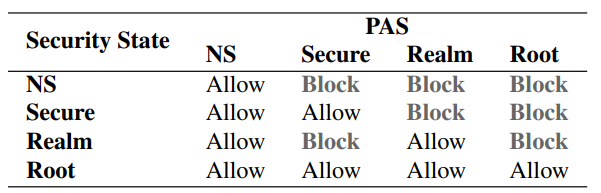
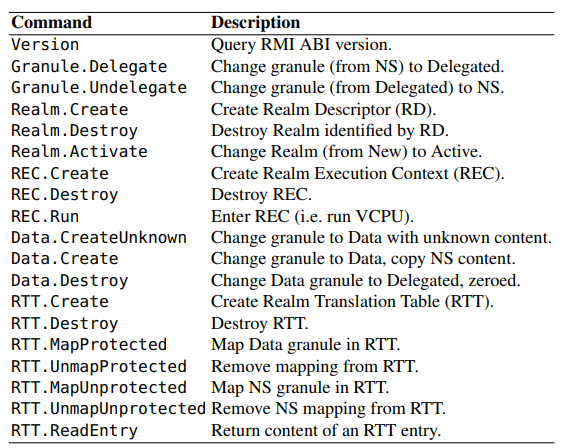
<figure><img src="https://files.gitbook.com/v0/b/gitbook-x-prod.appspot.com/o/spaces%2FetGMTZNbCMxe3nxgUCdF%2Fuploads%2FfBq7nYvalz16xkYHeLvE%2Fimage.png?alt=media&#x26;token=d2ce9b2c-2e00-427d-8394-51acb684574f" alt="" width="375"><figcaption><p>Access Control Policy of RME: In the context of the RME (Realm Management Entity) access control policy, the entity attempting to access a granule is associated with a specific security state. The Physical Address Space (PAS), on the other hand, is a characteristic that solely pertains to the granule that is being accessed.</p></figcaption></figure>

### Trusted Firmware Components

Arm CCA relies on two essential firmware components: the Realm Management Module (RMM) and the EL3 Monitor (EL3M). RMM, operating at EL2 in the Realm world, oversees the execution of Realms, providing services to untrusted software in the NS world. RMM employs established virtualization technologies, such as NPTs, to isolate Realms and ensure security. By focusing solely on enforcing Arm CCA's security guarantees, RMM's size is significantly smaller than traditional bare-metal hypervisors, which encompass various virtualization functionalities.

EL3M, on the other hand, resides in the Root world at EL3, the highest privilege level. This component orchestrates CPU execution across the different worlds and manages the GPT. Only EL3M has the authority to change the PAS of a granule, enabling secure world transitions. Software in other worlds can request PAS changes via Secure Monitor Calls (SMCs), maintaining controlled and authorized access.

### Isolation at the VM Level

The current Arm CCA version defines Realm isolation at the VM level. While this approach is effective for securing containers within virtual machines, finer application-level containerization is not yet supported. Similar to conventional VMs, Realm VMs can host multiple virtual CPUs (VCPUs). The number of Realm VMs scales with available physical memory, allowing for efficient resource utilization.

### Delegation and Management

A core concept enabling collaboration between the untrusted hypervisor and RMM is delegation. The hypervisor delegates memory to the Realm world, and RMM manages the integrity and confidentiality of data and code stored in that memory. Realms must receive delegated memory from the hypervisor before use, ensuring RMM oversight. The delegation process maintains a level of granularity, allowing for optimized memory management and controlled data flow.

### Realm Management Interface

RMM offers the Realm Management Interface (RMI) to the hypervisor, facilitating the delegation of memory, creation of Realms, execution of Realms, and memory allocation for Realms. Implemented as Secure Monitor Calls (SMCs), RMI commands channel hypervisor requests to RMM for processing. The interaction involves a seamless switch between EL3M and RMM, ensuring coherent execution. RMI commands are designed to maintain system consistency and uphold security guarantees, providing a controlled and structured approach to managing Realms.

<figure><img src="https://files.gitbook.com/v0/b/gitbook-x-prod.appspot.com/o/spaces%2FetGMTZNbCMxe3nxgUCdF%2Fuploads%2FTT2lm9DqdM3k8j6h9m6O%2Fimage.png?alt=media&#x26;token=4e08330d-ce3a-4d58-8d8f-b2c3343c231a" alt="" width="375"><figcaption><p>RMM Realm Management Interface (RMI)</p></figcaption></figure>

### Granule State Tracking

A pivotal responsibility of RMM is maintaining knowledge about the state of memory granules in the system. To achieve this, RMM utilizes a Granule Status Table (GST). The GST keeps track of the delegation status and current usage of each granule, enabling RMM to verify the validity of requested actions. For instance, when the hypervisor delegates a memory granule, RMM consults the GST to ascertain its delegation status. This rigorous validation process is applied to various RMI commands, ensuring adherence to system policies.

### Secure Creation and Management

Creating Realms, Realm Execution Contexts (RECs), and Realm Translation Tables (RTTs) is accomplished through RMM using dedicated RMI commands. RECs correspond to VCPUs, while RTTs play a role similar to normal VMs' nested page tables (NPTs). RTTs facilitate address translation within the Realm world, maintaining security. Granule delegation status is checked when using these commands, providing a structured approach to metadata and resource management.

### Protected Address Range and Memory Control

The Protected Address Range (PAR) within a Realm's IPA space guarantees the confidentiality and integrity of Realm operations within the defined range. This isolation ensures that operations within the PAR remain insulated from external interference, promoting secure processing. Beyond the PAR, the hypervisor can map NS PAS granules or emulate accesses, allowing controlled interaction between different worlds.

### Memory Manipulation and Reclamation

During Realm creation, the hypervisor can assign specific granules to a Realm, copying data from NS granules. This data is hashed and included in an attestation token, ensuring initial state validation. Memory manipulation continues as Realms operate, enabling dynamic memory allocation and reclamation. RMM erases reclaimed memory, maintaining data integrity and reducing information leakage risks. The process enables efficient memory usage while preserving security.

### Concurrency and Fine-Grained Locking

RMM is designed to handle concurrent operations effectively, utilizing fine-grained locking to support high concurrency. Locks are applied at the level of memory granules, REC, and RTT operations. Fine-grained locking ensures parallel processing of multiple operations, optimizing performance. The approach enhances scalability, allowing large Realms to operate with optimal efficiency.

### Firmware Security Measures

Arm CCA firmware follows stringent security practices. Unlike some systems that map all physical memory to kernel page tables, RMM and EL3M employ a more selective approach. These components map memory on demand, enhancing security. Firmware is carefully designed, adhering to secure coding principles. Special care is taken to prevent memory access vulnerabilities, such as interpreting SMC parameters exclusively as values rather than pointers, reducing potential attack vectors.

### Conclusion

The introduction of Realms within the Arm architecture involves intricate challenges. By utilizing orthogonal hardware mechanisms and relying on firmware for management, Arm CCA strikes a balance between simplicity and security. Collaboration between the hypervisor and RMM establishes clear boundaries of responsibility, ensuring confidentiality and integrity. Arm CCA stands as a promising solution that addresses compatibility and security concerns, provided diligent security practices and rigorous verification efforts are upheld.


# Comparison

Advancements in Trusted Execution Environments (TEEs) have become pivotal in modern computer architectures. Notably, Arm TrustZone offers static partitioning and isolation of memory segments in the Secure world, though scalability is limited due to the support of only a few such regions. Intel Software Guard Extensions (SGX) enable application developers to shield userspace memory from potential threats, but are not tailored for safeguarding virtual machines (VMs).

Meanwhile, AMD Secure Encrypted Virtualization (SEV) and Intel Trust Domain Extensions (TDX)  provide protection at the VM level, paralleling the threat models of Arm CCA. Initial SEV versions ensured confidentiality by encrypting VM memory at runtime, but lacked memory data integrity safeguards. However, Secure Nested Paging (SNP) subsequently introduced integrity protection in SEV-SNP, allowing untrusted hypervisors to manage NPTs with reverse map table checks. Conversely, Intel TDX utilizes a TDX module in a privileged SEAM root CPU mode. Unlike Arm CCA, these solutions rely on intricate, unverified microcode and firmware implementations, which can be challenging to update.

Komodo draws inspiration from SGX but adopts a software monitor, coded in verified Arm assembly, atop TrustZone instead of necessitating hardware for complex enclave manipulations. While it lacks multiprocessor execution support, Komodo's approach sidesteps hardware complexity and facilitates independent enclave feature deployment. Arm CCA retains these advantages, leveraging a verified software monitor for Realms implementation while ensuring verified VM protection and multiprocessor execution.

The concept of retrofitting a standard hypervisor to enforce security with a trusted core was initially explored by SeKVM. SeKVM pioneered microverification, where a commodity hypervisor's confidentiality and integrity guarantees can be verified. Arm CCA mirrors this by enabling modified hypervisors to support Realms, protected by a verified monitor reminiscent of SeKVM. However, RME introduces new hardware mechanisms safeguarding VMs from untrusted software in both NS and Secure worlds, maximizing virtualization features like VHE for superior performance. Furthermore, Arm CCA firmware ensures scalability and concurrent operation, utilizing fine-grain synchronization and enabling dynamic memory allocation for VM metadata.

In conclusion, Arm CCA introduces Realms as secure execution environments that bolster VM confidentiality and integrity against untrusted system software. Realms leverage hardware and firmware to offer these guarantees while maintaining compatibility with the Arm architecture. This approach minimizes complexity and performance overhead while establishing a robust TEE for VM protection.


# Attestation Methods

The different Confidential Computing architectures of the different manufactures are all supporting attestation/remote attestation. The attestation however is realized differently from each manufacturer. In addition the current attestation methods are also getting extended with virtualized Trusted Platform Modules (TPM) in order to enable a wider range of measurements.

The measurements that are being taken through the means of the manufacturer or the TPM are cryptographically sound and capture a snapshot of the systems configuration for the given moment. Through the hardware embedded keys in the TPM or the processor of the CPU manufactures a user can prove that the measurements have been taken through a trusted entity. Interpreting and trusting the results is up to the verifying user.

In order to cover a wide variety of different use cases different attestation methods will be discussed in the chapter. First of all the raw attestation provides the simplest way of measuring the system configuration for a given CPU vendor however due to being a low-level CPU bound implementation not many measurements are being taken. Extending the initial measurements with Secure Boot allows to verify the boot chain with predefined measurements. Adding a vTPM for taking measurements allows the verifier to also verify everything after the Kernel has been launched and attested through earlier measurements from Secure Boot/Vendor Attestation. Last but not least instead of using a vTPM, which has been implemented through vendor specific means, a paravirtualized TPM can be supplied through standard device drivers while providing the same functionality as a vendor specific vTPM.


---

[Next Page](https://docs.enclaive.cloud/confidential-cloud/llms-full.txt/1)